EasyManua.ls Logo

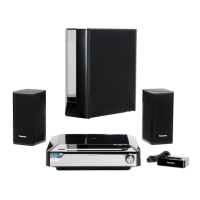
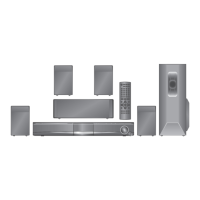
Panasonic SC-PTX50 - User Manual

Panasonic SC-PTX50
40 pages
Print Icon
To Next Page IconTo Next Page
Loading...
RQTX0136-B
OPEN CLOSE
MUSIC PORT
SELECTOR
TUNING
SA-PTX3
EG
Operating Instructions
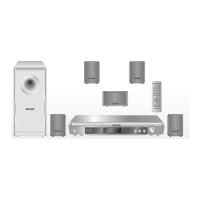
DVD Home Theater Sound System
Model No. SC-PTX50
Region number
The player plays DVD-Video marked with labels containing the region
number “2” or “ALL”.
Example:
Before connecting, operating or adjusting this product,
please read the instructions completely.
Please keep this manual for future reference.
2 ALL
3
5
2
High-quality picture
HDMI capability, Advanced
progressive scan and more.
6
Dolby Virtual Speaker
Enjoy surround sound effect
with a variety of sources.
29
USB connectivity
31
0136En_p01-02.fm Page 1 Thursday, January 17, 2008 2:18 PM

Table of Contents

Questions and Answers

  • G
    garciastacySep 9, 2025
    What does “U70?” mean on my Panasonic SC-PTX50?
    • E
      Elaine RobinsonSep 9, 2025
      If your Panasonic Home Theater System displays “U70?”, it indicates an unusual HDMI connection. This could be due to the connected equipment not being HDMI-compatible, using HDMI cables without the HDMI logo, an HDMI cable that is too long, or a damaged HDMI cable.
  • C
    curtisstephanieAug 23, 2025
    What does “F61” mean on my Panasonic SC-PTX50?
    • D
      Danielle ColeAug 23, 2025
      If your Panasonic Home Theater System displays “F61”, check and correct the speaker cable connections. If the problem persists, consult the dealer.
  • J
    Justin WelchAug 25, 2025
    What to do if my Panasonic Home Theater System shows “OVER CURRENT ERROR”?
    • J
      Joseph JacksonAug 25, 2025
      If your Panasonic Home Theater System displays “OVER CURRENT ERROR”, it means the connected USB device is drawing too much power. To resolve this, switch to DVD/CD mode, remove the USB device, and then turn the unit off.
  • B
    Barbara SmithAug 27, 2025
    Why is my Panasonic Home Theater System not responding to any button presses?
    • D
      davidknightAug 27, 2025
      If your Panasonic Home Theater System isn't responding when you press any buttons, it could be due to a few reasons. First, the unit may not be operating properly due to lightning, static electricity, or another external factor; try turning the unit off and then back on. Second, condensation may have formed; wait 1 to 2 hours for it to evaporate.
  • A
    Amanda HardinAug 27, 2025
    What to do if my Panasonic SC-PTX50 Home Theater System says “NO DISC”?
    • M
      Michael WebsterAug 28, 2025
      If your Panasonic Home Theater System displays “NO DISC”, it means either you haven't inserted a disc, or you haven't inserted it correctly. Insert a disc properly.
  • R
    robert00Aug 29, 2025
    How to troubleshoot no power on my Panasonic Home Theater System?
    • L
      Lindsey TaylorAug 29, 2025
      If your Panasonic Home Theater System is not getting power, ensure that the AC mains lead is securely inserted.
  • W
    Wesley WoodsSep 18, 2025
    How to adjust picture size on Panasonic SC-PTX50 to fit the screen?
    • T
      Tara BarajasSep 18, 2025
      To change the picture size on your Panasonic Home Theater System to fit the screen, adjust the “TV Aspect” setting in the “Video” menu.
  • M
    Mr. Paul KlineSep 19, 2025
    What does error “F76” mean on my Panasonic SC-PTX50?
    • G
      Glenn WadeSep 22, 2025
      If your Panasonic Home Theater System displays “F76”, it indicates a power supply problem. Consult the dealer.
  • M
    Mr. Walter Baker DDSSep 7, 2025
    What does “ERROR” mean on my Panasonic SC-PTX50 Home Theater System?
    • D
      Dr. Lisa Mccarty MDSep 7, 2025
      If your Panasonic Home Theater System displays “ERROR”, it means an incorrect operation was performed. Read the instructions and try again.
  • D
    Daniel BurkeSep 4, 2025
    Why does my Panasonic SC-PTX50 automatically switch to standby mode?
    • O
      oporterSep 4, 2025
      If your Panasonic Home Theater System is automatically switching to standby mode, it's likely because the Sleep timer was active and reached its set time limit.

Summary

Getting Started

Simple Setup Steps

Covers speaker positioning, cable connections, AC lead, remote control, radio presets, and quick setup.

Playback Operations

Basic Playback

Steps for powering on, loading discs, and starting playback using the unit or remote.

Convenient Playback Functions

Details on skipping, changing subtitles/soundtracks, zoom, repeat, and playback modes.

System Settings and Features

On-Screen Menus and Settings

Using menus for picture, audio, HDMI, display adjustments, and player settings.

Advanced Features and Connectivity

Explains VIERA Link, FM radio, sound effects, iPod, USB, and external audio.

Troubleshooting and Safety

Troubleshooting Common Issues

Solutions for problems with power, display, operation, playback, and connections.

Safety Precautions

Important safety information regarding placement, voltage, AC leads, and service.

Specifications and Glossary

Technical Specifications

Detailed technical data for the system's components and features.

Glossary of Terms

Definitions of technical terms used throughout the manual.

Panasonic SC-PTX50 Specifications

General IconGeneral
TypeHome Theater System
Total Power Output1000 W
Speaker Configuration5.1 Channel
DVD PlayerYes
HDMI OutputYes
USB PlaybackYes
BluetoothYes
Progressive ScanYes
SubwooferYes
Audio Channels5.1
Optical Digital InputYes
Playable file formatsMP3, WMA, JPEG

Related product manuals