63VQT1R00
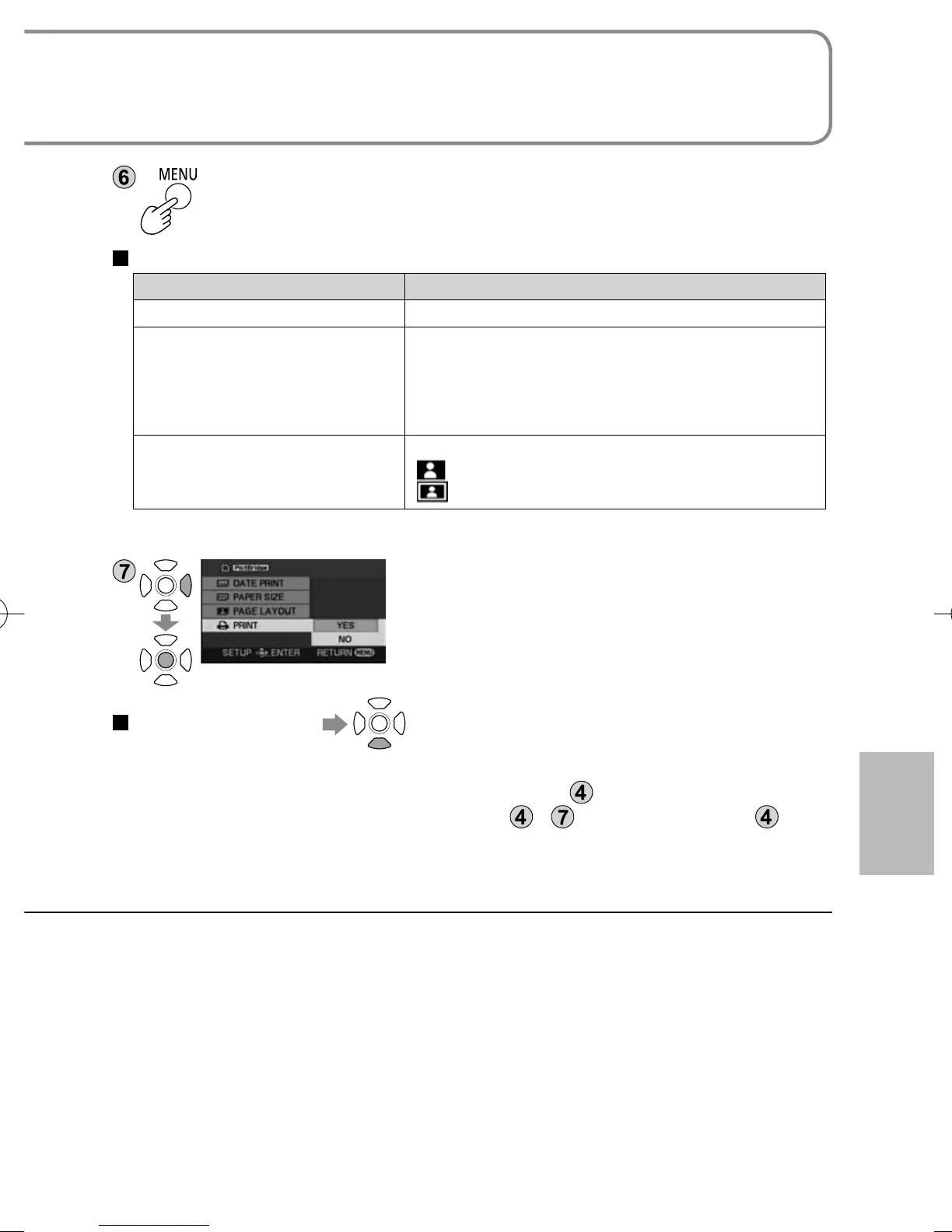
Display the PictBridge menu.
Make print settings.
Print settings
Item Available settings
DATE PRINT OFF/ON
PAPER SIZE STANDARD: Prioritize printer setting.
4×5 INCH: L size
5×7 INCH: 2L size
4×6 INCH: Postcard size
A4: A4 size
PAGE LAYOUT STANDARD: Prioritize printer setting.
[
]: No frame print
[
]: Frame print
● Settings not supported by the printer cannot be selected.
[PRINT]→[YES]
When printing is complete, disconnect the USB
cable (supplied) and exit [PictBridge].
To cancel printing
A confirmation message appears.
[YES]: Cancels print settings and returns to step
.
[NO]: Saves print settings made in steps
- and returns to step .
● Still pictures recorded with other devices may not be printed.
● DPOF settings (P.59) cannot be used while this unit is directly connected to a
PictBridge printer.
Still pictures recorded with this unit can be printed by connecting the unit
directly to a printer that supports PictBridge.





 To Next Page