EasyManua.ls Logo

Panasonic SG-40 - Radio Alignment Procedures; AM-IF and RF Alignment; FM Alignment Procedures; VU Meter Alignment

Panasonic SG-40
24 pages
Print Icon
To Next Page IconTo Next Page
To Previous Page IconTo Previous Page
Loading...
ENGLISH
SG-40
__SG-40
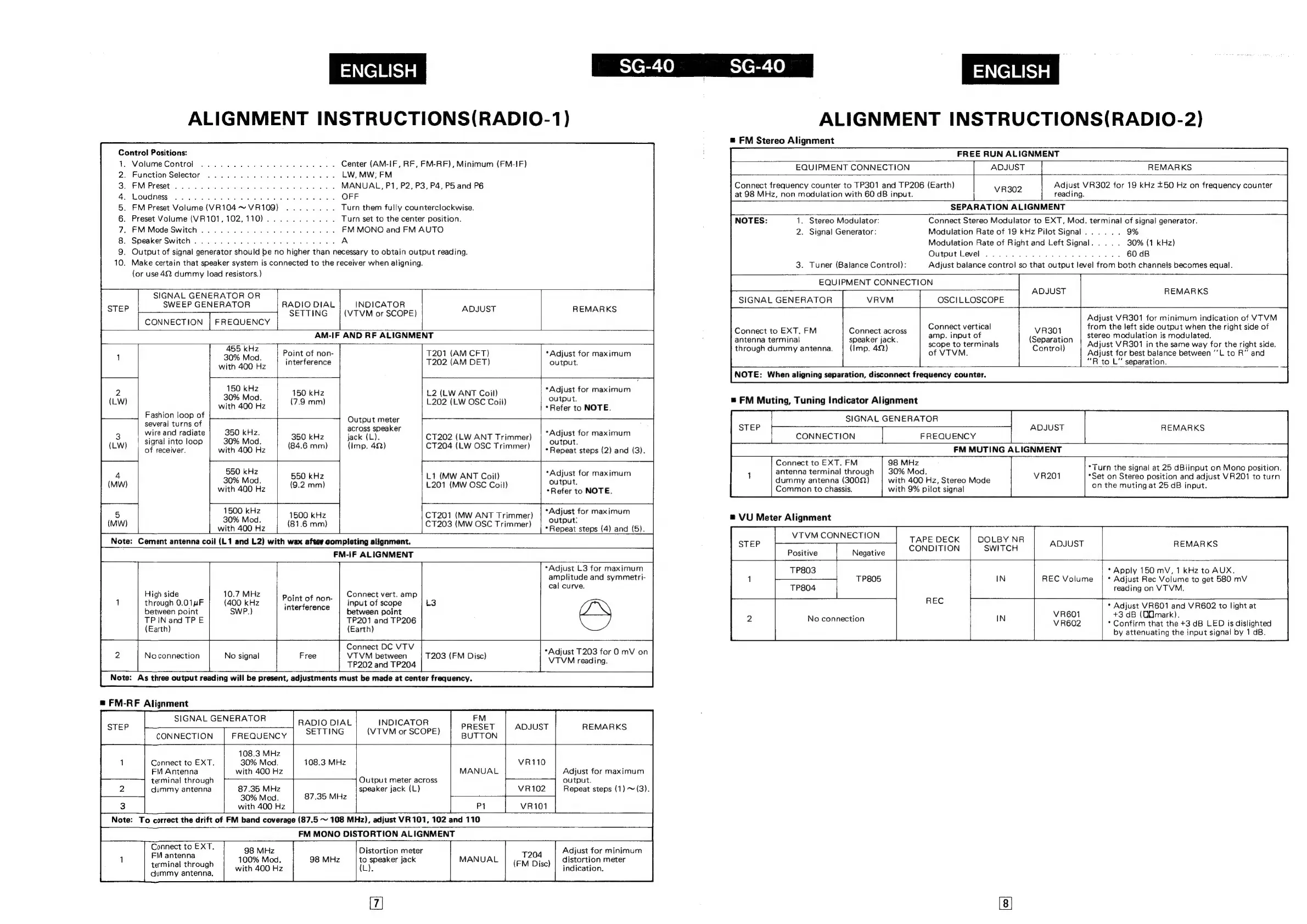
ALIGNMENT
INSTRUCTIONS(RADIO-2)
#
FM
Stereo
Alignment
ALIGNMENT
INSTRUCTIONS(RADIO-1)
Control
Positions:
Volume
Control
Function
Selector
FM
Preset
Loudness
FM
Preset
Volume
(VR104
~
VR109)
Preset
Volume
(VR101,
102,
110)
FM
Mode
Switch
Speaker
Switch
Output
of
signal
generator
should
be
no
higher
than
necessary
to
obtain
output
reading.
Make
certain
that
speaker
system
is
connected
to
the
receiver
when
aligning.
(or
use
42
dummy
load
resistors.)
FREE
RUN
ALIGNMENT
EQUIPMENT
CONNECTION
|
Center
(AM-IF,
RF,
FM-RF),
Minimum
(FM-IF)
LW,
MW;
FM
MANUAL,
P1, P2,
P3,
P4,
P5
and
P6
ADJUST
REMARKS
Adjust
VR302
for
19
kHz
+50
Hz
on
frequency
counter
reading.
SEPARATION
ALIGNMENT
Connect
Stereo
Modulator
to
EXT,
Mod.
terminal
of
signal
generator.
Modulation
Rate
of
19
kHz
Pilot
Signal
Modulation
Rate
of
Right
and
Left
Signal
Output
Level
Adjust
balance
control
so
that
output
level
from
both
channels
becomes
equa!.
Connect
frequency
counter
to
TP301
and
TP206
(Earth)
|
at
98
MHz,
non
modulation
with
60
dB
input.
VR302
Turn
them
fully
counterclockwise.
Turn
set
to
the
center
position.
FM
MONO
and
FM
AUTO
1.
Stereo
Modulator:
2.
Signal
Generator:
30%
{1
kHz)
SCOONOAARWN
>
=
3.
Tuner
(Balance
Control):
EQUIPMENT
CONNECTION
ADJUST
REMARKS
SIGNAL
GENERATOR
OR
SWEEP
GENERATOR
SIGNAL
GENERATOR
VRVM
OSC]
LLOSCOPE
RADIO
DIAL
SETTING
INDICATOR
(VTVM
or
SCOPE)
ADJUST
REMARKS
Adjust
VR301
for
minimum
indication
of
VTVM
from
the
left
side
output
when
the
right
side
of
stereo
modulation
is
modulated.
Adjust
VR301
in
the
same
way
for
the
right
side.
Adjust
for
best
balance
between
‘‘L
to
R"
and
““R
to
L"
separation.
CONNECTION
|
FREQUENCY
Connect
vertical
amp.
input
of
scope
to
terminals
of
VTVM.
Connect
to
EXT.
FM
antenna
terminal
through
dummy
antenna.
VR301
(Separation
Control)
Connect
across
speaker
jack.
(Imp.
42)
AM-IF
AND
RF
ALIGNMENT
ps
se
Point
of
non-
with
400
Hz
interference
T201
(AM
CFT)
T202
(AM
DET)
*Adjust
for
maximum
output.
NOTE:
When
aligning
separation,
disconnect
frequency
counter.
150
kHz
30%
Mod.
with
400
Hz
*Adjust
for
maximum
output.
*Refer
to
NOTE.
150
kHz
(7.9
mm)
L2
(LW
ANT
Coil)
L202
(LW
OSC
Coil)
=
FM
Muting,
Tuning
Indicator
Alignment
Fashion
loop
of
several
turns
of
wire
and
radiate
signal
into
loop
of
receiver.
SIGNAL
GENERATOR
CONNECTION
FREQUENCY
FM
MUTING
ALIGNMENT
Output
meter
across
speaker
jack
(L).
(Imp.
49)
STEP
ADJUST
REMARKS
350
kHz.
350
kHz
30%
Mod.
(61-6
can)
with
400
Hz
ee
a
|
S50
kHz
550
kHz
30%
Mod.
ree
aaalie
with
400
Hz
mm
“Adjust
for
maximum
output.
*
Repeat
steps
(2)
and
(3).
CT202
(LW
ANT
Trimmer)
CT204
(LW
OSC
Trimmer)
Connect
to
EXT.
FM
antenna
terminal
through
|
30%
Mod.
dummy
antenna
(3002)
with
400
Hz,
Stereo
Mode
Common
to
chassis.
with
9%
pilot
signal
Be
Miz
*Turn
the
signal
at
25
dBiinput
on
Mono
position.
*Set
on
Stereo
position
and
adjust
VR201
to
turn
on
the
muting
at
25
dB
input.
*Adjust
for
maximum
output.
*Refer
to
NOTE.
L1
(MW
ANT
Coil)
L201
(MW
OSC
Coil)
1500
kHz
30%
Mod.
with
400
Hz
1500
kHz
(81.6
mm)
CT201
(MW
ANT
Trimmer)
CT203
(MW
OSC
Trimmer)
*Adjust
for
maximum
output:
*Repeat
steps
(4)
and
(5).
Note:
Cement
antenna
coil
(L1
and
L2)
with
wax
after
completing
alignment.
FM-IF
ALIGNMENT
“7
High
side
through
0.01nF
between
point
TP
IN
and
TPE
(Earth)
10.7
MHz
(400
kHz
SWP.)
Point
of
non-
interference
Connect
vert.
amp
input
of
scope
between
point
TP201
and
TP206
(Earth)
2
Noconnection
4
No
signal
Free
*Adjust
L3
for
maximum
amplitude
and
symmetri-
cal
curve.
Connect
DC
VTV
VTVM
between
TP202
and
TP204
T203
(FM
Disc)
*Adjust
T203
for
O
mV
on
L
VTVM
reading.
Note:
As
three
output
reading
will
be
present,
adjustments
must
be
made
at
center
frequency.
=
FM-RF
Alignment
SIGNAL
GENERATOR
CONNECTION
FREQUENCY
RADIO
DIAL
SETTING
INDICATOR
(VTVM
or
SCOPE)
FM
PRESET
BUTTON
ADJUST
REMARKS
Connect
to
EXT.
FM
Antenna
terminal
through
dummy
antenna
108.3
MHz
30%
Mod.
with
400
Hz
108.3
MHz
87.35
MHz
30%
Mod.
with
400
Hz
87.35
MHz
Output
meter
across
speaker
jack
(L)
MANUAL
Adjust
for
maximum
output.
Repeat
steps
(1)
~(3).
Note:
To
correct
the
drift
of
FM
band
coverage
(87.5
~
108
MHz),
adjust
VR
101,
102
and 110
FM
MONO
DISTORTION
ALIGNMENT
Connect
to
EXT.
FM
antenna
terminal
through
dummy
antenna.
98
MHz
100%
Mod.
with
400
Hz
Distortion
meter
to
speaker
jack
L).
MANUAL
T204
(FM
Disc)
Adjust
for
minimum
distortion
meter
indication.
2
VU
Meter
Alignment
VTVM
CONNECTION
Positive
Negative
TAPE
DECK
CONDITION
DOLBY
NR
SWITCH
ADJUST
REMARKS
TP803
TP805
No
connection
IN
*
Apply
150
mV,
1
kHz
to
AUX.
*
Adjust
Rec
Volume
to
get
580
mV
reading
on
VTVM.
REC
Volume
*
Adjust
VR601
and
VR602
to
light
at
+3
dB
(QOmark).
*
Confirm
that
the
+3
dB
LED
is
dislighted
by
attenuating
the
input
signal
by
1
dB.

Related product manuals