EasyManua.ls Logo

Panasonic SH-FX80 - User Manual

Panasonic SH-FX80
8 pages
Print Icon
To Next Page IconTo Next Page
Loading...
1
RQT8661-1Y
F0406KN1046
P
Operating Instructions
Wireless Sound System
Model No. SH-FX80
Before connecting, operating or adjusting this product, please read the
instructions completely. Please keep this manual for future reference.
Dear customer
Thank you for purchasing this product. For optimum performance and safety, please read
these instructions carefully.
Designed for Panasonic DVD Home Theater Sound Systems
compatible with the SH-FX80.
System SH-FX80
Digital Transceiver SH-FX80T
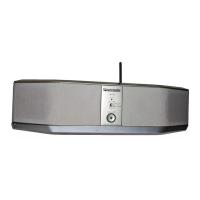
Wireless Sound System SB-FX80
Wireless 2nd-Room
Audio System
Enjoy your home theater unit’s audio
in any room.
page
2
page
3
Powerful Stand-Alone
Audio Amplifier
Connect your MP3 player or other
digital audio device.
page
4
Compatible with
Panasonic SH-FX60
Easily pair two wireless audio systems
for convenient tandem use.
Accessories
Please check and identify the supplied accessories. Use numbers indicated in parentheses when asking for replacement parts.
(Product numbers correct as of April 2006. This may be subject to change.)
To order accessories, refer to “Accessory Purchases” on page 5.
1 AC power supply cord (K2CB2CB00018)
For use with this unit only. Do not use it with other equipment.
Also, do not use cords for other equipment with this unit.
1 Cradle screw (XTB3+8GFJ)
2 Cradles for external digital audio players
User memo:
1 pocket-type cradle
(RGQX0033-H)
1 stand-type cradle
(RGPX0257-H)
DATE OF PURCHASE _______________________________________________
DEALER NAME ____________________________________________________
DEALER ADDRESS _________________________________________________
__________________________________________________________________
TELEPHONE NUMBER ______________________________________________
The model number and serial number of this product can be found on either the back
or the bottom of the unit. Please note them in the space provided below and keep for
future reference.
MODEL NUMBER SH-FX80
SERIAL NUMBER
Panasonic Consumer Electronics Company, Division of Panasonic
Corporation of North America
One Panasonic Way Secaucus,
New Jersey 07094
http://www.panasonic.com
C 2006 Matsushita Electric Industrial Co., Ltd.
Panasonic Puerto Rico, Inc.
Ave. 65 de Infantería, Km. 9.5
San Gabriel Industrial Park, Carolina,
Puerto Rico 00985
Printed in Malaysia
p
8661En&Cf.fm Page 1 Monday, April 17, 2006 11:32 AM

Questions and Answers

  • J
    jgreenAug 19, 2025
    What to do if there is no sound from SB-FX80 Panasonic Speaker System?
    • M
      Matthew HicksAug 19, 2025
      If the wireless link indicator is lit, but there is no sound from the SB-FX80 wireless sound system, ensure the selector on the SB-FX80 is set to MAIN SET and that the SB-FX80 is within 15 m (49 ft) of the home theater unit. Also, adjust the volume of your home theater unit. If the issue persists, repeat the pairing procedure.
  • H
    heather36Aug 21, 2025
    Why is there no sound from SH-FX60 Panasonic SH-FX80 Speaker System?
    • U
      ujacksonAug 21, 2025
      If the wireless link indicator is lit, but there is no sound from the SH-FX60 wireless system, ensure that the SH-FX60 is plugged into the AC outlet and that the selector on the wireless sound system is set to MAIN SET.
  • F
    Frank DiazAug 23, 2025
    How to fix erratic audio after pairing Panasonic SB-FX80 with SH-FX60?
    • M
      Michael JohnstonAug 23, 2025
      If you're experiencing erratic audio output after pairing the SB-FX80 wireless sound system with the SH-FX60 wireless system, ensure that the SH-FX60 wireless system is unplugged, and then repeat the pairing procedure.
  • T
    talexanderAug 26, 2025
    Why no sound from 'REAR MUSIC P.' on Panasonic Speaker System?
    • L
      lwangAug 26, 2025
      If there is no sound when the selected source on the home theater unit is “REAR MUSIC P.”, it may be because the “REAR MUSIC P.” source is not available for the SH-FX80 wireless sound system. To play audio from an external device through your home theater unit, connect to the MUSIC PORT on the home theater unit and select “FRONT MUSIC P.” as the source.
  • R
    Rebecca DavilaAug 28, 2025
    Why is there no sound from my Panasonic Stereo System SB-FX80 wireless sound system?
    • D
      Daniel KellyAug 28, 2025
      If the wireless link indicator is lit but you're not getting any sound from the SB-FX80 wireless sound system, here are a few things to check: * Make sure the SB-FX80 is plugged into the AC outlet. * Verify that the selector on the SB-FX80 is set to MAIN SET. * Ensure the SB-FX80 is within 15 m (49 ft) of the home theater unit. * Adjust the volume of your home theater unit. If there is still no sound, repeat the pairing procedure.
  • A
    angie61Aug 30, 2025
    What to do if the Panasonic Stereo System wireless link indicator is not lighting?
    • D
      donna32Aug 30, 2025
      If the wireless link indicator (e.g. “[W]” or LED) on your Panasonic Stereo System isn't lighting up, try the following: * Ensure the digital transceiver is fully inserted into the slot of the home theater unit. * Check that the home theater unit is turned on. * Check that the wireless sound system is plugged into the AC outlet. * Ensure that the selector on the wireless sound system is set to MAIN SET. * Ensure that the wireless sound system is within 15 m (49 ft) of the home theater unit.
  • C
    Christy RodriguezSep 1, 2025
    What to do if the Panasonic Stereo System wireless link indicator is flashing?
    • M
      melanie88Sep 2, 2025
      If the wireless link indicator (e.g. “[W]” or LED) is flashing on your Panasonic Stereo System, try the following: * Check that the home theater unit is turned on. * Check that the wireless sound system is plugged into the AC outlet. * Ensure that the selector on the wireless sound system is set to MAIN SET.
  • A
    Andrew SimmonsSep 4, 2025
    Why is the audio output erratic after pairing SB-FX80 and SH-FX60 wireless systems on my Panasonic Stereo System?
    • S
      Stephanie OrtegaSep 4, 2025
      Erratic audio output after pairing the SB-FX80 and SH-FX60 wireless systems with your Panasonic Stereo System can occur if the wrong transceiver card has been inserted into the home theater unit. Turn off your home theater system, remove the SH-FX80T transceiver card, and insert the SH-FX60T transceiver card. You can also try the following: * Turn on your home theater system, and then follow the pairing procedure. * Adjust the volume of your home theater unit. * Ensure that the SH-FX60 wireless system is unplugged, and then repeat the pairing procedure.
  • B
    bradley80Sep 6, 2025
    Why is there no sound from the Panasonic Stereo System SH-FX60 wireless system, even though the wireless link indicator is lit?
    • D
      dixondiamondSep 6, 2025
      If the wireless link indicator is lit but there is no sound from the SH-FX60 wireless system, ensure that the SH-FX60 wireless system is plugged into the AC outlet.
  • M
    Mathew BaileySep 8, 2025
    What to do if there is no sound when the selected source on the Panasonic Stereo System is “REAR MUSIC P.”?
    • O
      opayneSep 8, 2025
      The “REAR MUSIC P.” source is not available for the SH-FX80 wireless sound system. To play audio from an external device through your home theater unit, connect to the MUSIC PORT on the home theater unit and select “FRONT MUSIC P.” as the source.

Summary

Panasonic Wireless Sound System Operating Instructions

Product Accessories

Identification and listing of supplied accessories including power cord, cradles, and screws.

System Setup

Preparation and Wireless Diagram

Initial setup steps, including preparation and a visual guide for wireless system configuration.

Avoiding Interference

Guidance to prevent interference by strategically placing the wireless sound system away from specific devices.

Connecting and Linking Components

Digital Transceiver Connection

Instructions for inserting the digital transceiver into the home theater unit.

AC Cord Connection and Sound Level

Guide to connecting the AC power cord and setting the primary sound level for the wireless system.

Establishing Wireless Link

Steps to establish the wireless connection between the home theater unit and the wireless sound system.

Advanced Setup and Pairing

Attaching External Audio Player Cradles

Instructions for attaching the included cradles to the wireless sound system for external devices.

Pairing SB-FX80 with SH-FX60

Detailed steps for pairing the SB-FX80 wireless sound system with the SH-FX60 wireless system.

Canceling Pairing

Procedure to cancel the wireless system pairing or use the SB-FX80 independently.

Warranty and Support Information

Limited Warranty Coverage

Details on warranty coverage, limits, and exclusions for Panasonic audio products.

Customer Services Directory

Contact information for product assistance, parts, and literature via web or phone.

Accessory Purchases

Information on how to purchase parts and accessories online or via email/phone.

Safety Precautions and FCC Compliance

General Safety Warnings

Crucial warnings to reduce the risk of fire, electric shock, and product damage.

FCC Compliance Notes

Information regarding FCC rules, interference, and RF exposure compliance for the device.

Important Safety Instructions & Maintenance

Detailed Safety Instructions

Comprehensive safety instructions for operating and maintaining the apparatus.

Product Service and Parts

Guidelines for required servicing, replacement parts, and safety checks by qualified personnel.

Maintenance and Cleaning

Instructions on how to clean the unit using a soft, dry cloth and avoiding certain cleaning agents.

Troubleshooting and Specifications

Troubleshooting Guide

Common issues and solutions for the wireless sound system, including link indicators and sound problems.

Technical Specifications

Detailed technical specifications for amplifier, speaker, RF, and general components of the system.

Panasonic SH-FX80 Specifications

General IconGeneral
BrandPanasonic
ModelSH-FX80
CategorySpeaker System
LanguageEnglish

Related product manuals