EasyManua.ls Logo

Panasonic SP Series - User Manual

Panasonic SP Series
2 pages
Print Icon
To Next Page IconTo Next Page
Loading...
SP
ACCESSORIES
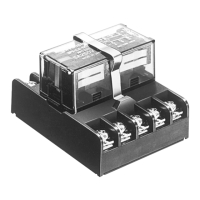
SP RELAYS
TERMINAL SOCKET
DIMENSIONS (Unit: mm inch)
SP2-Terminal socket
40.64±0.4
1.600±.016
19.5±0.6
.768±.024
23±1
.906±.039
20.32±0.4
.800±.016
67±1
2.638±.039
15.24±0.4
.600±.016
52±1
2.047±.039
30±0.6
1.181±.024
4.5±0.4
.177±.016
6.5±0.4
.256±.016
Part No.: SP2-SF
SP4-Terminal socket
General tolerance: ±0.5 ±.020
40.64±0.4
1.600±.016
20.32±0.4
.800±.016
97±1
3.819±.039
52±1
2.047±.039
30±0.6
1.181±.024
4.5±0.3
.177±.012
6.5±0.3
.256±.012
30.48±0.4
1.200±.016
15.24±0.4
.600±.016
23±1
.906±.039
32±0.6
1.260±.024
19.5±0.6
.768±.024
40.5±0.6
1.594±.024
70.5±1
2.776±.039
11±0.4
.433±.016
21±0.4
.827±.016
Part No.: SP4-SF
Note: Terminal number marking is on the socket body. Please refer together with the SP relay schematic.
RoHS Directive compatibility information
http://www.mew.co.jp/ac/e/environment/
Mounting hole diagram
Notes:
(1) Mounting screws and the fastening
bracket are included in the package.
(2) Mount the relay with the proper
mounting direction — i.e. with the
direction of the mark on top of the
relay case matching the direction of the
mark on the terminal block. (The
direction of the terminal block is the
upward direction of the relay.)
30±0.2
1.181±.008
2-DIA. HOLES 4.5±0.1
2-DIA. HOLES .177±.004
Fastening bracket mounting and removal
1. Mounting
Insert the A part of the fastening bracket
into the mounting groove of the terminal
block, and then fit the B part into groove,
while pressing with the tip of a minus
screwdriver.
2. Removal
Slide the B part of the fastening bracket
from the groove in the terminal block,
while pressing with the tip of a minus
screwdriver. While the bracket is in this
position, keep pressing the C part of the
bracket to the relay side with your finger,
and lift up to the left side and remove
from the groove, as in the diagram at
right.
BC
Minus screwdriver
A
Fastening
bracket
SP relay
Terminal block
All Rights Reserved © COPYRIGHT Matsushita Electric Works, Ltd.
Question and Answer IconNeed help?

Do you have a question about the Panasonic SP Series and is the answer not in the manual?

Summary

SP Terminal Socket Dimensions and Mounting

SP2 and SP4 Terminal Socket Dimensions

Provides detailed dimensional drawings for SP2 and SP4 terminal sockets, including measurements in mm and inches.

SP Terminal Socket Mounting Hole Diagram

Illustrates the mounting hole layout for the SP terminal socket, specifying hole size and spacing for installation.

SP Terminal Socket Fastening Bracket

Details the procedure for mounting and removing the fastening bracket for SP terminal sockets, including required tools.

SP Mounting Board Dimensions and Installation

SP Mounting Board Dimensions

Presents the physical dimensions for the SP mounting board, including overall size and hole specifications.

SP Mounting Board Mounting Hole Diagram

Shows the mounting hole diagram for the SP mounting board, indicating hole sizes and panel cutout details.

SP Mounting Board Use Method

Explains how to use the SP mounting board, covering direct chassis attachment and DIN rail mounting options.

SP Mounting Board DIN Rail Mounting

Details the step-by-step method for mounting the SP mounting board onto a DIN rail, including fastening.

SP Mounting Board DIN Rail Precautions

Advises on precautions for DIN rail mounting, specifically regarding the use of fastening brackets to prevent sliding.

Summary

SP Terminal Socket Dimensions and Mounting

SP2 and SP4 Terminal Socket Dimensions

Provides detailed dimensional drawings for SP2 and SP4 terminal sockets, including measurements in mm and inches.

SP Terminal Socket Mounting Hole Diagram

Illustrates the mounting hole layout for the SP terminal socket, specifying hole size and spacing for installation.

SP Terminal Socket Fastening Bracket

Details the procedure for mounting and removing the fastening bracket for SP terminal sockets, including required tools.

SP Mounting Board Dimensions and Installation

SP Mounting Board Dimensions

Presents the physical dimensions for the SP mounting board, including overall size and hole specifications.

SP Mounting Board Mounting Hole Diagram

Shows the mounting hole diagram for the SP mounting board, indicating hole sizes and panel cutout details.

SP Mounting Board Use Method

Explains how to use the SP mounting board, covering direct chassis attachment and DIN rail mounting options.

SP Mounting Board DIN Rail Mounting

Details the step-by-step method for mounting the SP mounting board onto a DIN rail, including fastening.

SP Mounting Board DIN Rail Precautions

Advises on precautions for DIN rail mounting, specifically regarding the use of fastening brackets to prevent sliding.

Overview

This document describes the Panasonic SP Relays and their associated terminal sockets and mounting boards, designed for industrial applications.

Function Description

The Panasonic SP Relays are designed to be used with specific terminal sockets (SP2-SF and SP4-SF) and mounting boards (SP-MA). These components facilitate the secure and organized installation of SP relays in control panels or other electrical enclosures. The terminal sockets provide an interface for wiring the relays, while the mounting boards offer flexible installation options, including direct chassis mounting and DIN rail mounting.

Important Technical Specifications

SP2-Terminal Socket (Part No.: SP2-SF)

  • Dimensions:
    • Overall Length: 67±1 mm (2.638±.039 inch)
    • Width: 40.64±0.4 mm (1.600±.016 inch)
    • Height: 20.32±0.4 mm (0.800±.016 inch)
    • Mounting Hole Pitch: 52±1 mm (2.047±.039 inch)
    • Terminal Pitch (across width): 15.24±0.4 mm (0.600±.016 inch)
    • Terminal Pitch (across length): 23±1 mm (0.906±.039 inch)
    • Mounting Hole Diameter: 4.5±0.4 mm (0.177±.016 inch)
    • Mounting Groove Width: 6.5±0.4 mm (0.256±.016 inch)
  • Mounting Hole Diagram:
    • Two-hole mounting with a pitch of 30±0.2 mm (1.181±.008 inch).
    • Hole diameter: 4.5±0.1 mm (0.177±.004 inch).
  • General Tolerance: ±0.5 mm (±.020 inch).
  • RoHS Directive Compatibility: Information available at http://www.mew.co.jp/ac/e/environment/.
  • Note: Terminal number marking is on the socket body; refer to the SP relay schematic for details.

SP4-Terminal Socket (Part No.: SP4-SF)

  • Dimensions:
    • Overall Length: 97±1 mm (3.819±.039 inch)
    • Width: 40.64±0.4 mm (1.600±.016 inch)
    • Height: 20.32±0.4 mm (0.800±.016 inch)
    • Mounting Hole Pitch: 70.5±1 mm (2.776±.039 inch)
    • Terminal Pitch (across width): 15.24±0.4 mm (0.600±.016 inch)
    • Terminal Pitch (across length): 23±1 mm (0.906±.039 inch)
    • Mounting Hole Diameter: 4.5±0.3 mm (0.177±.012 inch)
    • Mounting Groove Width: 6.5±0.3 mm (0.256±.012 inch)
  • Mounting Hole Diagram:
    • Two-hole mounting with a pitch of 30±0.2 mm (1.181±.008 inch).
    • Hole diameter: 4.5±0.1 mm (0.177±.004 inch).
  • General Tolerance: ±0.5 mm (±.020 inch).
  • RoHS Directive Compatibility: Information available at http://www.mew.co.jp/ac/e/environment/.
  • Note: Terminal number marking is on the socket body; refer to the SP relay schematic for details.

SP Relays Mounting Board (Part No.: SP-MA)

  • Dimensions:
    • Overall Length: 57.2 mm (2.252 inch)
    • Width: 18.4 mm (0.724 inch)
    • Height: 25 mm (0.984 inch)
    • Mounting Hole Pitch: 57.2 mm (2.252 inch)
    • Mounting Hole Diameter: 3.2 mm (0.126 inch)
  • Panel Cutout Tolerance: ±0.1 mm (±.004 inch).
  • Compatibility: Direct chassis mounting possible, and applicable to DIN rail.

Usage Features

Terminal Socket Mounting

  • Mounting Direction: Relays must be mounted with the proper orientation. The "M" mark on top of the relay case should align with the "M" mark on the terminal block. The upward direction of the terminal block corresponds to the upward direction of the relay.
  • Fastening Bracket: Mounting screws and the fastening bracket are included in the package.
    • Mounting: Insert part "A" of the fastening bracket into the mounting groove of the terminal block. Then, fit part "B" into the groove by pressing with the tip of a minus screwdriver.
    • Removal: Slide part "B" of the fastening bracket from the groove while pressing with a minus screwdriver. While "B" is in this position, press part "C" of the bracket towards the relay side with your finger, and lift it up to the left side to remove it from the groove.

Mounting Board Usage

  • Relay Compatibility: Both SP relay 2 Form C and 4 Form C can be mounted to the mounting slats of the SP-MA.
  • Mounting Options:
    • Direct Chassis Mounting: Use two M3 screws. Refer to the specification diagram for the mounting pitch.
    • DIN Rail Mounting: Use a 35mm (1.378 inch) wide DIN rail (DIN46277).
  • DIN Rail Mounting Method:
    1. Fit the arc-shaped claw of the mounting slat into the DIN rail.
    2. Press on the side of the mounting slat as shown in the diagram.
    3. Fit the claw part on the opposite side.
  • Removal from DIN Rail: To remove the relay, press down on the mounting slats so that the claws move outwards, allowing the relay to be detached.

Maintenance Features

  • Fastening Bracket Removal: The design of the fastening bracket allows for relatively easy removal using a minus screwdriver and finger pressure, facilitating relay replacement or maintenance.
  • DIN Rail Mounting/Removal: The mounting board's design enables straightforward installation and removal from a DIN rail, which is beneficial for system upgrades or maintenance tasks.
  • Sliding Prevention: When mounting to a DIN rail, it is recommended to use a commercially available fastening bracket if there is a need to prevent the mounting slat from sliding in the rail direction. This ensures stability and prevents accidental dislodgement during operation or maintenance.
  • RoHS Compliance: The products are RoHS Directive compatible, indicating adherence to environmental standards for hazardous substances, which can be a factor in long-term maintenance and disposal.

Panasonic SP Series Specifications

General IconGeneral
BrandPanasonic
ModelSP Series
CategoryAccessories
LanguageEnglish

Related product manuals