EasyManua.ls Logo

Panasonic Technics ST-CH7L - Page 2

Panasonic Technics ST-CH7L
21 pages
Print Icon
To Next Page IconTo Next Page
To Previous Page IconTo Previous Page
Loading...
ST-CH7L
m@
CONTENTS
Page
LOCATION
OF
CONTROLS
...........
0.00
0c
cece
e
eee
eens
2,3
DISASSEMBLY
INSTRUCTIONS
................000
000
eee
4
MEASUREMENTS
AND
ADJUSTMENTS
..................
5,6
DESCRIPTION
OF
FLPANEL
...............000cceeeeeees
7
FUNCTION
OF
IC
TERMINALS..............0.00.0
00.
ce
ees
8
SCHEMATIC
DIAGRAM
..............000
cc
ccc
eee
e
eee
9~12
Note:
Page
PRINTED
CIRCUIT
BOARDS
AND
WIRING
CONNECTION
DIAGRAM
(.,
55355
05te
chen
fon
oi
wate
Saitonae
nae
oe
13,
14
BLOCK
DIAGRAM
..........0..
00.
c
cece
eee
e
eee
15,
16
REPLACEMENT
PARTS
LIST
..................0.000,
17~21
CABINET
PARTS
LOCATIONS
............0
0000
cece
cee ues
21
Refer
to
the
service
manual
for
Model
No.
SU-CH7,
Order
No.
AD9104082C8
for
information
on
ACCESSORIES,
INSTALLATION
OF
THE
SYSTEM,
CONNECTIONS
and
PACKAGING.
m@
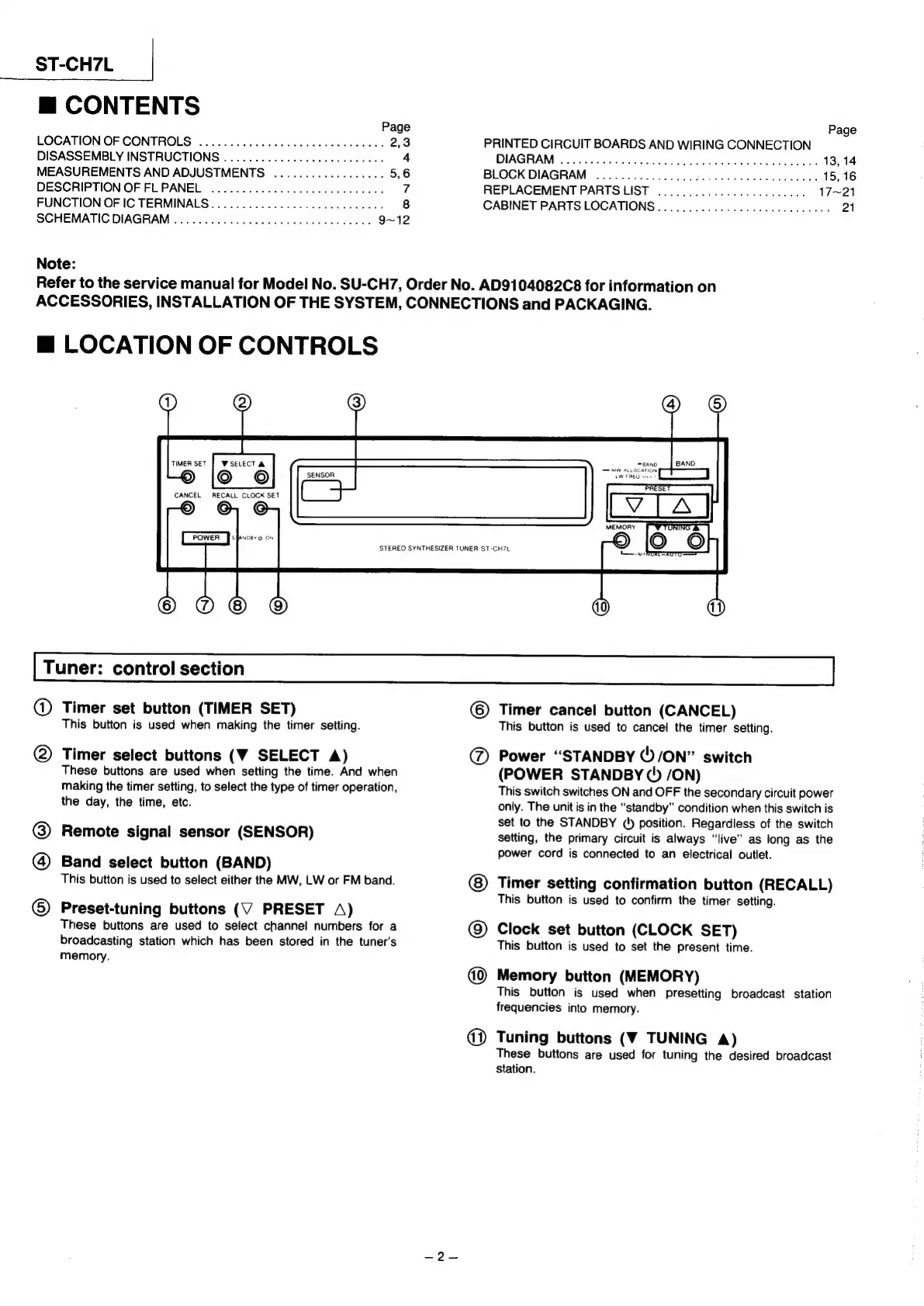
LOCATION
OF
CONTROLS
SENSOR
CANCEL
RECALL
CLOCK
SET
WSELECT
A
©
Oo
G
STEREO
SYNTHESIZER
TUNER
ST-CH7L
om
MWV
ALLOCATION
PT
LW
FREQ
sine
PRESET
Tuner:
control
section
@
Timer
set
button
(TIMER
SET)
This
button
is
used
when
making
the
timer
setting.
Timer
select
buttons
(WV
SELECT
A)
These
buttons
are
used
when
setting
the
time.
And
when
making
the
timer
setting,
to
select
the
type
of
timer
operation,
the
day,
the
time,
etc.
Remote
signal
sensor
(SENSOR)
Band
select
button
(BAND)
This
button
is
used
to
select
either
the
MW,
LW
or
FM
band.
Preset-tuning
buttons
(V
PRESET
A)
These
buttons
are
used
to
select
channel
numbers
for
a
broadcasting
station
which
has
been
stored
in
the
tuner’s
memory.
®
®
©
Timer
cancel
button
(CANCEL)
This
button
is
used
to
cancel
the
timer
setting.
Power
“STANDBY
()/ON”
switch
(POWER
STANDBY
(!)
/ON)
This
switch
switches
ON
and
OFF the
secondary
circuit
power
only.
The
unit
is
in
the
“standby”
condition
when
this
switch
is
set
to
the
STANDBY
('
position.
Regardless
of
the
switch
setting,
the
primary
circuit
is
always
“live”
as
long
as
the
power
cord
is
connected
to
an
electrical
outlet.
@
©
Timer
setting
confirmation
button
(RECALL)
This
button
is
used
to
confirm
the
timer
setting.
Clock
set
button
(CLOCK
SET)
This
button
is
used
to
set
the
present
time.
Memory
button
(MEMORY)
This
button
is
used
when
presetting
broadcast
station
frequencies
into
memory.
Tuning
buttons
(V
TUNING
A)
These
buttons
are
used
for
tuning
the
desired
broadcast
Station.
@ ©
@

Related product manuals