Watc
[]
|
TV
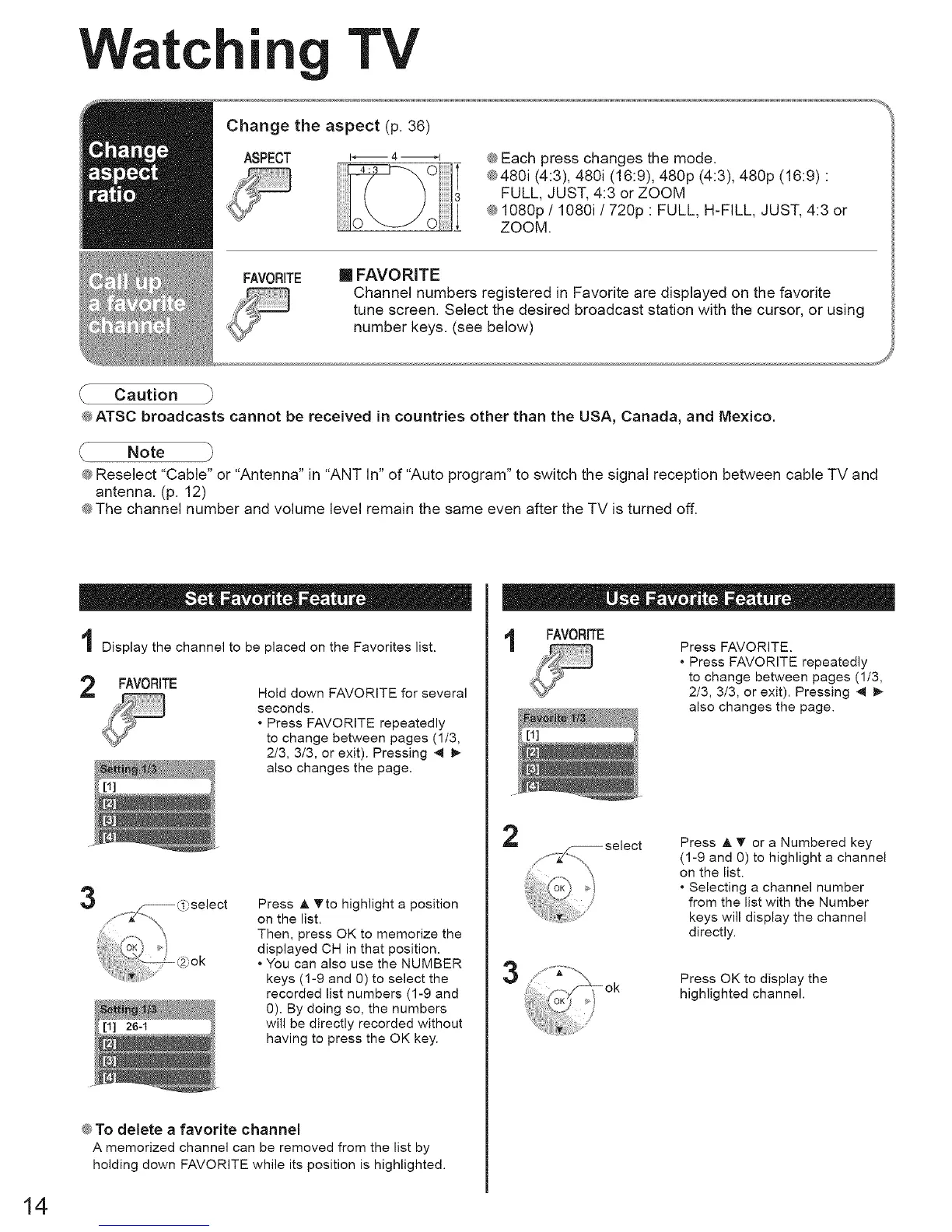
Change the aspect (p. 36)
ASPECT i_ 4 _f
® Each press changes the mode.
®480i (4:3), 480i (16:9), 480p (4:3), 480p (16:9) :
FULL, JUST, 4:3 or ZOOM
® 1080p / 1080i ! 720p : FULL, H-FILL, JUST, 4:3 or
ZOOM.
FAVORITE
m FAVORITE
Channel numbers registered in Favorite are displayed on the favorite
tune screen. Select the desired broadcast station with the cursor, or using
number keys. (see below)
® ATSC broadcasts cannot be received in countries other than the USA, Canada, and Mexico.
Note j_
_ Reselect "Cable" or "Antenna" in "ANT In" of "Auto program" to switch the signal reception between cable TV and
antenna. (p. 12)
_ The channel number and volume level remain the same even after the TV is turned off.
i Display the channel to be placed on the Favorites list.
FAVORITE
Hold down FAVORITE for several
seconds.
• Press FAVORITE repeatedly
to change between pages (1/3,
2/3, 3/3, or exit). Pressing 4 _,-
also changes the page.
3
Press A _to highlight a position
on the list.
Then, press OK to memorize the
displayed CH in that position.
• You can also use the NUMBER
keys (1-9 and 0) to select the
recorded list numbers (1-9 and
0). By doing so, the numbers
will be directly recorded without
having to press the OK key.
® To delete a favorite channel
A memorized channel can be removed from the list by
holding down FAVORITE while its position is highlighted.
i FAVORITE
Press FAVORITE.
• Press FAVORITE repeatedly
to change between pages (1/3,
2/3, 3/3, or exit). Pressing 4 _-
also changes the page.
2
(oK'_ ok
Press A T or a Numbered key
(1-9 and 0) to highlight a channel
on the list.
• Selecting a channel number
from the list with the Number
keys will display the channel
directly.
Press OK to display the
highlighted channel.
14





 To Next Page