Watt
==
|
TV
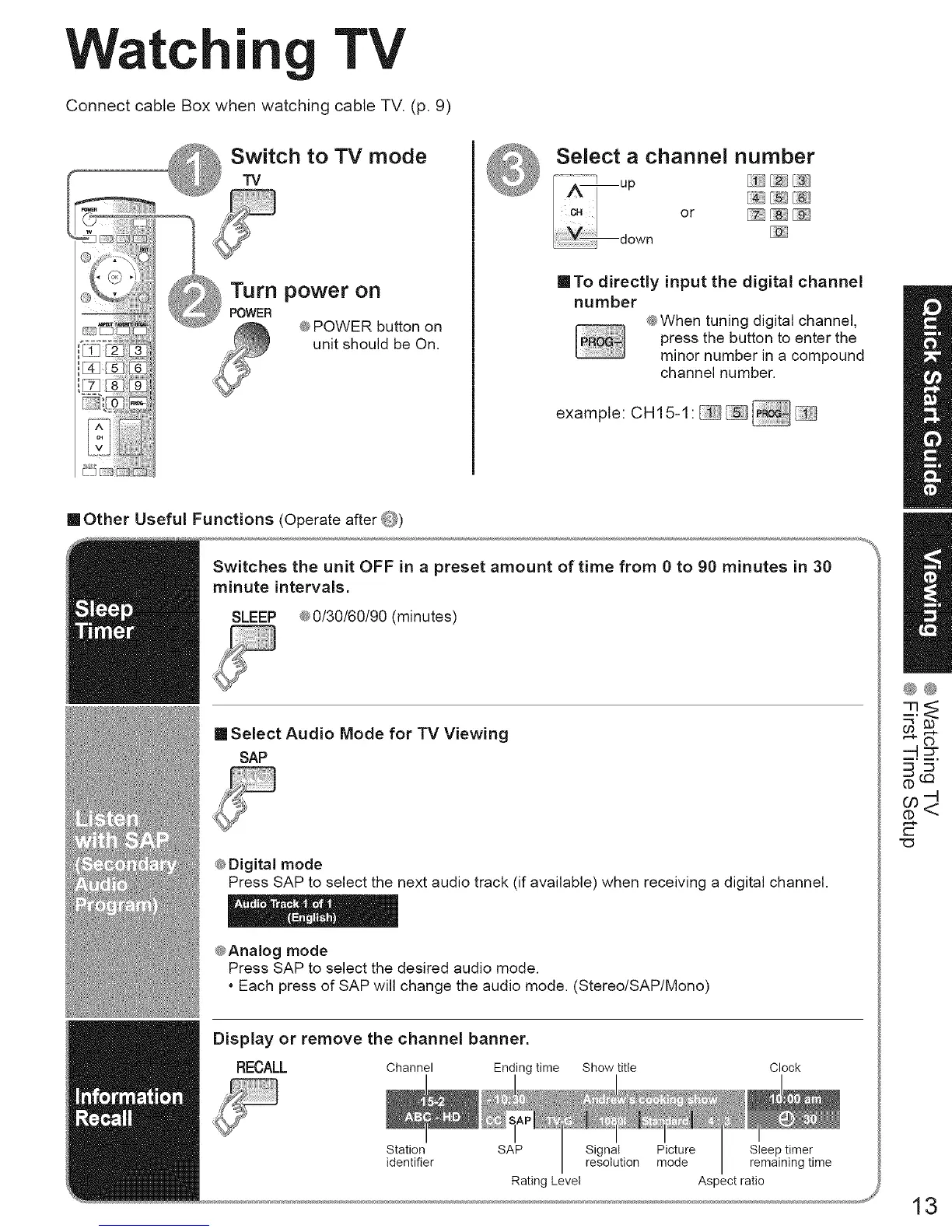
Connect cable Box when watching cable TV. (p. 9)
u
,I 4- I ,% ]
u
[_q FAqF¢
I v ( ;;;;liii)))))[))))))iiYi_
@POWER button on
unit should be On.
@
Select a channel number
/ c. or _[;_][_} (ej
down
ITo directly input the digital channel
number
@When tuning digital channel,
press the button to enter the
minor number in a compound
channel number,
example: CH15-1: _
mOther Useful Functions (Operate after @)
Switches the unit OFF in a preset amount of time from 0 to 90 minutes in 30
minute intervals.
SLEEP 4®0/30/60/90 (minutes)
[] Select Audio Mode for TV Viewing
SAP
@Digital mode
Press SAP to select the next audio track (if available) when receiving a digital channel.
@Analog mode
Press SAP to select the desired audio mode.
• Each press of SAP will change the audio mode. (Stereo/SAP/Mono)
Display or remove the channel banner.
RECALL Channel Ending time Show title
Clock
Station SAP Signal Picture Sleep timer
identifier resolution mode remaining time
Rating Level Aspect ratio
®@
r-
13





 To Next Page