Accesso "es/Opti
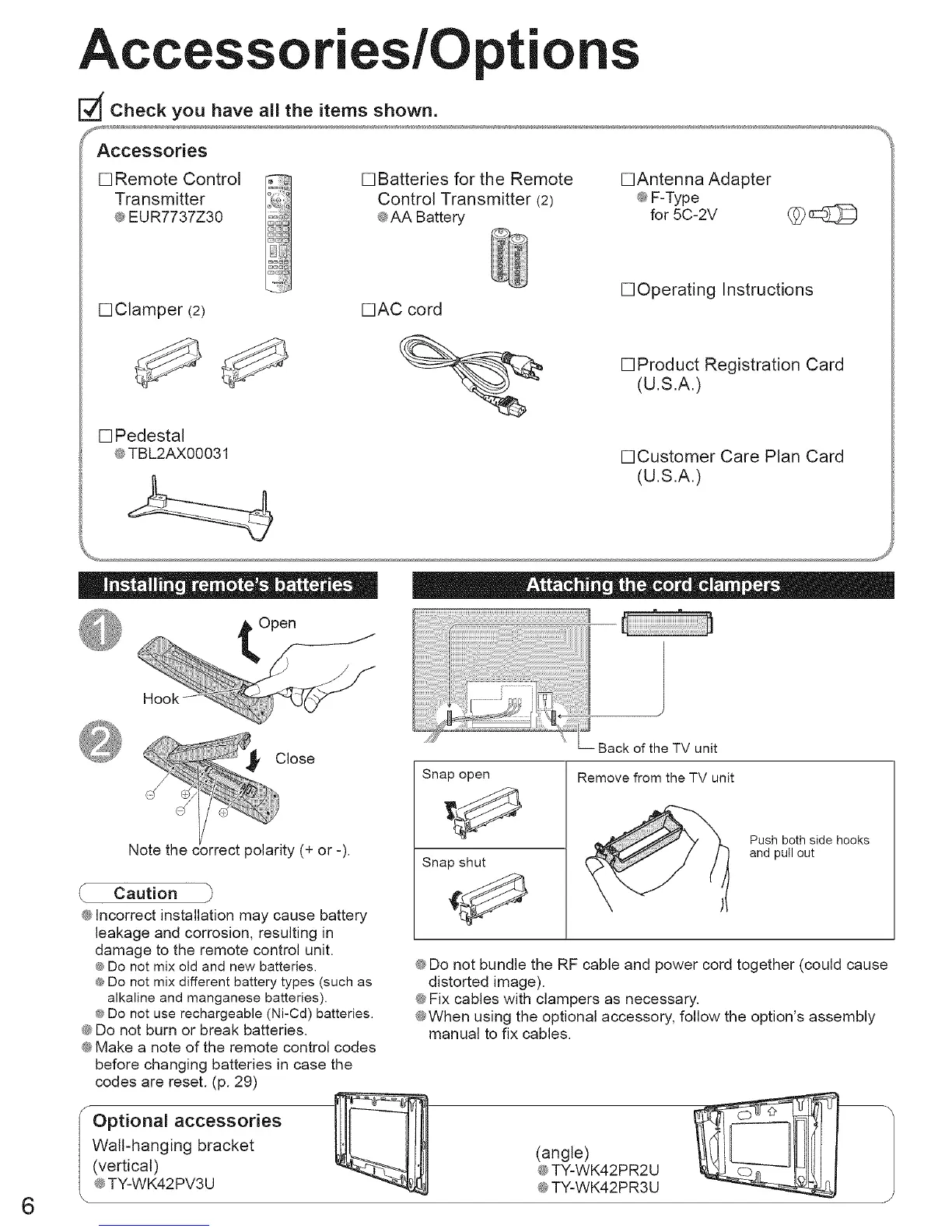
Check you have all the items shown.
[] Remote Control
Transmitter
e EUR7737Z30
[] Batteries for the Remote
Control Transmitter (2)
eAA Battery
•Antenna Adapter
@F-Type
for 5C-2V _p
[]Clamper (2)
[] Pedestal
@TBL2AX00031
•AC cord
•Operating Instructions
[]Product Registration Card
(U.S.A.)
•Customer Care Plan Card
(U.S.A.)
\
Open
Hook
6
Caution
@Incorrect installation may cause battery
leakage and corrosion, resulting in
damage to the remote control unit.
® Do not mix old and new batteries.
e Do not mix different battery types (such as
alkaline and manganese batteries).
® Do not use rechargeable (Ni-Cd) batteries.
@Do not burn or break batteries.
@Make a note of the remote control codes
before changing batteries in case the
codes are reset. (p. 29)
Optional accessories
Wall-hanging bracket
(vertical)
@TY-WK42PV3U
Back of the TV unit
Snap open
Snap shut
Remove from the TV unit
Push both side hooks
and pull out
@Do not bundle the RF cable and power cord together (could cause
distorted image).
@Fix cables with clampers as necessary.
@When using the optional accessory, follow the option's assembly
manual to fix cables.
(angle)
@TY-WK42PR2U
@TY-WK42PR3U





 To Next Page