Caution
Do not use any television or displays other than those supplied in the package.
@Otherwise the unit may fall over and become damaged, and personal injury may result.
Do not use the pedestal if it becomes warped or physically damaged.
¢ If you use the pedestal while it is physically damaged, personal injury may result. Contact your nearest Panasonic
Dealer immediately.
During setting-up, make sure that all screws are securely tightened.
@If sufficient care is not taken to ensure screws are properly tightened during assembly, the pedestal will not be
strong enough to support the _lasma television, and it might fall over and become damaged, and personal injury
may result.
Use the accessory fall-prevention brackets to secure the plasma television.
_ If the unit is knocked or children climb onto the pedestal with the Plasma TV installed, the plasma television may
fall over and personal injury may result.
Two people are required to install and remove the television.
@If two people are not present, the television may be dropped, and personal injury may result.
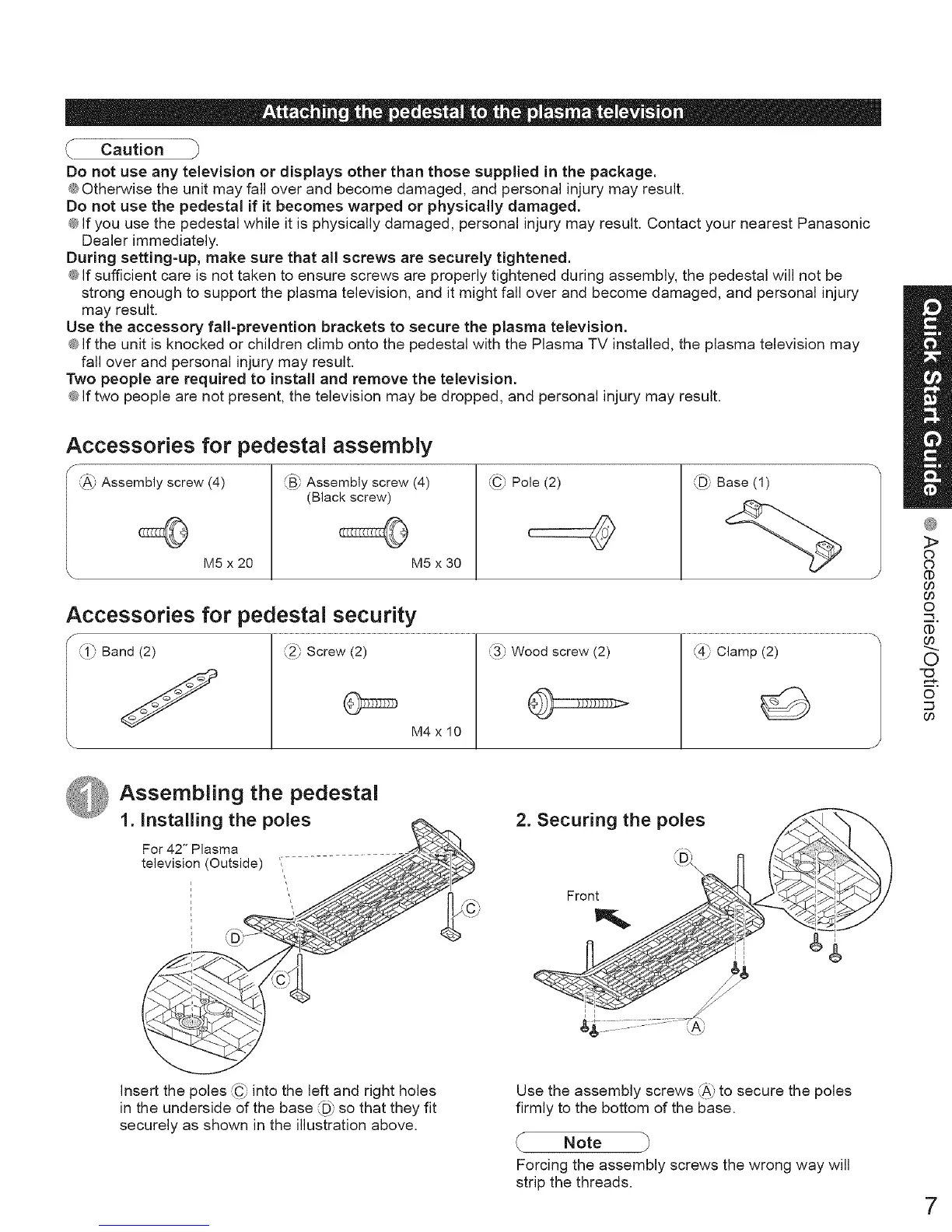
Accessories for pedestal assembly
_v Assembly screw (4)
M5 x 20
fB', Assembly screw (4)
(Black screw)
M5 x 30
,FC_Pole (2)
(
L_D_Base (1)
Accessories for pedestal security
J_ Band (2) (2_,Screw (2)
. _/
M4xl0
\
L3_ Wood screw (2) ,_/ Clamp (2)
3>
C)
C)
(t)
00
00
O
(1)
00
0
©
Assembling the pedestal
1. Installing the poles
For 42" Plasma
television (Outside) ,
i
r
i
i
2. Securing the poles
LD×
Front
Insert the poles _"__C9into the left and right holes
in the underside of the base _D_°"so that they fit
securely as shown in the illustration above.
Use the assembly screws _" to secure'_A_ the poles
firmly to the bottom of the base.
Note
Forcing the assembly screws the wrong way will
strip the threads.
7





 To Next Page