TH-L32C3D
28
8 Measurements and Adjustments
8.1. Voltage chart of A-board
8.2. Voltage chart of P-board
8.3. Picture level adjustment (RF)
Power Supply Name Measurement Point Specification (V)
STB1.8V TP8700 1.74 - 1.90 V
SUB1.2V TP8100 1.18 - 1.32 V
SUB3.3V TP8701 3.19 - 3.46 V
SUB5V TP8702 4.75 - 5.25 V
STB5V TP5400 4.9 - 5.1 V
SUB1.5V TP8101 1.4 - 1.6 V
VOLTAGE TEST POINT SPECIFICATION STATE TEST POINT
for UTF
PFC390V
+ TP7201, 7202 390 ± 15 Reception - * HOT
- TP7203, 7204 - Reception - * HOT
DTV16V TP7801, 7505 15.6 ± 1.5 Reception D7503K
STBY6V TP7506
5.8 ± 0.8 Reception
D7506K
5.8 ± 0.8 Stand by
Instrument Name Remarks
1. REMOTE TRANSMITTER
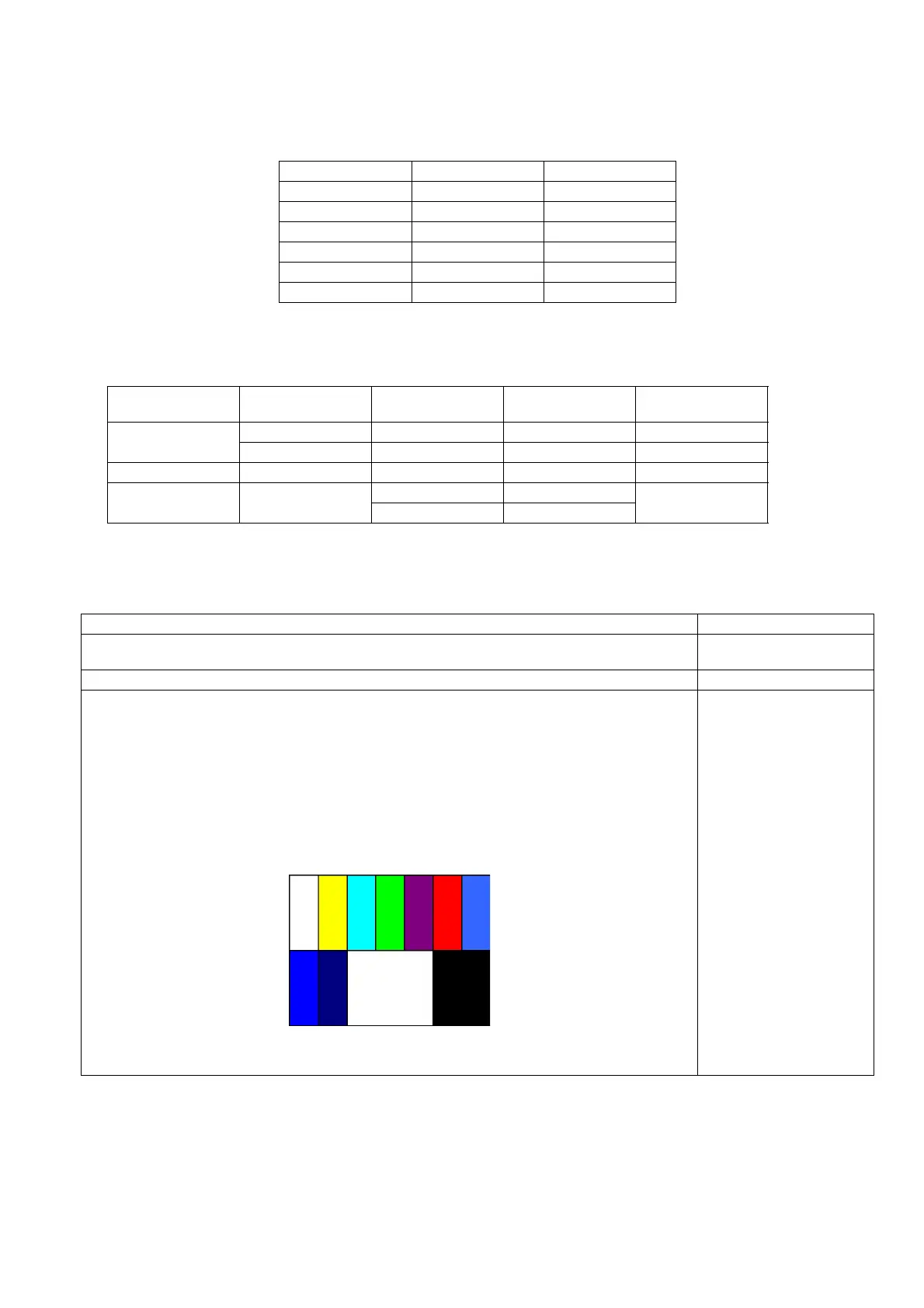
2. Ex. Signal (Sprit color bar)
Adjustment or Inspection Procedure Remarks
procedure
1. Receive the Sprit color bar.
(Screen mode: ZOOM or FULL Picture mode: DYNAMIC AI: OFF AI Picture: OFF)
*BACK LIGHT +30
Inspection
1. Enter Service mode, and select MAIN_ADJ PICTURE.
Volume UP/DOWN key makes GAIN displayed under PICTURE to set.
Pushing the remote controller [OK] key for about 3 seconds, GAIN is suited
to the adjustment value automatically.
(The Sprit Color Bar Pattern)




 To Next Page