EasyManua.ls Logo

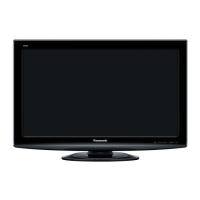
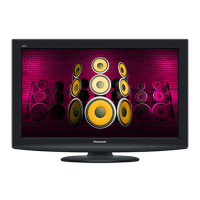
Panasonic TH-L37U20Z - User Manual

Panasonic TH-L37U20Z
60 pages
Print Icon
To Next Page IconTo Next Page
Loading...
Operating Instructions
LCD TV
English
Thank you for purchasing this Panasonic product. Please read these
instructions before operating your set and retain them for future reference.
The images shown in this manual are for illustrative purposes only.
Model No.
TH-L37U20Z
AAJ
TQB4GC0530-1
TH-L37U20Z_EN.indd 1TH-L37U20Z_EN.indd 1 7/20/2010 9:40:27 AM7/20/2010 9:40:27 AM
Question and Answer IconNeed help?

Do you have a question about the Panasonic TH-L37U20Z and is the answer not in the manual?

Summary

Safety Precautions

Handling the Mains Plug and Lead

Warning about proper handling of the mains plug and lead to prevent hazards.

Power Source and Installation

Specifies the TV's power requirements and table-top installation.

Electrical and Physical Safety

Warnings against removing covers, inserting objects, and exposure to elements.

Installation and Usage Guidelines

TV Stability and Placement

Ensuring the TV is on a stable surface and properly positioned.

TV Stability and Mounting

Securing TV to Furniture

Using fall-prevention parts and bands to secure the TV to furniture.

Basic Connection

Connecting the Aerial

Diagram and notes for connecting the TV to an aerial for signal reception.

Connecting External Equipment

Remote Control Identification

Remote Control Layout

Detailed overview of the TV remote control buttons and their functions.

TV Unit Controls and Display

On-Screen Display Navigation

How to use menus and the remote for navigating the TV's interface.

Automatic Channel Tuning

Performing Auto Tuning

Step-by-step guide to automatically search and store TV channels.

Watching TV Basics

Powering On and Mode Selection

Steps to turn on the TV and select between Digital and Analogue modes.

Using Freeview Guide (EPG)

Viewing Teletext

Connecting External Inputs

Input Selection Menu

How to select and switch between different input sources for external devices.

Operating External Equipment

Remote Control Operation

Using the TV remote to control connected equipment and changing remote codes.

Using VIERA TOOLS

Navigating Menu Functions

Menu Navigation Steps

Step-by-step guide on how to display, select menus, items, and adjust settings.

Picture Menu Settings

Channel Tuning and Editing

Initiating Channel Tuning

Steps to select TV mode and start the tuning process.

Managing Digital TV Channels

Digital TV Tuning Procedures

Automatic and Manual Tuning

Guides for automatic channel scanning and manual tuning.

Analogue TV Channel Management

Analogue Auto and Manual Tuning

Procedures for automatically and manually tuning analogue TV channels.

Child Lock and Parental Controls

Setting Up Child Lock

Steps to enable and configure child lock for channels and inputs.

Managing Parental Ratings

How to set parental ratings and change the PIN number.

Customizing Input Labels

Configuring Input Terminal Labels

Instructions for labeling or skipping input terminals for easier selection.

Factory Reset and Shipping Condition

Performing a Shipping Condition Reset

Step-by-step guide to reset the TV to its original factory settings.

Software Update Procedures

Automating TV Software Updates

How to enable automatic software updates and download new versions.

Using the Media Player

Media Player Operation

Launching the Media Player

Steps to insert media and launch the Media Player application.

Media Player Photo Mode

Media Player Video Mode

Media Player Music Mode

VIERA Link and HDAVI Control

Overview of VIERA Link Features

Summary of features and compatibility for VIERA Link and HDAVI Control.

VIERA Link: Live TV and Recording

Operating Equipment via VIERA Link

Controlling Connected Equipment

How to operate connected equipment using the TV remote via VIERA Link Control.

VIERA Link Speaker Control

External Equipment

Recommended Connection Diagrams

Diagrams showing connections for camcorders, PCs, headphones, and speakers.

HDMI Connectivity Details

Technical Information - Signal Input

Supported Input Signals

TV Maintenance Guide

Cleaning the Display and Cabinet

Instructions for cleaning the TV's panel, cabinet, and pedestal for regular and stubborn dirt.

Troubleshooting Common Issues

Image and Sound Problems

Solutions for issues like noise, no image/sound, distorted images, and panel movement.

Advanced Troubleshooting

Screen and Sound Troubleshooting

Resolving issues related to screen display, sound output, and HDMI connections.

Product Specifications

Summary

Safety Precautions

Handling the Mains Plug and Lead

Warning about proper handling of the mains plug and lead to prevent hazards.

Power Source and Installation

Specifies the TV's power requirements and table-top installation.

Electrical and Physical Safety

Warnings against removing covers, inserting objects, and exposure to elements.

Installation and Usage Guidelines

TV Stability and Placement

Ensuring the TV is on a stable surface and properly positioned.

TV Stability and Mounting

Securing TV to Furniture

Using fall-prevention parts and bands to secure the TV to furniture.

Basic Connection

Connecting the Aerial

Diagram and notes for connecting the TV to an aerial for signal reception.

Connecting External Equipment

Remote Control Identification

Remote Control Layout

Detailed overview of the TV remote control buttons and their functions.

TV Unit Controls and Display

On-Screen Display Navigation

How to use menus and the remote for navigating the TV's interface.

Automatic Channel Tuning

Performing Auto Tuning

Step-by-step guide to automatically search and store TV channels.

Watching TV Basics

Powering On and Mode Selection

Steps to turn on the TV and select between Digital and Analogue modes.

Using Freeview Guide (EPG)

Viewing Teletext

Connecting External Inputs

Input Selection Menu

How to select and switch between different input sources for external devices.

Operating External Equipment

Remote Control Operation

Using the TV remote to control connected equipment and changing remote codes.

Using VIERA TOOLS

Navigating Menu Functions

Menu Navigation Steps

Step-by-step guide on how to display, select menus, items, and adjust settings.

Picture Menu Settings

Channel Tuning and Editing

Initiating Channel Tuning

Steps to select TV mode and start the tuning process.

Managing Digital TV Channels

Digital TV Tuning Procedures

Automatic and Manual Tuning

Guides for automatic channel scanning and manual tuning.

Analogue TV Channel Management

Analogue Auto and Manual Tuning

Procedures for automatically and manually tuning analogue TV channels.

Child Lock and Parental Controls

Setting Up Child Lock

Steps to enable and configure child lock for channels and inputs.

Managing Parental Ratings

How to set parental ratings and change the PIN number.

Customizing Input Labels

Configuring Input Terminal Labels

Instructions for labeling or skipping input terminals for easier selection.

Factory Reset and Shipping Condition

Performing a Shipping Condition Reset

Step-by-step guide to reset the TV to its original factory settings.

Software Update Procedures

Automating TV Software Updates

How to enable automatic software updates and download new versions.

Using the Media Player

Media Player Operation

Launching the Media Player

Steps to insert media and launch the Media Player application.

Media Player Photo Mode

Media Player Video Mode

Media Player Music Mode

VIERA Link and HDAVI Control

Overview of VIERA Link Features

Summary of features and compatibility for VIERA Link and HDAVI Control.

VIERA Link: Live TV and Recording

Operating Equipment via VIERA Link

Controlling Connected Equipment

How to operate connected equipment using the TV remote via VIERA Link Control.

VIERA Link Speaker Control

External Equipment

Recommended Connection Diagrams

Diagrams showing connections for camcorders, PCs, headphones, and speakers.

HDMI Connectivity Details

Technical Information - Signal Input

Supported Input Signals

TV Maintenance Guide

Cleaning the Display and Cabinet

Instructions for cleaning the TV's panel, cabinet, and pedestal for regular and stubborn dirt.

Troubleshooting Common Issues

Image and Sound Problems

Solutions for issues like noise, no image/sound, distorted images, and panel movement.

Advanced Troubleshooting

Screen and Sound Troubleshooting

Resolving issues related to screen display, sound output, and HDMI connections.
Product Specifications

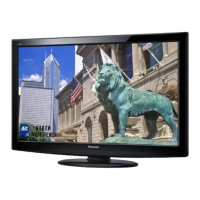
Panasonic TH-L37U20Z Specifications

General IconGeneral
BrandPanasonic
ModelTH-L37U20Z
CategoryLCD TV
LanguageEnglish

Related product manuals