29
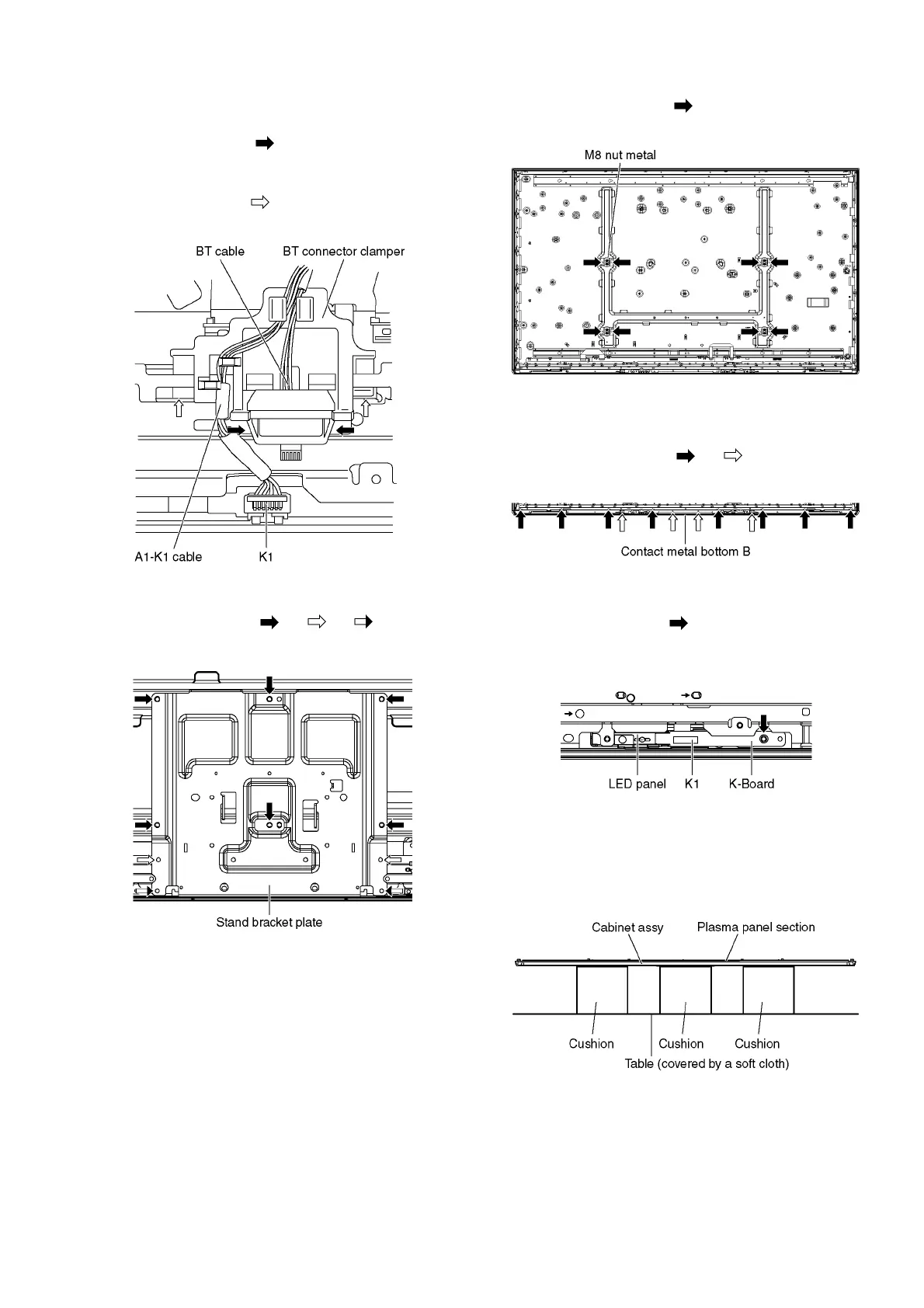
9.2.19. Remove the BT connector clamper
1. Unlock the cable clampers and the tapes to free the
cables.
2. Remove the claws (×2 ) and remove the BT cable.
3. Disconnect the connector (K1) and remove the A1-K1
cable.
4. Remove the claws (×2 ) and remove the BT connector
clamper.
9.2.20. Remove the Stand bracket plate
1. Remove the screws (×6 , ×2 , ×2 ) and remove
the Stand bracket plate.
9.2.21. Remove the M8 nut metals
1. Remove the screws (×2 each) and remove the M8 nut
metals.
9.2.22. Remove the Contact metal bottom
B
1. Remove the screws (×8 , ×4 ).
2. Remove the Contact metal bottom B.
9.2.23. Remove the K-Board
1. Remove the screw (×1 ).
2. Disconnect the connector (K1) and remove the K-Board
from the LED panel.
9.2.24. Remove the Cabinet assy from the
Plasma panel section.
1. Place the Cabinet assy on a flat surface of a table
(covered by a soft cloth) and a cushion.



 To Next Page