English
11
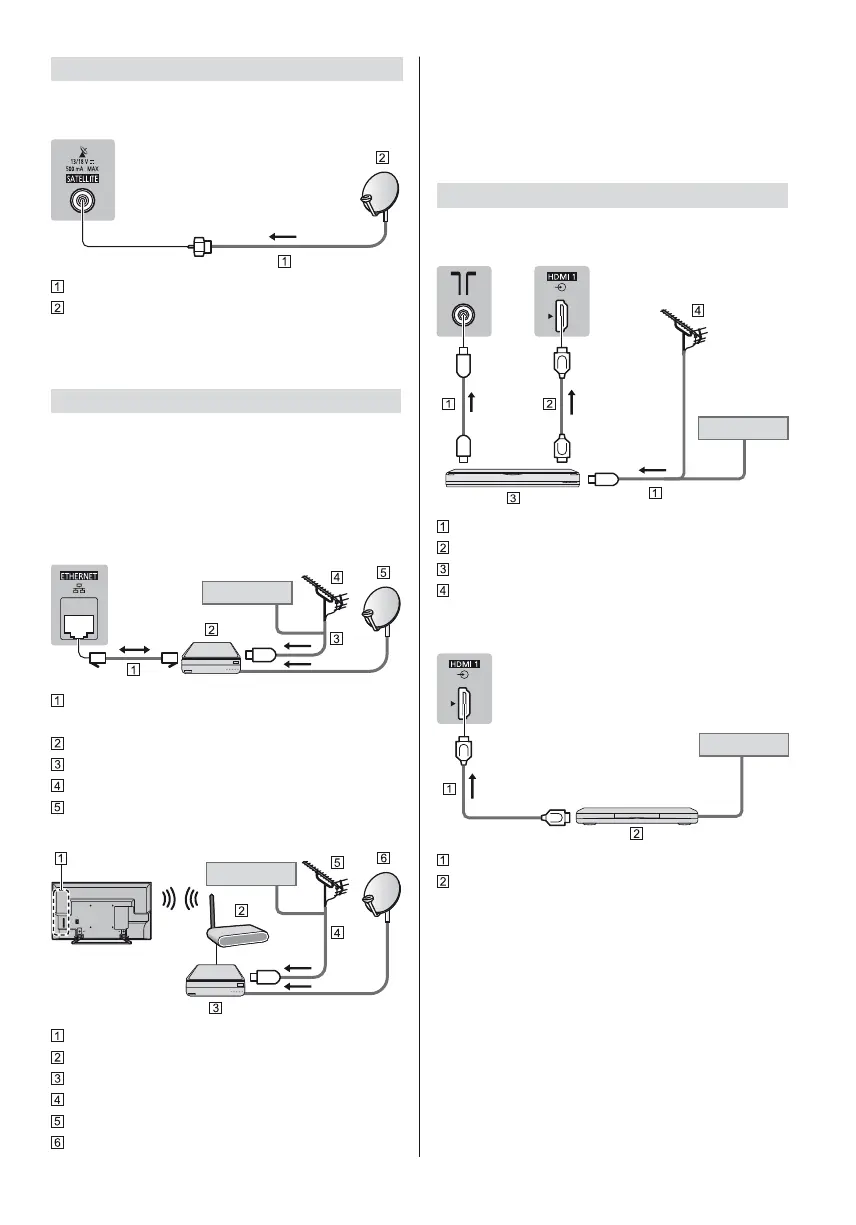
Satellite dish
DVB-S
TV
Satellite cable
Satellite dish
To ensure your satellite dish is correctly installed,
please consult your local dealer. Also consult the
received satellite broadcasting companies for details.
DVB-via-IP client connection
This TV has DVB-via-IP client function and can connect
to DVB-via-IP server or SAT>IP compatible servers to
receive broadcast streaming.
It is recommended to connect to DVB-via-IP server
with a LAN cable.
Wired connection
TV
Cable
LAN cable (Shielded)
Use Shielded Twist Pair (STP) LAN cable.
DVB-via-IP server
RF cable
Terrestrial aerial
Satellite dish
Wireless connection
Cable
Built-in wireless LAN
Access point
DVB-via-IP server
RF cable
Terrestrial aerial
Satellite dish
This function may not be available depending on
network condition and broadcast.
For information about the connections, read the
manual of the DVB-via-IP server.
For details, refer to [eHELP] (Search by Purpose >
Functions > DVB-via-IP).
AV devices
DVD Recorder / Blu-ray Recorder, etc.
TV
Cable
RF cable
HDMI cable
DVD Recorder / Blu-ray Recorder, etc.
Terrestrial aerial
Set top box
TV
Cable
HDMI cable
Set top box







 To Next Page