-$
r
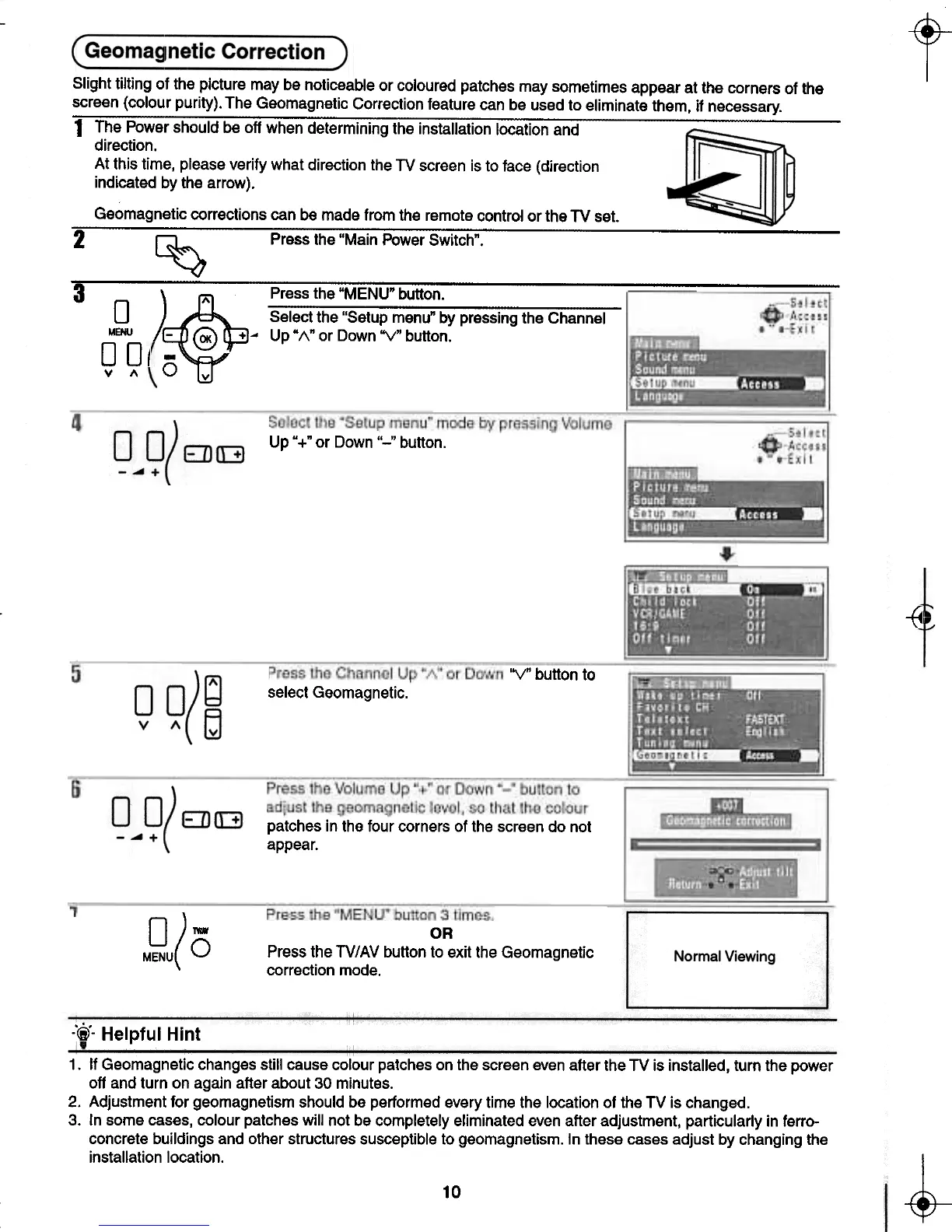
Up "+" or Down "-" button.
-{4
'YO button to
select Geomagnetic.
patches in the four corners of the screen do not
appear.
0)-
MENU(O
OR
Press the TV/AV button to exit the Geomagnetic
correction mode.
:r'pj- Helpful Hint
1. If Geomagnetic changes still cause colour patches on the screen even after the TV is installed, turn the power
off and turn on again after about 30 minutes.
2. Adjustment for geomagnetism should be performed every time the location of the TV is changed.
3. In some cases, colour patches will not be completely eliminated even after adjustment, particularly in ferro-
concrete buildings and other structures susceptible to geomagnetism. In these cases adjust by changing the
installation location.
~
10
-t
t- --t-
Slight tilting of the picture may be noticeable or coloured patches may sometimes appear at the corners of the
screen (colour purity). The Geomagnetic Correction feature can be used to eliminate them, if necessary.
1 The Power should be 011 when determining the installation location and
direction.
At this time, please verify what direction the TV screen is to face (direction
indicated by the arrow).
Geomagnetic corrections can be made from the remote control or the TV set.
---
2 ~ Press the "Main Power Switch".
---
3
A " Press the "MENU" button.
0
~Select the "Setup menu" by pressing the Channel
MENU -@ + ~ Up "1\" or Down 'Y" button.
00/ -
v " 0 v






 To Next Page