---$
.1 ~9FO50A'M.2S33_Efm PaS,9 Th"day, J~""Y II, 2005 513 PM
-t
r
16
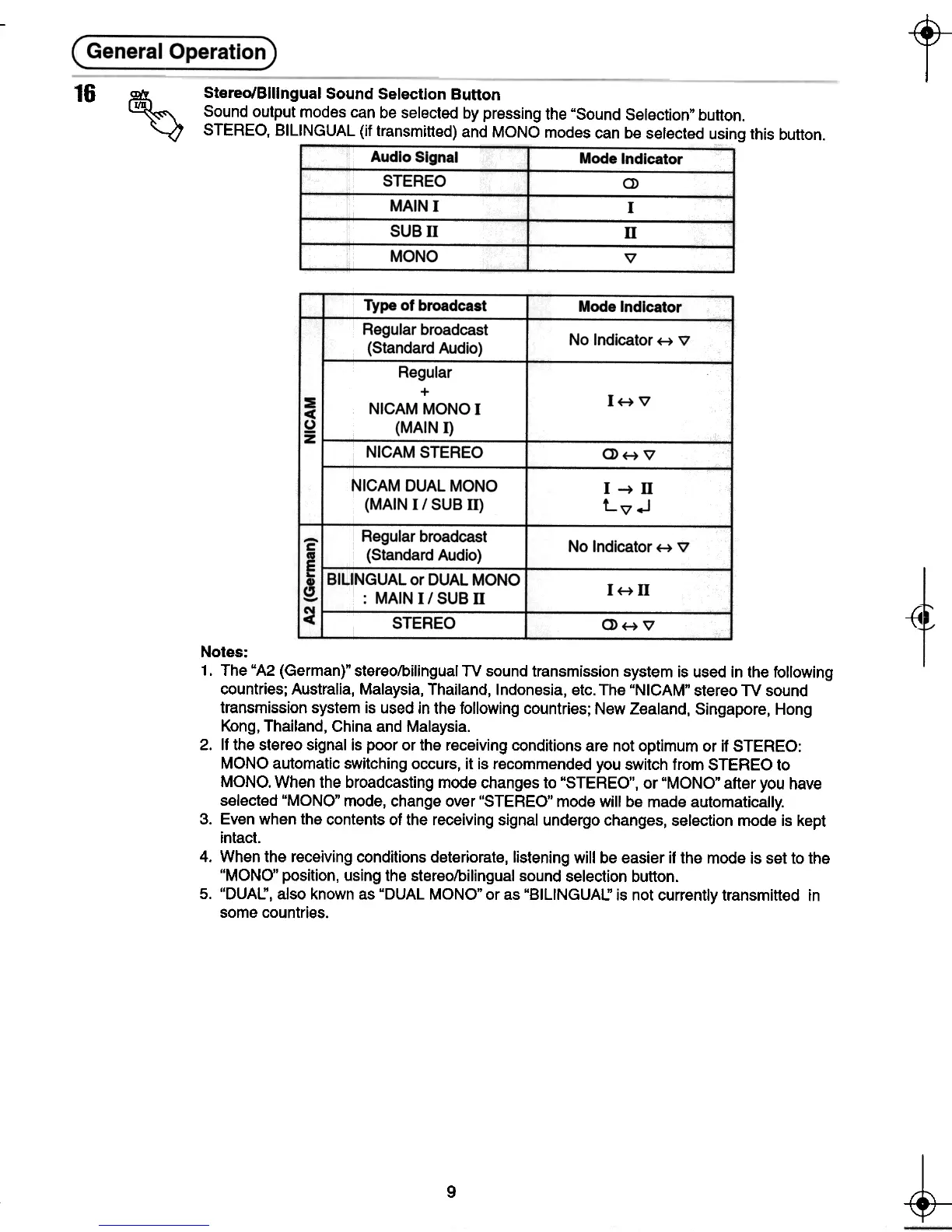
~ Stereo/Bilingual Sound Selection Button "" Sound output modes can be selected by pressing the "Sound Selection" button.
STEREO, BILINGUAL (if transmitted) and MONO modes can be selected using this button.
Audio Signal
STEREO
MAIN I
SUBD
MONO
Mode Indicator
(J)
I
n
V
~
-{4
Notes:
1. The"A2 (German)" stereo/bilingual TV sound transmission system is used in the following
countries; Australia, Malaysia, Thailand, Indonesia, etc. The "NICAM" stereo TV sound
transmission system is used in the following countries; New Zealand, Singapore, Hong
Kong, Thailand, China and Malaysia.
2. If the stereo signal is poor or the receiving conditions are not optimum or if STEREO:
MONO automatic switching occurs, it is recommended you switch from STEREO to
MONO. When the broadcasting mode changes to "STEREO", or "MONO" after you have
selected "MONO" mode, change over "STEREO" mode will be made automatically.
3. Even when the contents of the receiving signal undergo changes, selection mode is kept
intact.
4. When the receiving conditions deteriorate, listening will be easier if the mode is set to the
"MONO" position, using the stereo/bilingual sound selection button.
5. "DUAL:', also known as "DUAL MONO" or as "BILINGUAL:' is not currently transmitted in
some countries.
~
~
9
-tIO
t- -<t-






 To Next Page