-+
-$-m9FG50A,M-2833_Eofm Page 14 Tuesday, January 11,2005 5:13 PM
~
{4
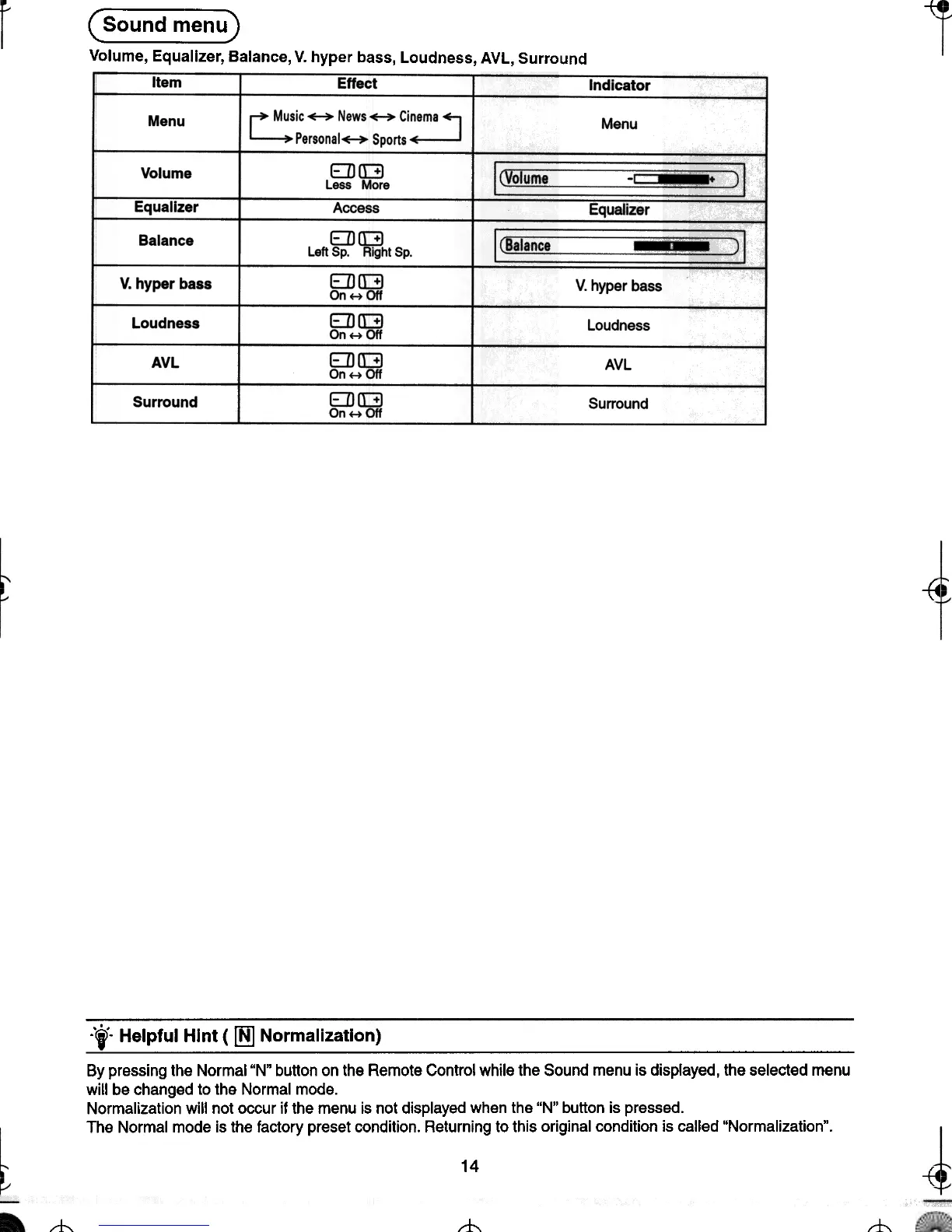
( Sound menu)
Volume, Equalizer, Balance, V. hyper bass, Loudness, AVL, Surround
Item
Effect
Indicator
~ Music ~ News ~ Cineme ~
L-.Personal~Sports~
Menu
Menu
IlVOlume~~~~~ 2l
EDII:]
Less More
Access
EDII:]
Left Sp. Right Sp.
EDII:]
On...011
EDII:]
On... 011
EDII:]
On...011
EDII:]
On ...011
Volume
EquaIrzer
Balance
t:quallzer
IlBalanca~~ ) I
V. hyper bass
V. hyper bass
Loudness
Loudness
AVL
AVL
Surround
Surround
-{4
~
"'t" Helpful Hint ( ~ Normalization)
By pressing the Normal "N" button on the Remote Control while the Sound menu is displayed, the selected menu
will be changed to the Normal mode.
Normalization will not occur if the menu is not displayed when the "N" button is pressed.
The Normal mode is the factory preset condition. Returning to this original condition is called "Normalization".
14
--(4 -{4
---t
"t-
--t-







 To Next Page