--+
-$-m9FG50A,M-2833_Eofm Page 15 Thursday, January 13,2005 5:24 PM
~
~
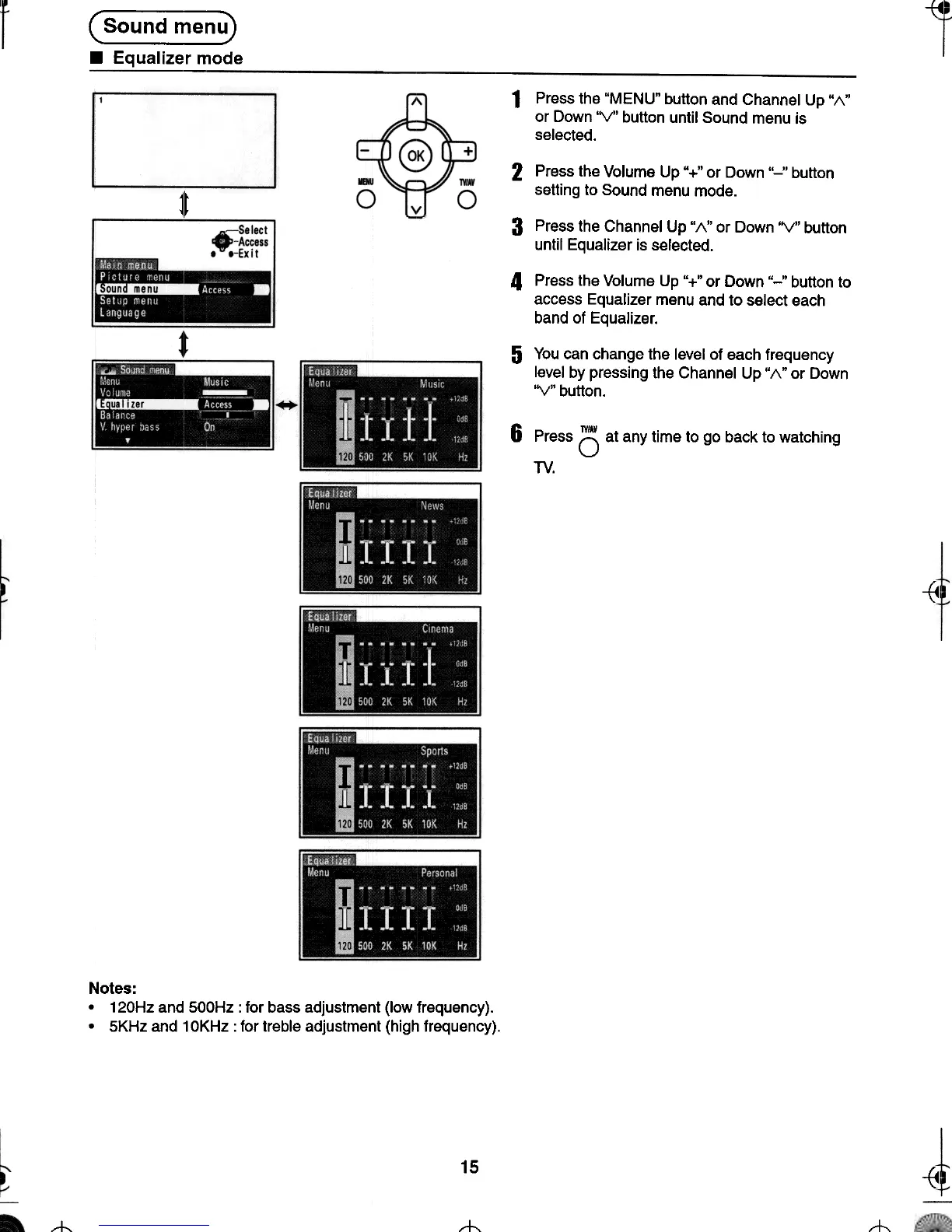
(Sound menu)
.Equalizer mode
1t
1 Press the "MENU" button and Channel Up "1\"
or Down 'V" button until Sound menu is
selected.
2 Press the Volume Up "+" or Down "-,' button
setting to Sound menu mode.
3 Press the Channel Up "1\" or Down 'V" button
until Equalizer is selected.
4 Press the Volume Up "+" or Down "-" button to
access Equalizer menu and to select each
band of Equalizer.
5 You can change the level of each frequency
level by pressing the Channel Up" 1\" or Down
'V" button.
6 Press (5 at any time to go back to watching
TV.
~
~
Notes:
.120Hz and 500Hz: for bass adjustment (low frequency).
.5KHz and 10KHz: for treble adjustment (high frequency).
15
~-{4
--t-
t-
-t






 To Next Page