~
.1~9FG50A'M.2833_Efm Po,o. Th",,"oy, April 7,2005 247 PM
-t
r
1
'--
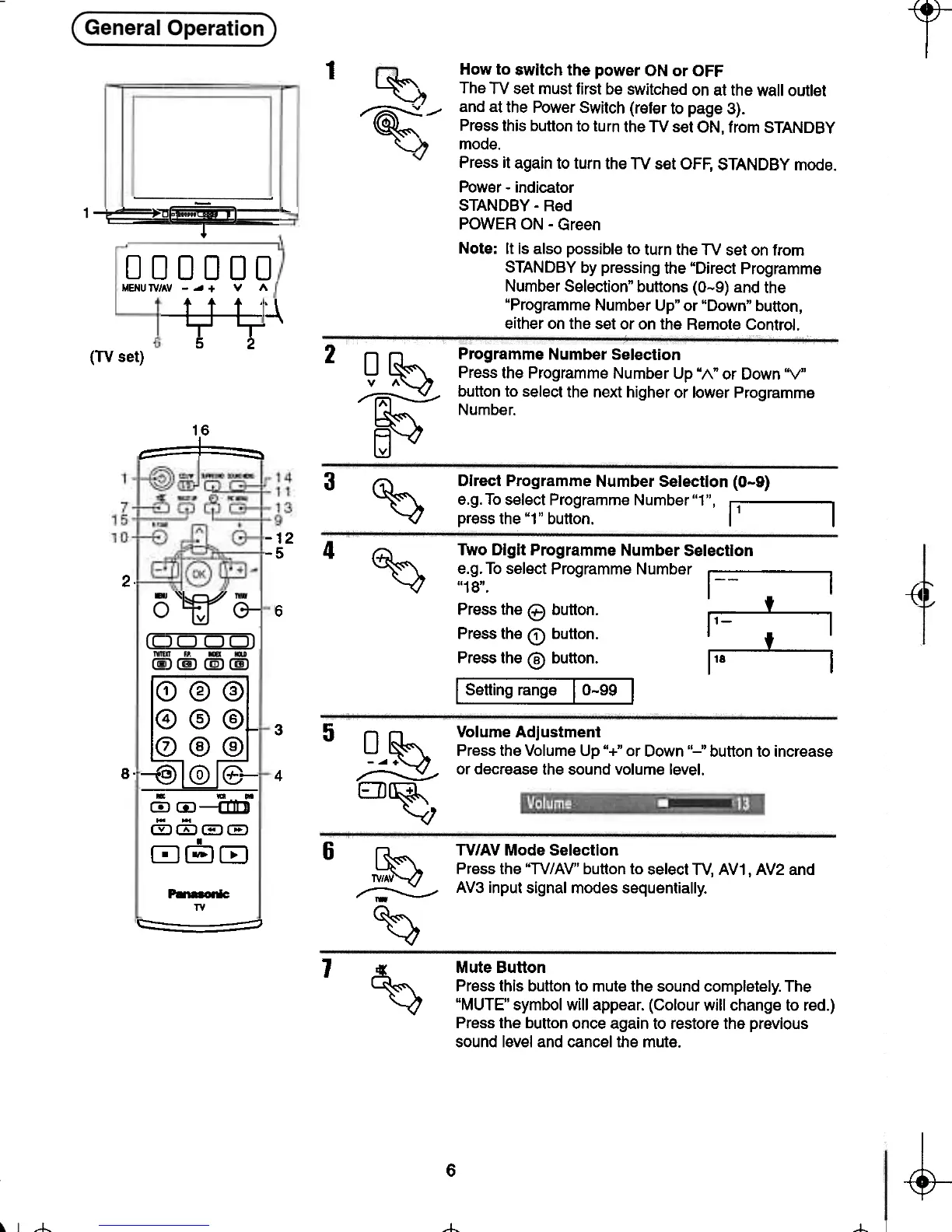
How to switch the power ON or OFF
~ The TV set must first be switched on at the wall outlet
~-- and at the Power Switch (refer to page 3).
~ Press this button to turn the TV set ON, from STANDBY
~ mode.
Press it again to turn the TV set OFF, STANDBY mode.
Power -indicator
STANDBY -Red
POWER ON -Green
Note: It is also possible to turn the TV set on from
STANDBY by pressing the "Direct Programme
Number Selection" buttons (0-9) and the
"Programme Number Up" or "Down" button,
either on the set or on the Remote Control.
000000
MENUlV/AV -..+ v A
---¥---~~
~
2
(TV set)
0 ~ Programme Number Selection
Press the Programme Number Up "1\" or Down "V"
~ button to select the next higher or lower Programme
~ Number.
~
16
t::::=1~
3
Direct Programme Number Selection (0-9)
e.g. To select Programme Number "1". 11 I
press the "1" button. I I
~
-12
-5 4
~
2.
~
{4
Two Digit Programme Number Selection
e.g. To select Programme Number 1-- I
"18". I -I
Pressthee button. :,- t .
Press the Q) button. ~ 1- t ~
Press the @ button. 1'8 I
I Setting range I 0-99 I
6
(!)@@
4 5 6
rnCD-cm
00(EJ(EJ
080
-
TV
c:=- -=:;:J
5
3
8-
4
0 ~ Volume Adjustment
-~ + Press the Volume Up "+" or Down "-" button to increase
~ or decrease the sound volume level.
EJJ~
6
~ TV/AV Mode Selection
~ Press the "TV/AV" button to select TV, AV1, AV2 and
~ AV3 input signal modes sequentially.
-
~
1
~
Mute Button
Press this button to mute the sound completely. The
"MUTE" symbol will appear. (Colour will change to red.)
Press the button once again to restore the previous
sound level and cancel the mute.
~
-4-
6
~
t- --t-







 To Next Page