---$
8
~
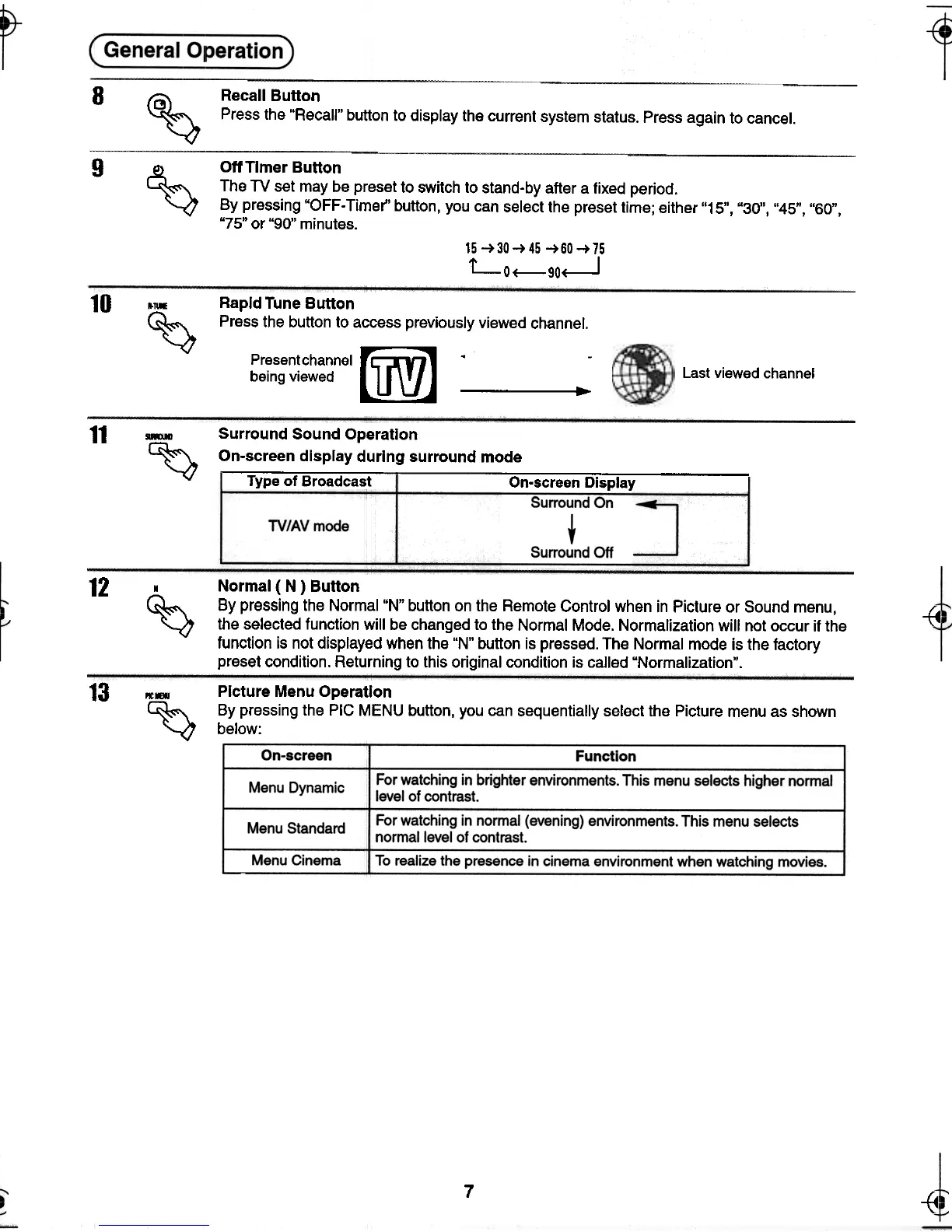
Recall Button
Press the "Recall" button to display the current system status. Press again to cancel.
9
~ Off Timer Button
The TV set may be preset to switch to stand-by alter a fixed period.
By pressing "OFF-Timer" button, you can select the preset time; either "15", "30", "45", "60",
"75" or "90" minutes.
15 -+30-+45 -+60-+75
LO+--90~
10
...
~
Last viewed channel
Rapid Tune Button
Press the button to access previously viewed channel.
Present channel
~ .
being viewed
..
11
-Surround Sound Operation
~ On-screen display during surround mode
Type of Broadcast On-screen Display I
12
--{4
, Normal ( N ) Button
~ By pressing the Normal "N" button on the Remote Control when in Picture or Sound menu,
~ the selected function will be changed to the Normal Mode. Normalization will not occur if the
function is not displayed when the "N" button is pressed. The Normal mode is the factory
preset condition. Returning to this original condition is called "Normalization".
-{c
13
..-Picture Menu Operation
~ By pressing the PIC MENU button, you can sequentially select the Picture menu as shown
'-<7 below:
7
~ ~
-t- --t- -<t






 To Next Page