
 Need help?
Do you have a question about the Panasonic TX-37LX75A and is the answer not in the manual?
Covers electrical safety, placement, ventilation, and environmental considerations to prevent damage or hazards.
Instructions for unplugging the TV, cleaning the screen and unit, and care for surface quality.
Lists items included with the TV, such as the remote control and batteries.
Information about purchasing additional accessories like wall-hanging brackets.
Step-by-step guide and precautions for inserting batteries into the remote control.
Explains the purpose and operation of various buttons on the remote control.
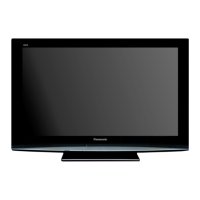
Identifies the power lamp, power switch, and remote control signal receiver on the TV unit.
Diagrams showing how to connect an aerial and external devices like DVD recorders or VCRs.
Advice on cable placement, aerial quality, and system requirements for optimal connection.
Detailed instructions on navigating menus to perform the auto tuning process.
Explains options for channel selection, system selection, and initiating auto tuning.
How to turn on the TV and select channels using direct or position-based methods.
Describes features like freezing the picture, recalling status, and changing aspect ratios.
Guide to displaying and selecting input modes for connected external equipment.
Instructions to configure the remote for operating Panasonic VCRs, DVD players, or home theatre systems.
Steps for switching to Teletext, selecting pages, and adjusting display contrast.
Explains using teletext for hidden words, holding pages, and managing automatic updates.
Covers accessing the index, split-screen viewing, storing pages, and viewing sub pages.
How to display the TV picture alongside teletext information while searching.
Step-by-step guide for accessing and adjusting settings within the TV's menus.
How to use alternatives, slide bars, and return to previous or next screens in menus.
Visual representation of the main menu hierarchy linking Picture, Sound, Setup, and Tuning sections.
Guidance on returning to TV or previous screens and selecting available menu items.
Configuration of picture modes, contrast, brightness, colour, and sharpness for optimal viewing.
Adjustments for NTSC-Tint, Colour Temperature, D.PNR, and 3D-COMB for fine picture tuning.
Configuration of VIERA Link, Teletext display mode, and the automatic off timer.
Options for channel colour adjustment, child lock, blue back display, and text selection.
How to manually tune channels, store, search, and repeat programmes.
Adjusting sound systems and selecting correct colour standards for broadcast signals.
Fine-tuning individual channels and skipping unused programme numbers.
Steps to connect a PC and select the appropriate input source for display.
Configuration of PC menu settings for resolution, horizontal/vertical position, and clock phase.
Explains VIERA Link function for interoperability and HDAVI control features.
Guide on enabling VIERA Link for automatic input switching and controlling connected equipment.
Managing sound output between home theatre speakers and TV speakers.
Visual guides illustrating connections for various external devices to the TV.
A table detailing which equipment can be connected to each specific terminal on the TV.
Table showing supported aspect ratios for different signal types like TV/AV, Component, and HDMI.
Visual examples and explanations of various aspect ratio modes such as 16:9, 4:3, and Zoom.
Explains the HDMI interface for high-definition digital AV connections and compatibility.
Details on connecting a PC, including max resolution, aspect ratios, and D-sub pin signals.
How VIERA Link enables easy playback control and automatic input switching.
Lists applicable input signals for Component, HDMI, and PC connections, including frequencies.
Guide on how to choose between Stereo, Mono, and Bilingual sound output for broadcasts.
Information regarding audio signal licences and trademarks associated with the product.
Addresses common problems like noise, screen spots, panel movement, and sound issues.
Troubleshooting tips for HDMI connection issues and a non-working remote control.
Solutions for common picture issues like snowy or distorted images and sound problems like no sound.
Addresses issues with VIERA Link, poor video/audio quality, and error messages.
Specifications for power source, consumption, LCD panel size, speakers, and audio output.
Details on receiving systems, channel bands, operating conditions, and connection terminals.
Information on the TV's overall dimensions, including with the stand, and its net weight.
Outlines the terms, duration, and conditions for warranty service in New Zealand.
Provides essential contact details for Panasonic New Zealand retailers and service centers.
 General
| Screen Size | 37 inches |
|---|---|
| Display Type | LCD |
| Resolution | 1366 x 768 |
| Aspect Ratio | 16:9 |
| HDMI Ports | 2 |
| Brightness | 500 cd/m² |
| Viewing Angle | 178° |
| Response Time | 8 ms |
| VGA Port | Yes |
| Component Video Input | 1 |
| Composite Video Input | 1 |
| SCART Input | 1 |
| Digital Audio Output | Yes |
| Built-in Speakers | Yes |





 To Next Page