English
18
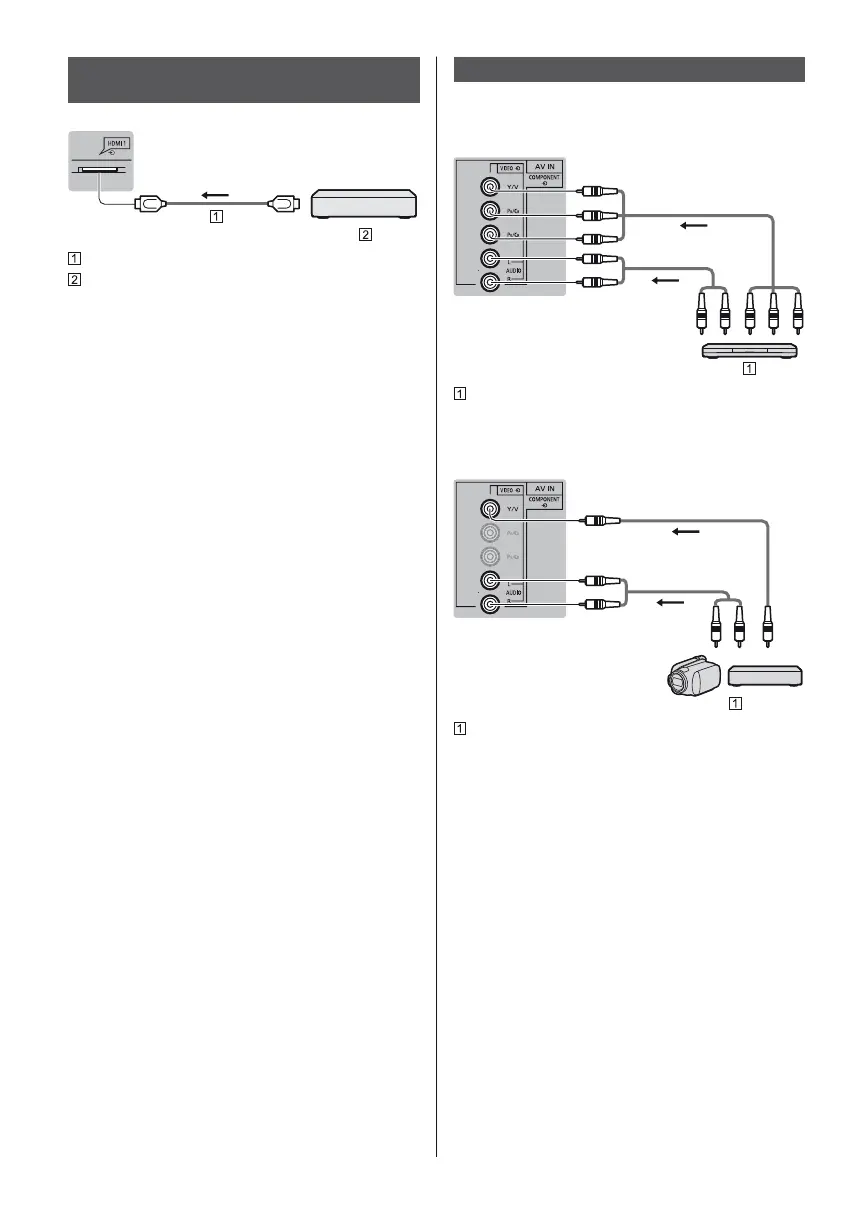
Connections for 4K compatible
equipment
TV
HDMI cable
4K compatible equipment
To watch high-definition 4K more accurately or HDR
content, connect the 4K compatible equipment to
HDMI1 or 2 terminal.
Connect the 4K compatible equipment to HDMI
terminal using a 4K compatible cable and you can
watch content in 4K format.
[HDMI Auto Setting] (Setup Menu)
Reproduces the image more precisely with the
expanded colour gamut when connecting the 4K
compatible equipment. Select the mode depending on
the equipment.
[Mode1]:
For better compatibility. Set to [Mode1] when the
image or sound in HDMI input is not played properly.
[Mode2]:
For the 4K compatible equipment that has the
function to output the image precisely with the
expanded colour gamut
To change the mode
1. Select the HDMI input mode connected to the
equipment.
2. Display the menu and select [HDMI Auto Setting]
(Setup Menu).
For information about the valid format, refer to
[eHELP] (Search by Purpose > Watching > 4K
resolution > HDMI Auto Setting).
Other connections
DVD Player
(COMPONENT equipment)
TV
(Listening)
(Viewing)
DVD Player
Camcorder / Game equipment
(VIDEO equipment)
TV
(Listening)
(Viewing)
Camcorder / Game equipment








 To Next Page