English - 6 -
High Dynamic Range (HDR) / Hybrid Log-
Gamma (HLG)
Using this feature the TV can reproduce greater
dynamic range of luminosity by capturing and then
promises better picture quality thanks to brighter, more
realistic highlights, more realistic colour and other
intended to achieve, showing the hidden areas of
dark shadows and sunlight with full clarity, colour and
detail. HDR/HLG contents are supported via native
and market applications, HDMI, USB inputs and over
DVB broadcasts.
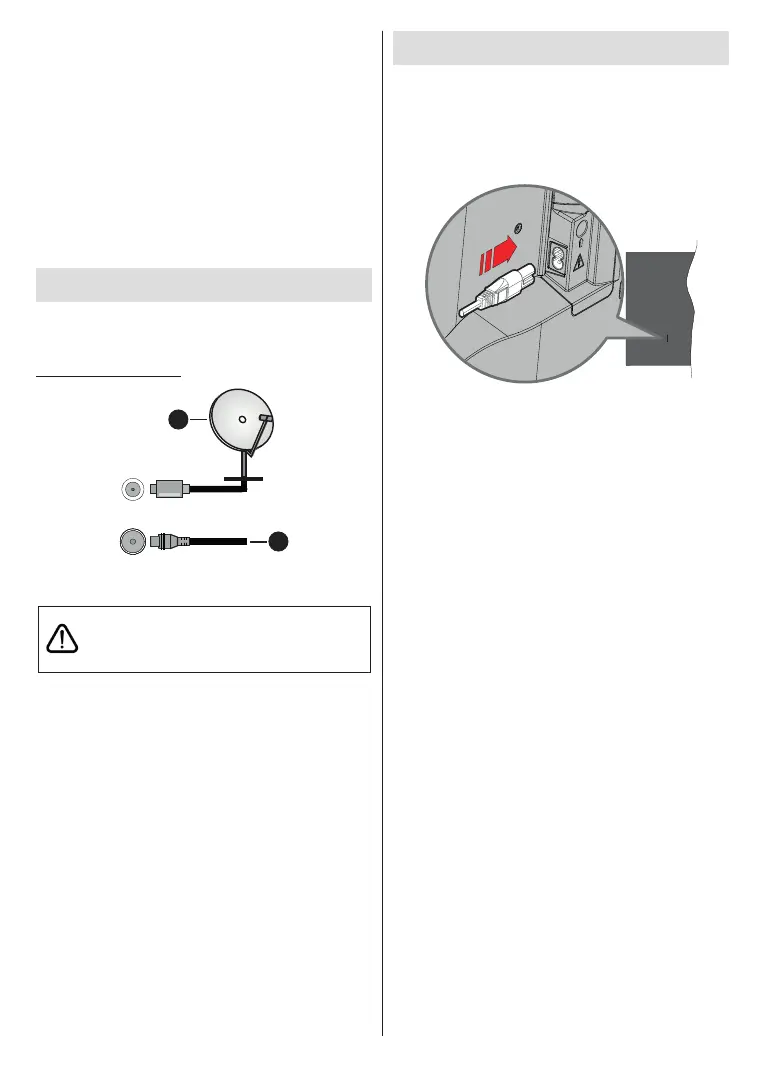
Antenna Connection
Connect the aerial or cable TV plug to the AERIAL
INPUT (ANT) socket or satellite plug to the SATELLITE
INPUT (LNB) socket located on the rear side of the TV.
Rear side of the TV
1
2
LNB
ANT
1. Satellite
2. Aerial or cable
If you want to connect a device to the TV, make
before making any connection. After the connection
is done, you can turn on the units and use them.
Turning On/Off the TV
Connect power
IMPORTANT: The TV set is designed to operate on
220-240V AC, 50 Hz socket.
After unpacking, allow the TV set to reach the ambient
room temperature before you connect the set to the
mains.
Plug one end (the two-hole plug) of the supplied
detachable power cord into the power cord inlet on
the rear side of the TV as shown above. Then plug
the other end of the power cord into the mains socket
outlet. The TV will switch on automatically.
Note: The position of the power cord inlet may dier depending
on the model.
To switch on the TV from standby
If the TV is in standby mode the standby LED lights
up. To switch on the TV from standby mode either:
• Press the Standby button on the remote control.
• Press the centre of the joystick on the TV in.
To switch the TV into standby
The TV cannot be switched into standby mode via
joystick. Press and hold the Standby button on the
remote control. dialogue will appear on the
screen. Highlight OK and press the OK button. The
TV will switch into standby mode.
To power down the TV completely, unplug the power
cord from the mains socket.
Quick standby mode
In order to switch the TV into quick standby mode
either;
• Press the Standby button on the remote.
Press again to go back to operating mode.
• Press and hold the center of the joystick on the TV.
Press again to go back to operating mode.
Note: When the TV is switched into standby mode, the standby
LED can blink to indicate that features such as standby search
or timer is active. The LED can also blink when you switch on
the TV from standby mode.











 To Next Page