14
English
∫
∫
∫
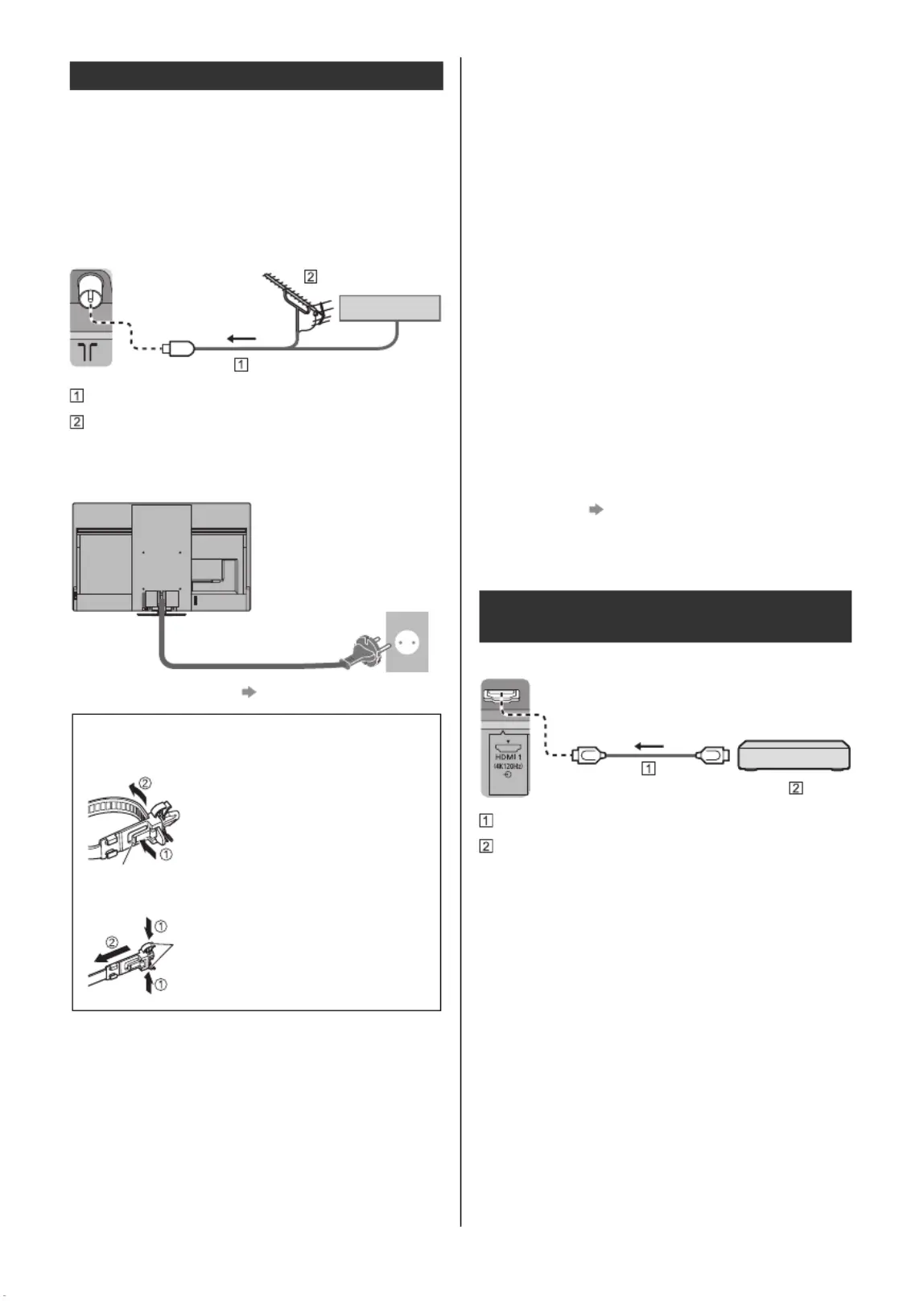
∫∫ AV devices
(DVD Recorder / Blu-ray Recorder, Set top box, etc.)
≥ For details, refer to [eHELP] (Search by Purpose >
Watching > Basic > Basic connection).
∫
∫
∫
∫∫ Aerial
(For viewing cable / digital / analogue broadcasts)
TV
RF cable
Terrestrial aerial
∫
∫
∫
∫∫ Mains lead
≥
≥
≥
≥≥ “Cable arrangement” (p. 16)
∫
∫
∫
∫∫ Satellite connection
≥ To ensure your satellite dish is correctly installed,
please consult your local dealer. Also consult the
received satellite broadcasting companies for details.
≥ For details, refer to [eHELP] (Search by Purpose >
Watching > Basic > Satellite connection).
∫
∫
∫
∫∫ DVB-via-IP connection (server, client etc.)
≥ This function may not be available depending on
network condition and broadcast.
≥ For information about the connections, read the
manual of the DVB-via-IP server.
≥ For details, refer to [eHELP] (Search by Purpose >
Functions > DVB-via-IP).
∫
∫
∫
∫∫ Network
A broadband network environment is required to be able
to use internet services.
≥ If you do not have any broadband network services,
please consult your retailer for assistance.
≥ Prepare the internet environment for wired connection
or wireless connection.
≥ Setup of the network connection will start when first
using the TV. (p. 22)
≥ For details, refer to [eHELP] (Search by Purpose >
Network > Network connections).
TV
HDMI cable
4K / HDR compatible equipment
≥ Reproduces the image more precisely with the
expanded colour gamut and more smoothly with the
high frame rate when connecting the 4K compatible
equipment. [Mode2] is a mode that supports higher
definition signals than [Mode1]. [Mode3] is a mode
that supports higher frame rate signals than [Mode2].
Set to [Mode1] when the image or sound in HDMI
input is not played properly.
≥ Connect the 4K compatible equipment to HDMI
terminal using a 4K compatible cable and you can
watch content in 4K format.
≥ Supporting HDR does not increase the peak
brightness capabilities of the TV panel.
Basic connections




 To Next Page