English
14
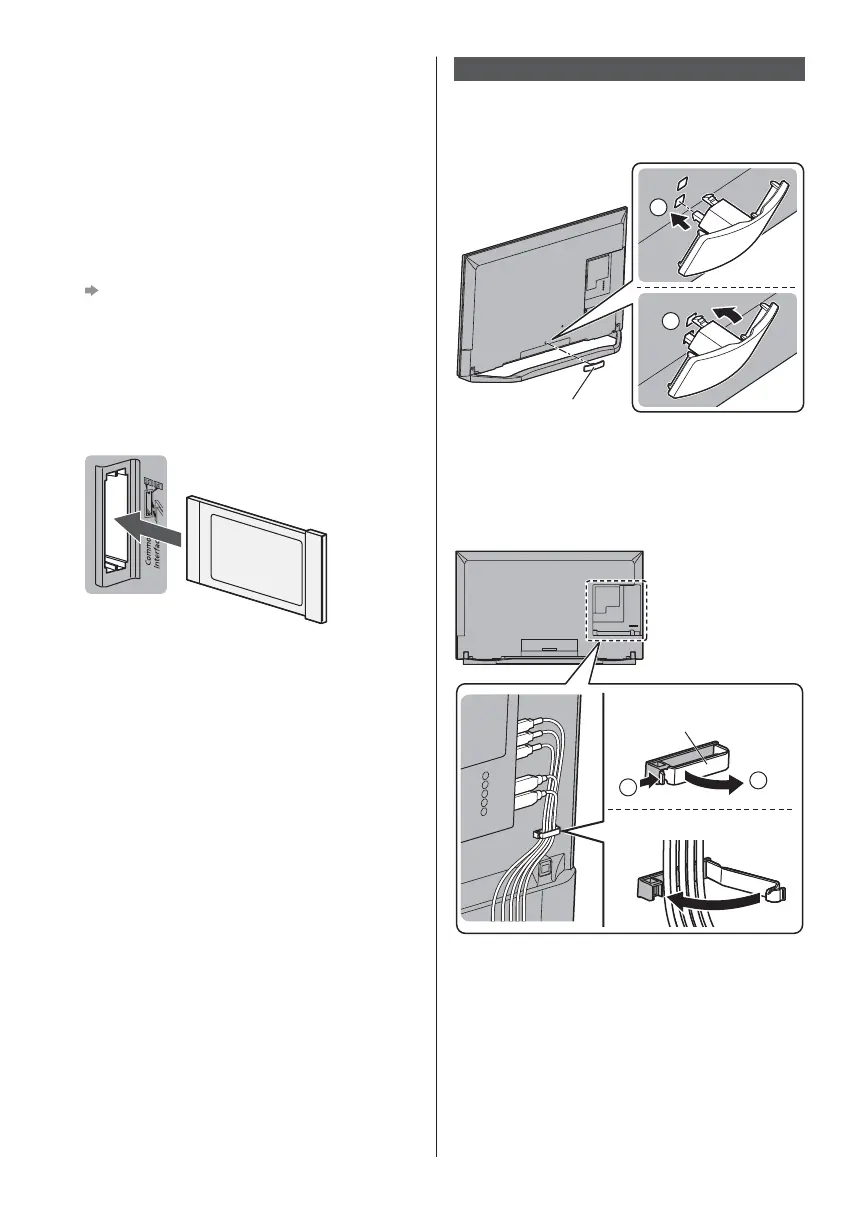
Common Interface
Turn the TV off with Mains Power On / Off switch
whenever inserting or removing the CI module.
If a smart card and a CI module come as a set, first
insert the CI module, then insert the smart card into
the CI module.
Insert or remove the CI module completely in the
correct direction as shown.
Normally encrypted channels will appear. (Viewable
channels and their features depend on the CI
module.)
If encrypted channels do not appear
[Common Interface] in the Setup Menu
There might be some CI modules in the market
with older firmware versions that do not work fully
interoperable with this new CI+ v1.3 TV. In this case,
please contact your content provider.
For details, refer to [eHELP] (Functions > Common
Interface), read the manual of the CI module, or
check with the content provider.
TV
CI module
USB HDD (for recording)
Use USB 3 port for connecting the USB HDD.
For details, refer to [eHELP] (Recording).
VIERA Link
Use HDMI1 - 4 for VIERA Link connection.
For details, refer to [eHELP] (Functions > VIERA Link
“HDAVI Control™”).
Cable arrangement
Fix the cables using the cable clamp and cable guide,
and then attach the cable cover to the TV.
Attaching the cable guide
1
2
Cable guide
Removing the cable guide
Remove the cable guide in the reverse order of
assembly.
Fixing the cables using the cable clamp and
cable guide
1
2
Open
Close
Cable clamp








 To Next Page