English
10
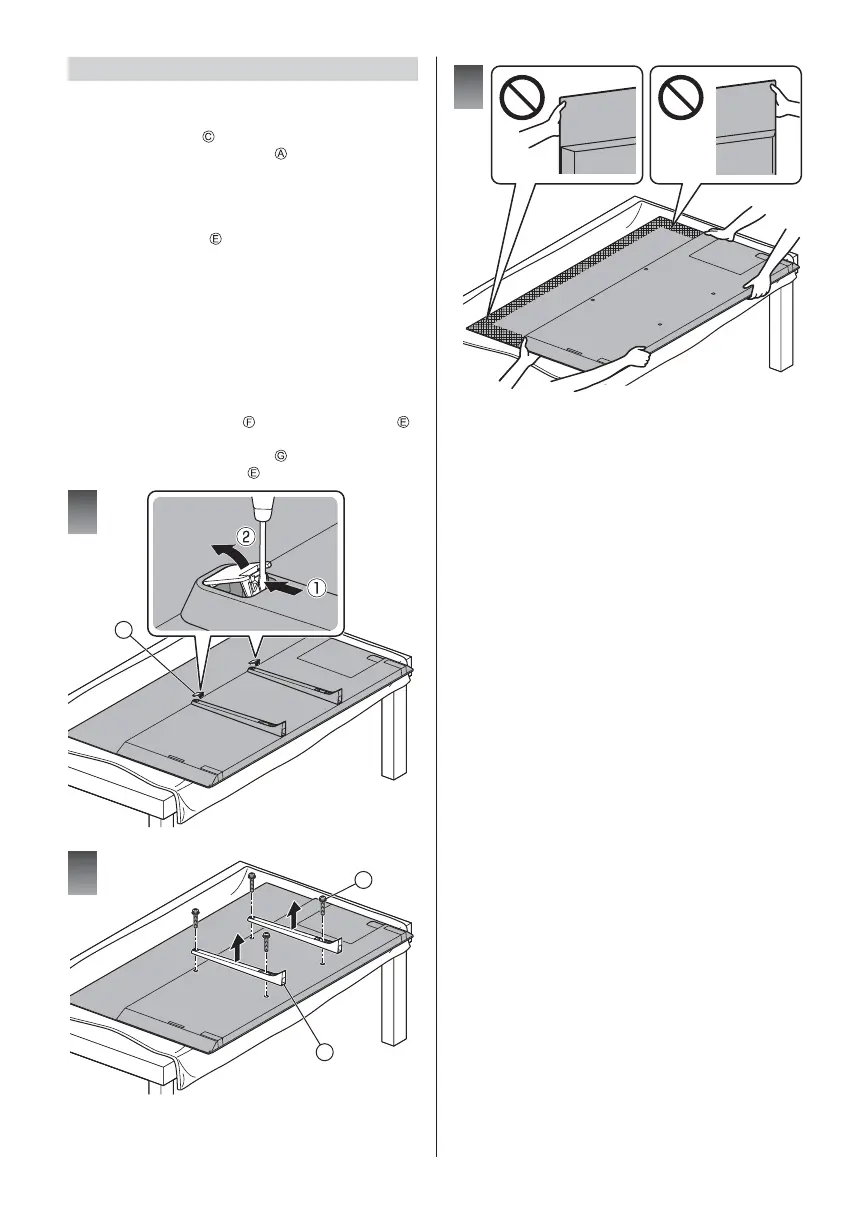
Removing the pedestal
Be sure to remove the pedestal in the following
procedures when you repack the TV.
1
Remove the cover
.
2
Remove the assembly screws
from the pedestal.
3 Lift the TV from the pedestal.
When using the wall-hanging bracket
In addition to removing the pedestal, removing the
following back bracket is needed.
When moving the TV, support the TV as shown in
step 1 (p. 8).
Preparations
Put the TV onto a work table with the screen panel down
on the clean and soft cloth (blanket, etc.)
Use a flat and firm table bigger than the TV.
Do not hold the screen panel part.
Make sure not to scratch or break the TV.
4
Remove the screw cover
from the back bracket .
(Using a flathead screwdriver, etc.)
5
Remove the assembly screws
.
6
Remove the back bracket
.
F
1
2
G
E
3



 To Next Page