English
11
Connections
External equipment and cables shown are not
supplied with this TV.
Please ensure that the unit is disconnected from the
mains socket before attaching or disconnecting any
cables.
Check the terminal type and cable plugs are correct
for connection.
Use a fully wired HDMI compliant cable.
Keep the TV away from electronic equipment (video
equipment, etc.) or equipment with an infrared sensor,
otherwise distortion of image / sound may occur or
operation of other equipment may be affected.
Please also read the manual of the equipment being
connected.
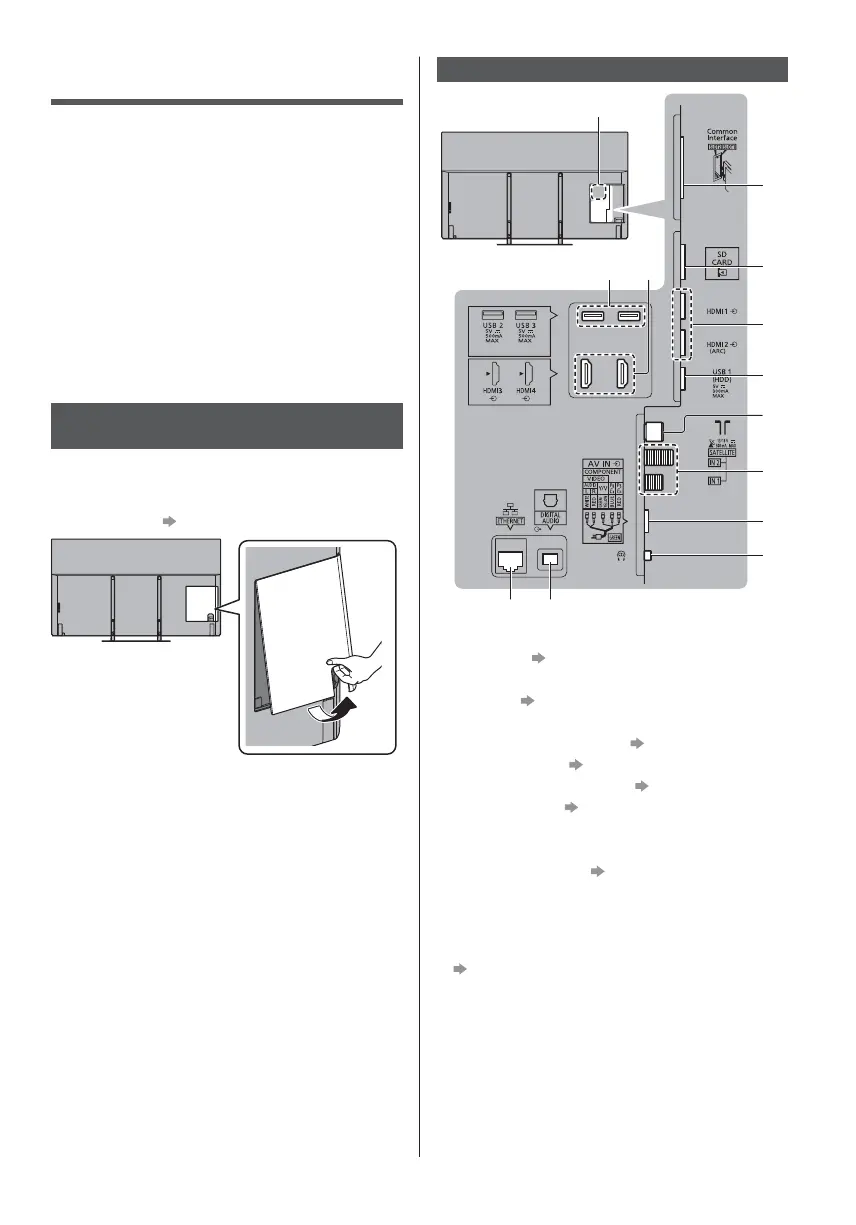
Removing the terminal cover from
the TV
Be sure to remove the terminal cover before
connecting or disconnecting cables.
When the connections are completed, attach the
terminal cover.
(p. 16)
Terminals
2
3
4
5
6
7
1
8
9
10 11
12 13
1 Model name plate
2 CI slot 1 - 2 (p. 15)
3 SD Card slot
4 HDMI1 - 2
(p. 13, 14, 15)
5
USB 1 port
6
T
errestrial / cable terminal
(p. 12)
7 Satellite terminal (p. 12)
8 AV (COMPONENT / VIDEO)
(p. 14, 15)
9 Headphone jack (p. 15)
10
USB 2 - 3 port
11
HDMI3 - 4
12
ETHERNET terminal (p. 14)
13
DIGITAL AUDIO
To connect the equipment to AV, the terminal adaptor
(supplied) is necessary.
To watch content in 4K format, use HDMI terminal.
(p. 14)



 To Next Page