English
16
Cable arrangement
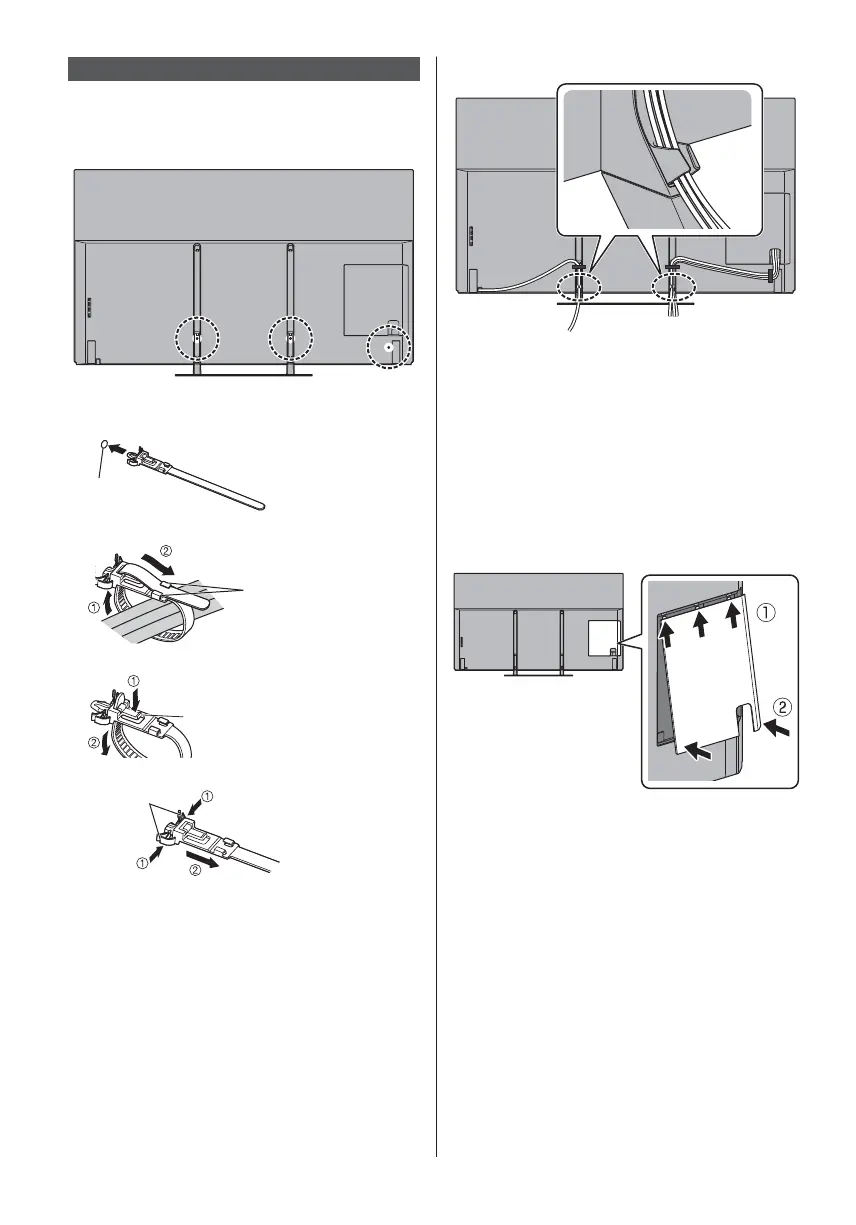
Fix the cables using the cable tie, and then attach the
terminal cover to the TV.
Fixing the cables using the cable tie
Attach the cable tie
Insert the cable tie in a hole
Hole
Bundle the cables
Hooks
Set the tip in the hooks
To loosen:
Knob
Keep pushing the knob
To remove from the TV:
Keep pushing both side snaps
Snaps
<Example>
Fix cables as necessary.
When using the optional accessory, follow the option’s
assembly manual to fix cables.
Attaching the terminal cover
Do not apply load to the terminal cover.
Be careful not to nip the cables between the TV and
the terminal cover.
When using USB 2 port, USB 3 port, ETHERNET
terminal, DIGITAL AUDIO, HDMI3 terminal or HDMI4
terminal, you cannot attach the terminal cover. Keep
the removed cover for future use.



 To Next Page