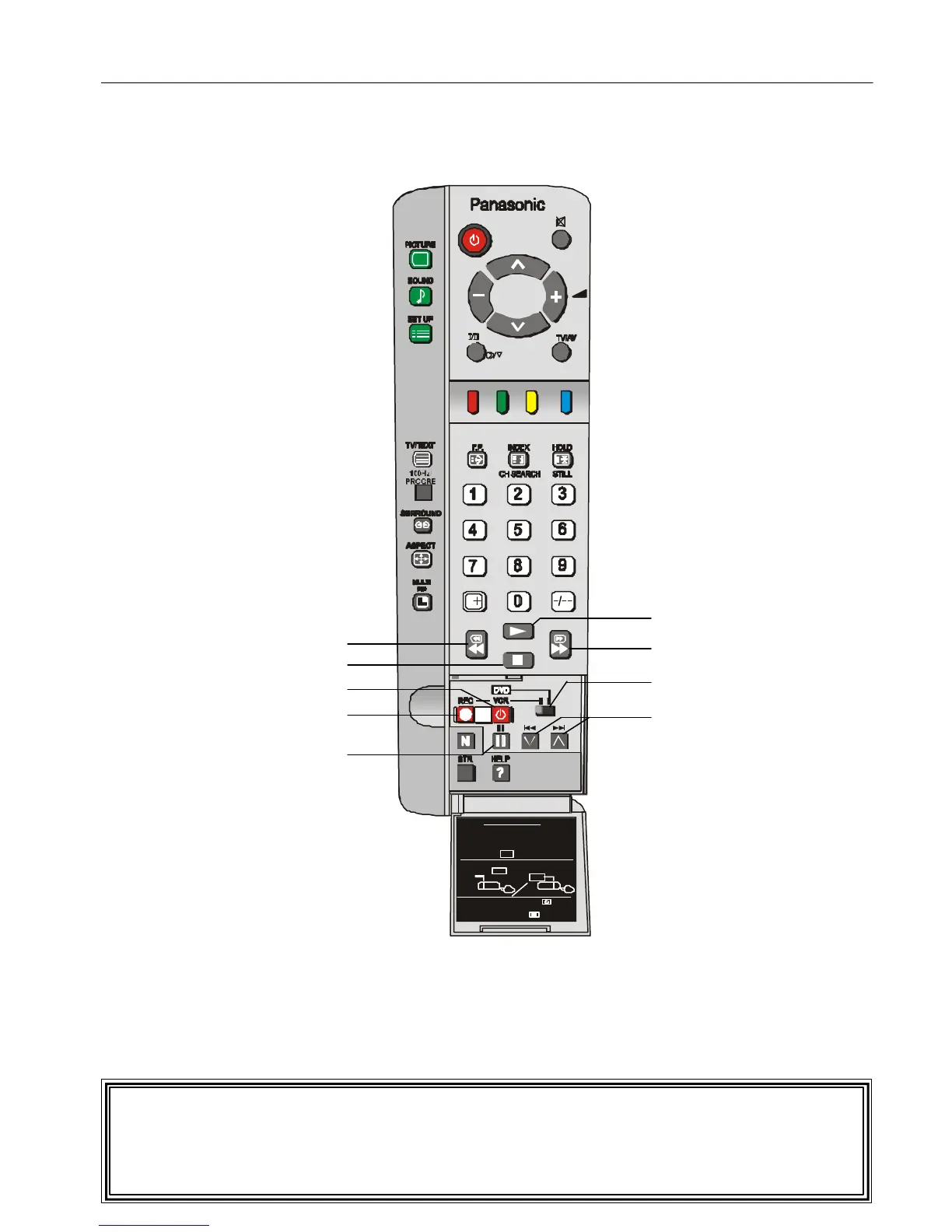
Remote Control Operation is possible for
the VCR’s and DVD’s of the various
manufacturers. After completion of setting,
execute the various operations by selecting
the VCR or the DVD switch.
1 Select the switch of the unit to be set
(VCR or DVD )
2 While pressing the VCR/DVD button,
key in the manufacturer code setting.
Then press the VCR/DVD button.
Remote Control VCR/DVD Operation
This remote control has been designed to work with a variety of VCRs and DVD players.
Please refer to page 35 for details of manufacturers’ codes.
* WARNING:
Unauthorised recording of material from Television Broadcasts or from other video
and/or audio sources may contravene copyright laws.
PAUSE
RECORD
POWER
STOP
REWIND / REVIEW
PLAY
FAST FORWARD / CUE
PROGRAMME NUMBER
DOWN & UP
VCR - DVD SWITCH






 To Next Page