22
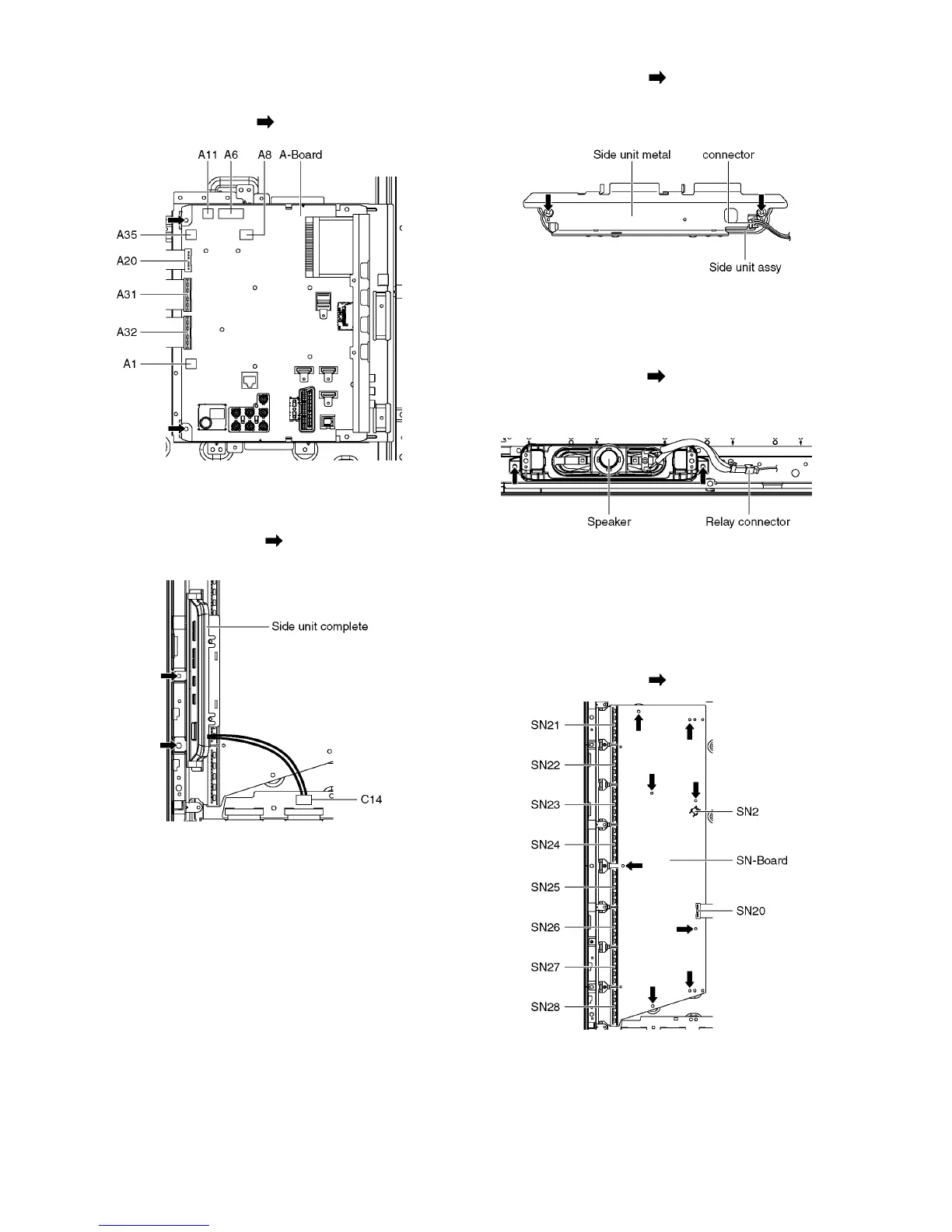
8.6. Remove the A-Board
1. Remove the Tuner unit. (See section 8.5.)
2. Remove the screws (×2 ) and remove the A-Board.
8.7. Remove the Side unit assy
1. Disconnect the connector (C14).
2. Remove the screws (×2 ) and remove the Side unit
complete.
3. Remove the screws (×2 ).
4. Disconnect the connector.
5. Remove the Side unit assy from the Side unit metal.
8.8. Remove the Speakers
1. Unlock the cable clampers to free the cable.
2. Disconnect the Relay connector.
3. Remove the screws (×2 each) and remove the Speak-
ers (L, R).
8.9. Remove the SN-Board
1. Disconnect the flexible cables (SN21, SN22, SN23,
SN24, SN25, SN26, SN27 and SN28) connected to the
SN-Board.
2. Disconnect the connector (SN2).
3. Disconnect the flexible cable (SN20).
4. Remove the screws (×8 ) and remove the SN-Board.











 To Next Page