24
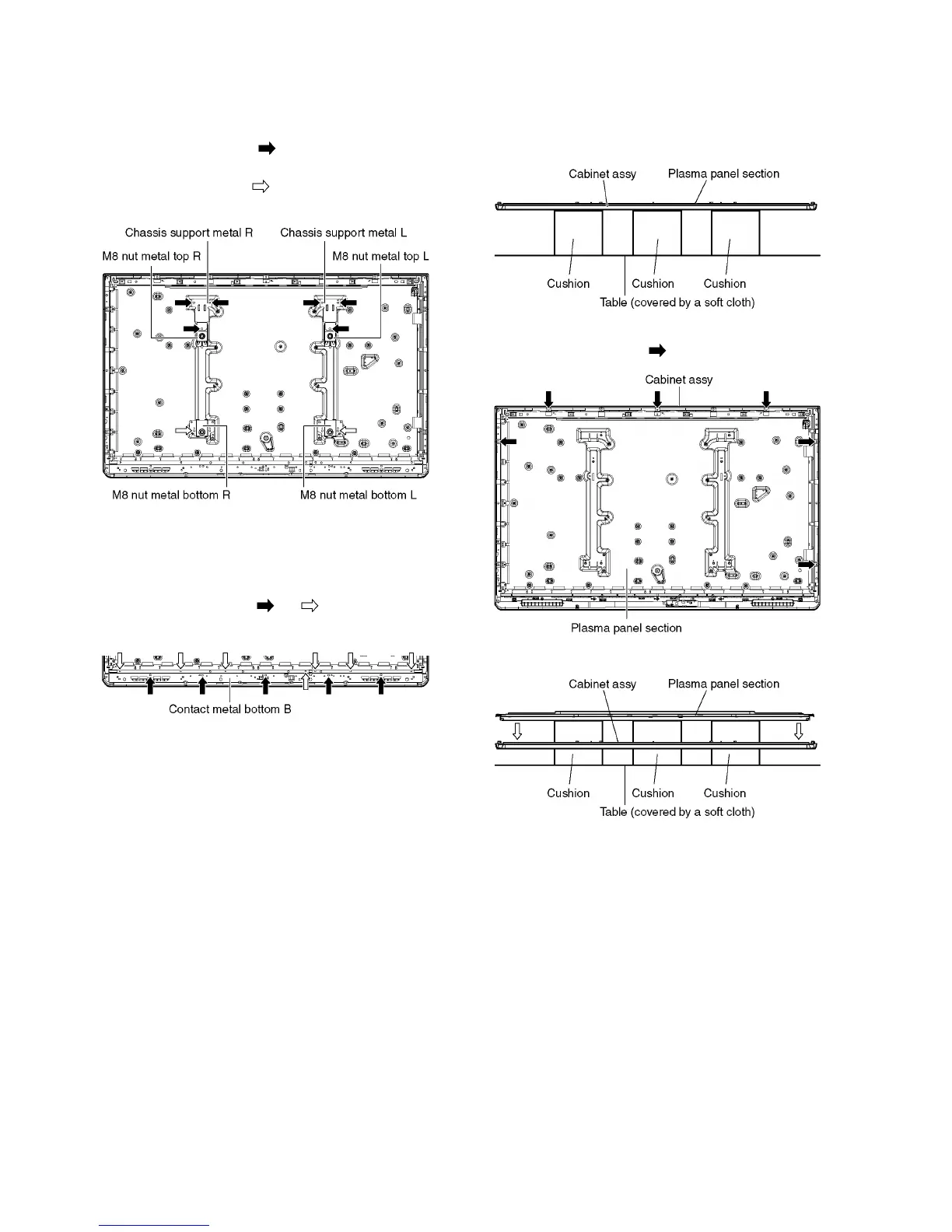
8.15. Remove the Chassis support
metals and the M8 nut metals
1. Remove the Stand bracket. (See section 8.12.)
2. Remove the screws (×3 each) and remove the Chas-
sis support metal (L, R) and the M8 nut metal top (L, R).
3. Remove the screw (×1 each) and remove the M8 nut
metal bottom (L, R).
8.16. Remove the Contact metal bot-
tom B
1. Remove the Stand bracket. (See section 8.12.)
2. Remove the screws (×5 , ×7 ).
3. Remove the Contact metal bottom B.
8.17. Remove the Plasma panel sec-
tion from the Cabinet assy
1. Place the Cabinet assy on a flat surface of a table (cov-
ered by a soft cloth) and a cushion.
2. Remove the Contact metal bottom B. (See section 8.16.)
3. Remove the screws (×6 ).
4. Remove the Plasma panel section from the Cabinet assy.











 To Next Page