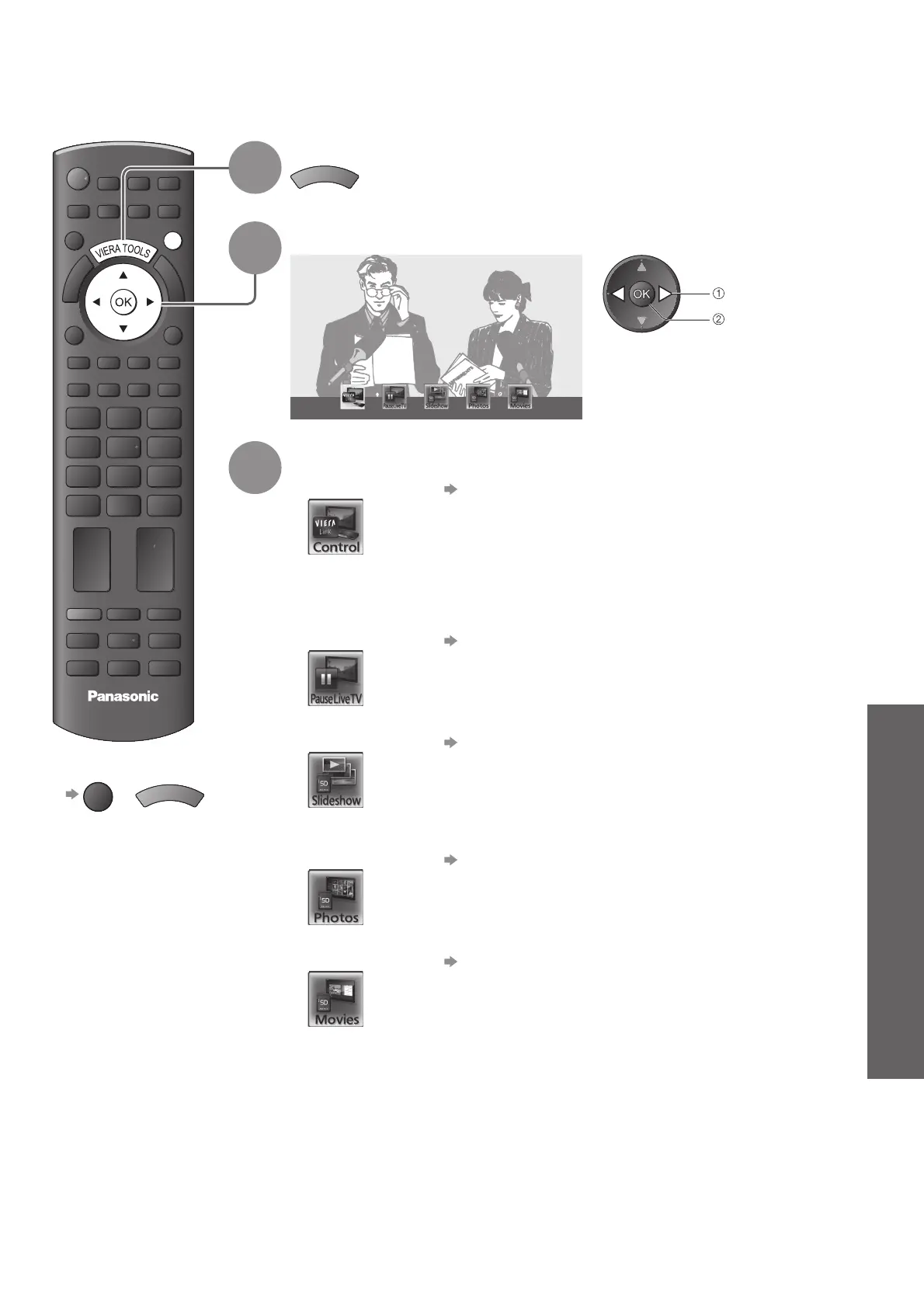
How to Use VIERA TOOLS ●
Input Labels ●
Advanced
DIRECT TV REC
ASPECT
OPTION
RETURN
TEXT
PROGRAMME
STTL
INDEX HOLD
N
INPUT
TV AV
MENU
TV
EXIT
41
How to Use VIERA TOOLS
You can access some special features easily by using the VIERA TOOLS function.
1
Display icons of the feature
V
I
E
R
A
T
O
O
L
S
2
Select a feature
VIERA Link Control
access
select
3
Follow the operations of each feature
VIERA Link Control● “VIERA Link Control” (p. 52)
When more than two pieces of compatible equipment are connected a
selection screen will be displayed.
Please select the correct description and access.
Pause Live TV
● “Pause Live TV” (p. 51)
Slideshow● “Slideshow” (p. 43)
Slideshow will use all of the photos on the SD Card.
Photos
● “Photo View” (p. 42)
Movies● “Movie View” (p. 44)
To return to TV■
EXIT
or
V
I
E
R
A
T
O
O
L
S











 To Next Page