English
5
During set-up, make sure that all screws are securely tightened.
●
If insufficient care is taken to ensure screws are properly tightened during assembly, the pedestal will not be strong
enough to support the TV, and it might fall over and become damaged, and personal injury may result.
Ensure that the TV does not fall over.
●
If the TV is knocked or children climb onto the pedestal with the TV installed, the TV may fall over and personal injury
may result.
Two or more people are required to install and remove the TV.
●
If two or more people are not present, the TV may be dropped, and personal injury may result.
When removing the pedestal from the TV, do not remove the pedestal by the methods other than the specified
procedure. (p. 6)
●
Otherwise the TV and / or pedestal may fall over and become damaged, and personal injury may result.
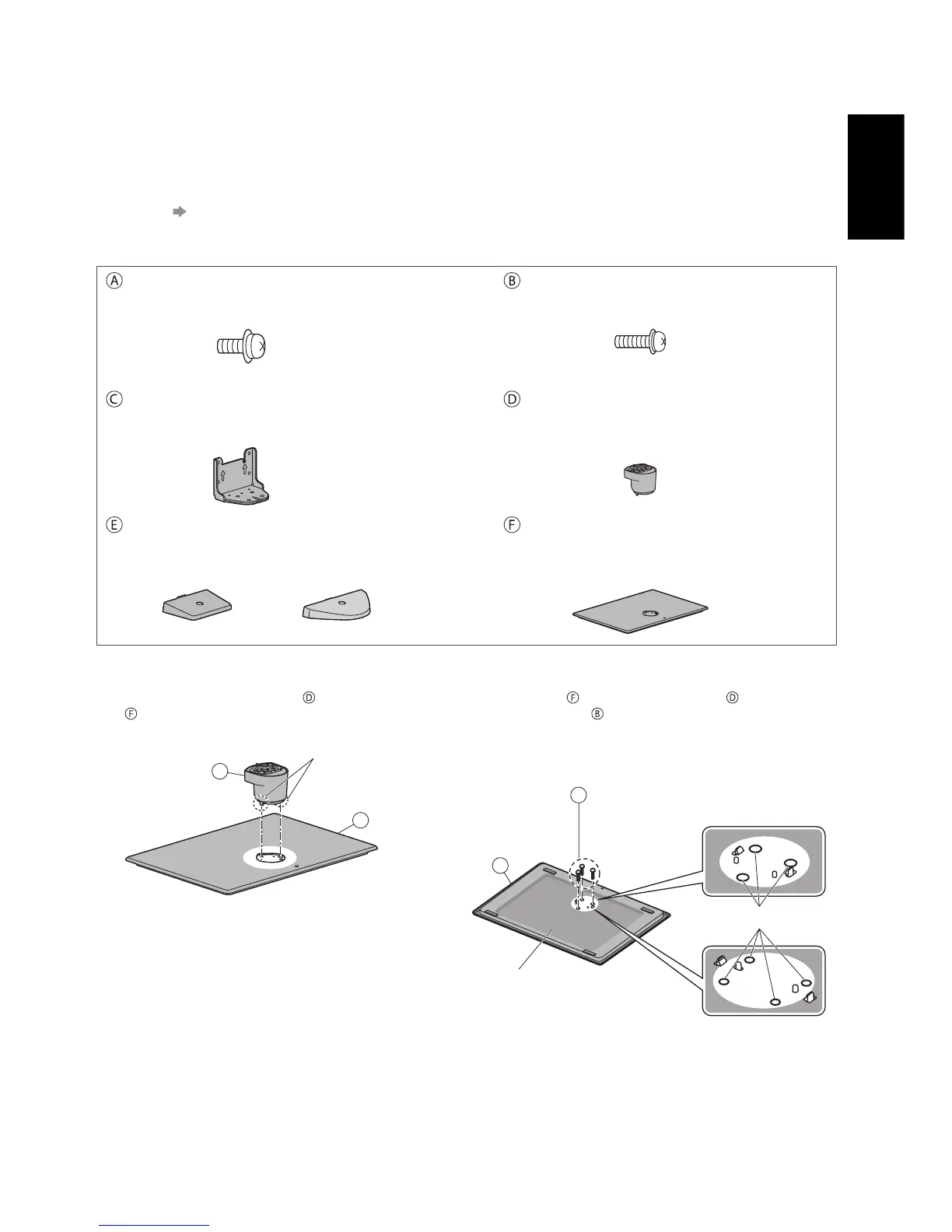
Assembly screw (black)
(5) (TX-P42ST50E, TX-P50ST50E)
(1) (TX-P55ST50E)
M4 × 10
Assembly screw (silver)
(7) (TX-P42ST50E, TX-P50ST50E)
(12) (TX-P55ST50E)
M5 × 16
Bracket
●
TBL5ZA3157 (TX-P42ST50E, TX-P50ST50E)
●
TBL5ZA3200 (TX-P55ST50E)
Neck
●
TXFBL5Z0095 (TX-P42ST50E)
●
TXFBL5Z0066 (TX-P50ST50E)
●
TXFBL5Z0067 (TX-P55ST50E)
Cover
●
TXFBL5Z0050
(TX-P42ST50E,
TX-P50ST50E)
●
TXFBL5Z0057
(TX-P55ST50E)
Base
●
TBL5ZX0306 (TX-P42ST50E)
●
TBL5ZX0242 (TX-P50ST50E)
●
TBL5ZX0345 (TX-P55ST50E)
■ Assembling the pedestal
1
Insert the tabs of the neck into the base
firmly
2
Turn the base over and fix the neck securely with
assembly screws
●
Do not hold the neck when turning over the base.
F
B
Back of the base
Screw hole
TX-P42ST50E,
TX-P50ST50E
TX-P55ST50E
(3) (TX-P42ST50E, TX-P50ST50E)
(4) (TX-P55ST50E)
F
D
Tabs (bottom)









 To Next Page