EasyManua.ls Logo

Panasonic TX32LX80 - Control with VIERA Link

Panasonic TX32LX80
32 pages
Print Icon
To Next Page IconTo Next Page
To Previous Page IconTo Previous Page
Loading...
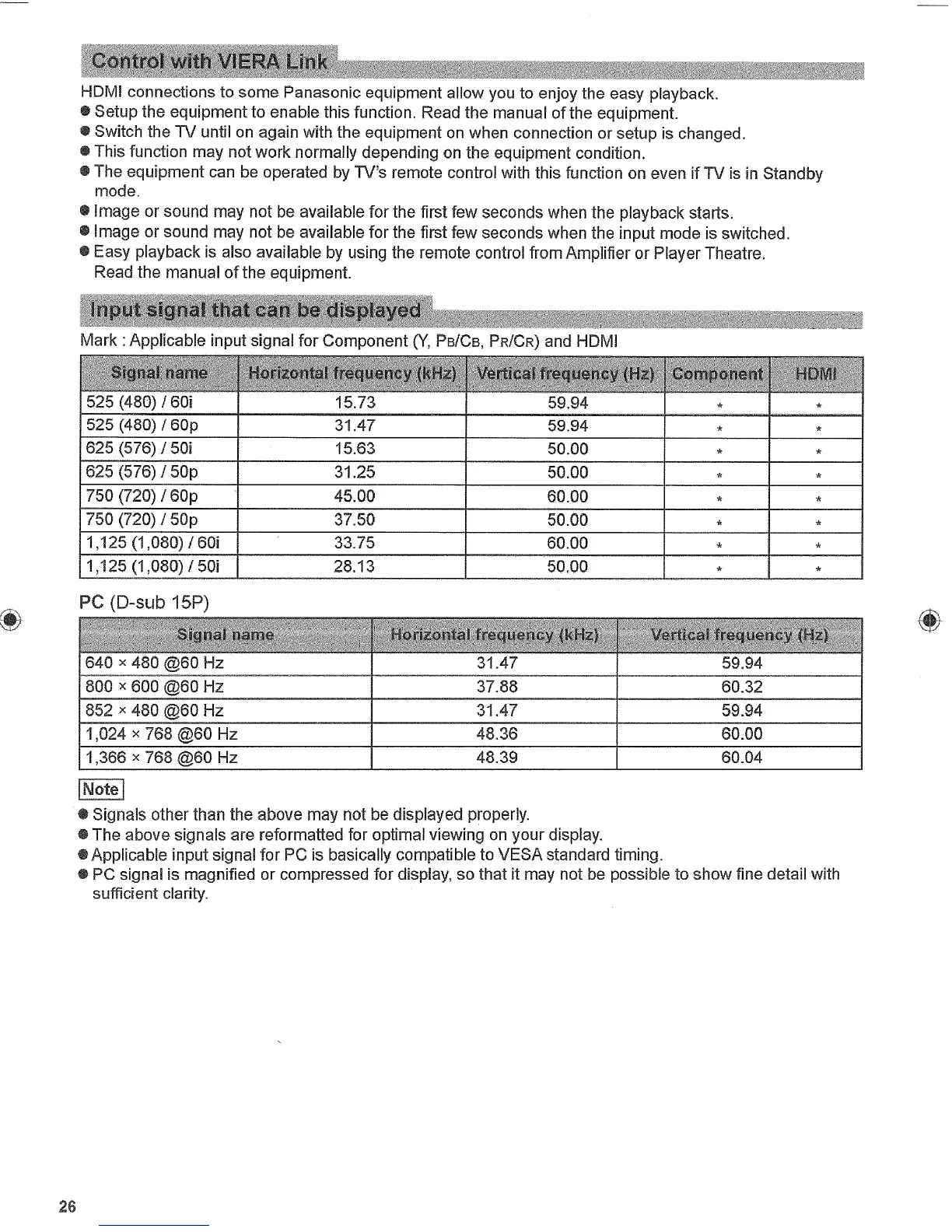
HDMI
connections
to
some
Panasonic equipment
allow
you
t
o e
njoy the
easy
playback.
"
Setup
the
equipment
to
enable
this
function.
Read
the
manual
of
the
equipment.
"
Switch
the
TV
until
on
again with the
equipment on
when
connection
or
setup
is
changed.
"
This function
may
not
work
normally
depending on
the
equipment
condition.
" The
equipment
can be operated by
TVs
remote
control with
this
function
on
even
if
TV
is in
Standby
mode.
" Image
or
sound
may
not
be
available
for
the
first
few seconds
when
the
playback
starts.
"
Image
or
sound
may
not
be
available
for
the
first
few seconds
when
the input
mode
is
switched.
"
Easy playback
is
also available
by
using the
remote
control
from
Amplifier
or
Player Theatre.
Read
the
manual
of the
equipment.
Mark:
Applicable input signal
for
Component
(Y,
P
SICB,
PR/CR)
a nd
HDMI
525
(480) /601
1
15.73
1
59.94
526(480)/60p
625
(576) /501
1525
(576)
/
50p
750
(720)
/
60p
750
(720)
1
50p
1,125
(1,080)
1
60i
31.47
15.63
31.25
45.00
37.50
33.75
1,125
(1,080)
/
501
1
28.13
P
C
(D-sub 15P)
5
9.94
5
0.00
50.00
60.00
50.00
1
6 0.00
1
5
0.00
640
x
480
@60
Hz
800
x
600 @100
Hz
852
x
480
@60
Hz
1,024
x
768
@60
Hz
1,366
x
768
@60
Hz
N
iEl
"
S
ignals other
than
the
above
may
not
be
displayed
properly.
" The
above
signals are refbrmatted
for
optimal
viewing on your
display.
OApplicable
input signal
for
PC
is
basically
compatible
to
VESA
standard timing.
0
PC
signal
is
magnified
or
compressed
for
display,
so
that
it
may
not
be
possible
to
show
fine detail
with
sufficient clarity.
26
I
T
X-37LX80A 0022-EN.Indd
26
+
317=
824;13
AM
I

Related product manuals