3 - 5
3
Mini VRF SYSTEM
Outdoor Unit Maintenance Remote Controller
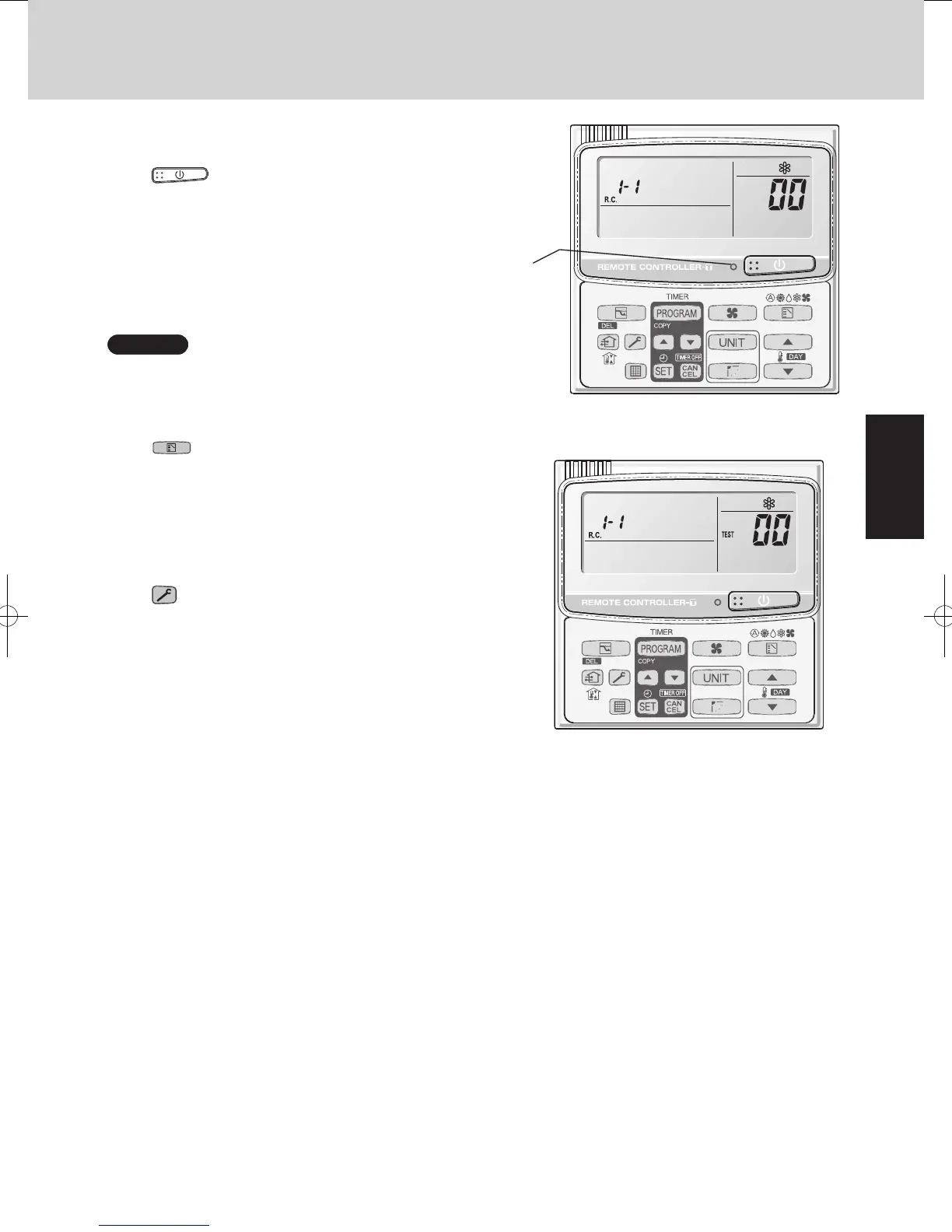
Fig. 3-1
l
All units start/stop (Fig. 3-1)
<Operation>
The
(ON/OFF operation) button can be used to
start and stop all the indoor units.
• The LED illuminates if any indoor units is operating.
• The LED blinks if an alarm at any of the operating indoor
units occurs.
l
Cooling/heating change (Fig. 3-1)
NOTE
Cooling and heating mode changes are only available when
all indoor units are stopped.
<Operation>
The (MODE) button can be used to change
between heating and cooling operation.
• The display indicates the operating mode of the indoor
unit with the lowest unit No.
l
All units test run (Fig. 3-2)
<Operation>
The (CHECK) button can be used to start and stop a
test run for all indoor units.
• Press and hold for 4 seconds to turn ON.
During the test run “TEST” is displayed.
• The status of test runs performed from the indoor unit
remote controller is not displayed on the outdoor unit
maintenance remote controller.
Fig. 3-2
LED
3.
Ordinary Display Controls and Functions
SM830195-04_Mini VRF SYS.indb 5 15/02/16 17:56:52



 To Next Page