33
SET UP for MULTI DISPLAY
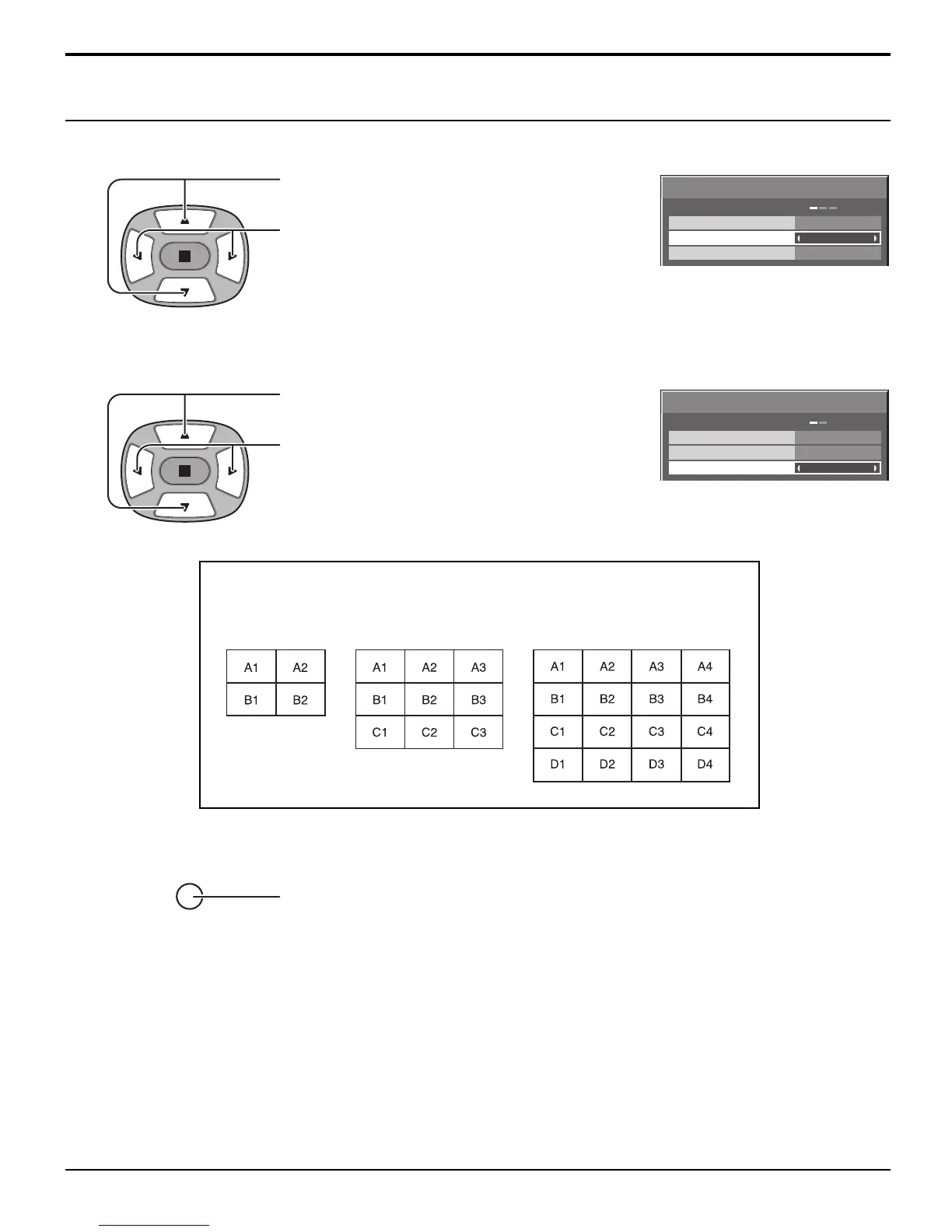
Press to select ARRANGEMENT (2nd step).
Press to select “2 × 2”, “3 × 3”, “4 × 4”.
How to set the Display location number for each Plasma Display
Press to select LOCATION.
Press to select the required arrangement
number. (A1-D4 : Refer to the following)
Display Number locations for each arrangement.
Press twice to exit from SET UP.
Notes:
• The multi-display capability is functional for the following component signals:
525 (480) / 60i · 60p, 625 (575) / 50i · 50p, 1125 (1080) / 60i · 50i · 24p · 25p · 30p · 24sF, 750 (720) / 60p · 50p, 1250
(1080) / 50i
• The multi-display capability is functional for the following composite signals:
NTSC, PAL, SECAM
• The MultiDisplay function does not display certain input signals from the terminals of the installed option boards listed
below:
Digital RGB input signals from the DVI terminal of RGB (Digital) Terminal Board (TY-42TM6D)
4
5
LOCATION
MULTI DISPLAY SETUP
ARRANGEMENT
OFF
2 × 2
A1
MULTI DISPLAY SETUP
2 × 2
A1
LOCATION
MULTI DISPLAY SETUP
ARRANGEMENT
OFF
MULTI DISPLAY SETUP
( 2 × 2 ) ( 3 × 3 ) ( 4 × 4 )
6
R







 To Next Page