EasyManua.ls Logo

Panasonic WJ-AVE7 - Page 6

Panasonic WJ-AVE7
36 pages
Print Icon
To Next Page IconTo Next Page
To Previous Page IconTo Previous Page
Loading...
@
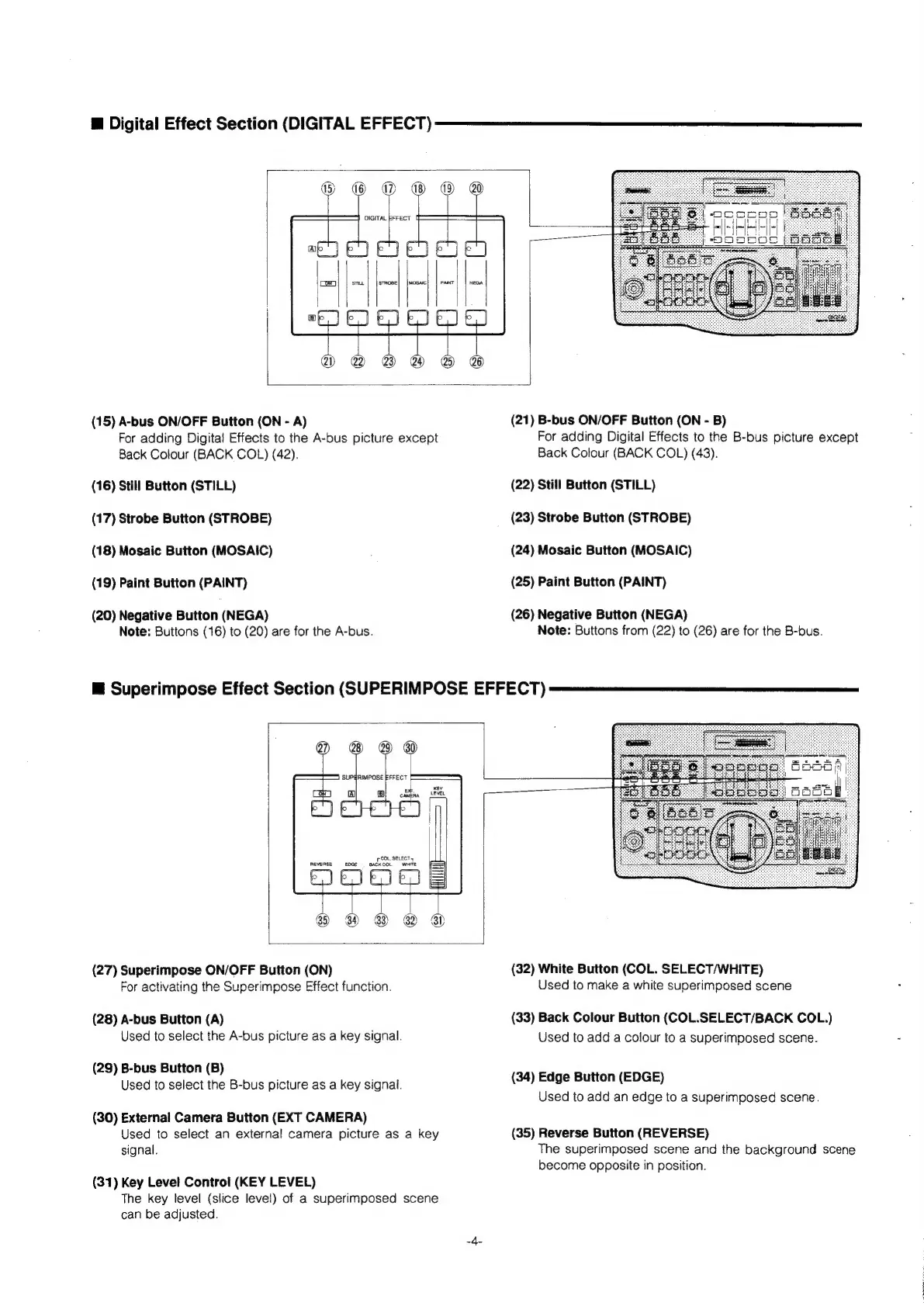
Digital
Effect
Section
(DIGITAL
EFFECT)
(15)
A-bus
ON/OFF
Button
(ON
-
A)
For
adding
Digital
Effects
to
the
A-bus
picture
except
Back
Colour
(BACK
COL)
(42).
(16)
Still
Button
(STILL)
(17)
Strobe
Button
(STROBE)
(18)
Mosaic
Button
(MOSAIC)
(19)
Paint
Button
(PAINT)
(20)
Negative
Button
(NEGA)
Note:
Buttons
(16)
to
(20)
are
for
the
A-bus.
@
Superimpose
Effect
Section
(SUPERIMPOSE
EFFECT)
(21)
B-bus
ON/OFF
Button
(ON
-
B)
For
adding
Digital
Effects
to
the
B-bus
picture
except
Back
Colour
(BACK
COL)
(43).
(22)
Still
Button
(STILL)
(23)
Strobe
Button
(STROBE)
(24)
Mosaic
Button
(MOSAIC)
(25)
Paint
Button
(PAINT)
(26)
Negative
Button
(NEGA)
Note:
Buttons
from
(22)
to
(26)
are
for
the
B-bus.
POL.
SELECT
+
REVERSE
EDGE
==
BACK
COL.
rT,
(27)
Superimpose
ON/OFF
Button
(ON)
For
activating
the
Superimpose
Effect
function.
(28)
A-bus
Button
(A)
Used
to
select
the
A-bus
picture
as
a
key
signal.
(29)
B-bus
Button
(B)
Used
to
select
the
B-bus
picture
as
a
key
signal.
(30)
External
Camera
Button
(EXT
CAMERA)
Used
to
select
an
external
camera
picture
as
a
key
signal.
(31)
Key
Level
Control
(KEY
LEVEL)
The
key
level
(slice
level)
of
a
superimposed
scene
can
be
adjusted.
(32)
White
Button
(COL.
SELECT/WHITE)
Used
to
make
a
white
superimposed
scene
(33)
Back
Colour
Button
(COL.SELECT/BACK
COL.)
Used
to
add
a
colour
to
a
superimposed
scene.
(34)
Edge
Button
(EDGE)
Used
to
add
an
edge
to
a
superimposed
scene.
(35)
Reverse
Button
(REVERSE)
The
superimposed
scene
and
the
background
scene
become
opposite
in
position.