EasyManua.ls Logo

Panasonic WJ-AVE7 - Page 8

Panasonic WJ-AVE7
36 pages
Print Icon
To Next Page IconTo Next Page
To Previous Page IconTo Previous Page
Loading...
lm
Mix
Wipe
Effect/Fade
Control
Section
(MIX
WIPE
EFFECT/FADE
CONTROL)
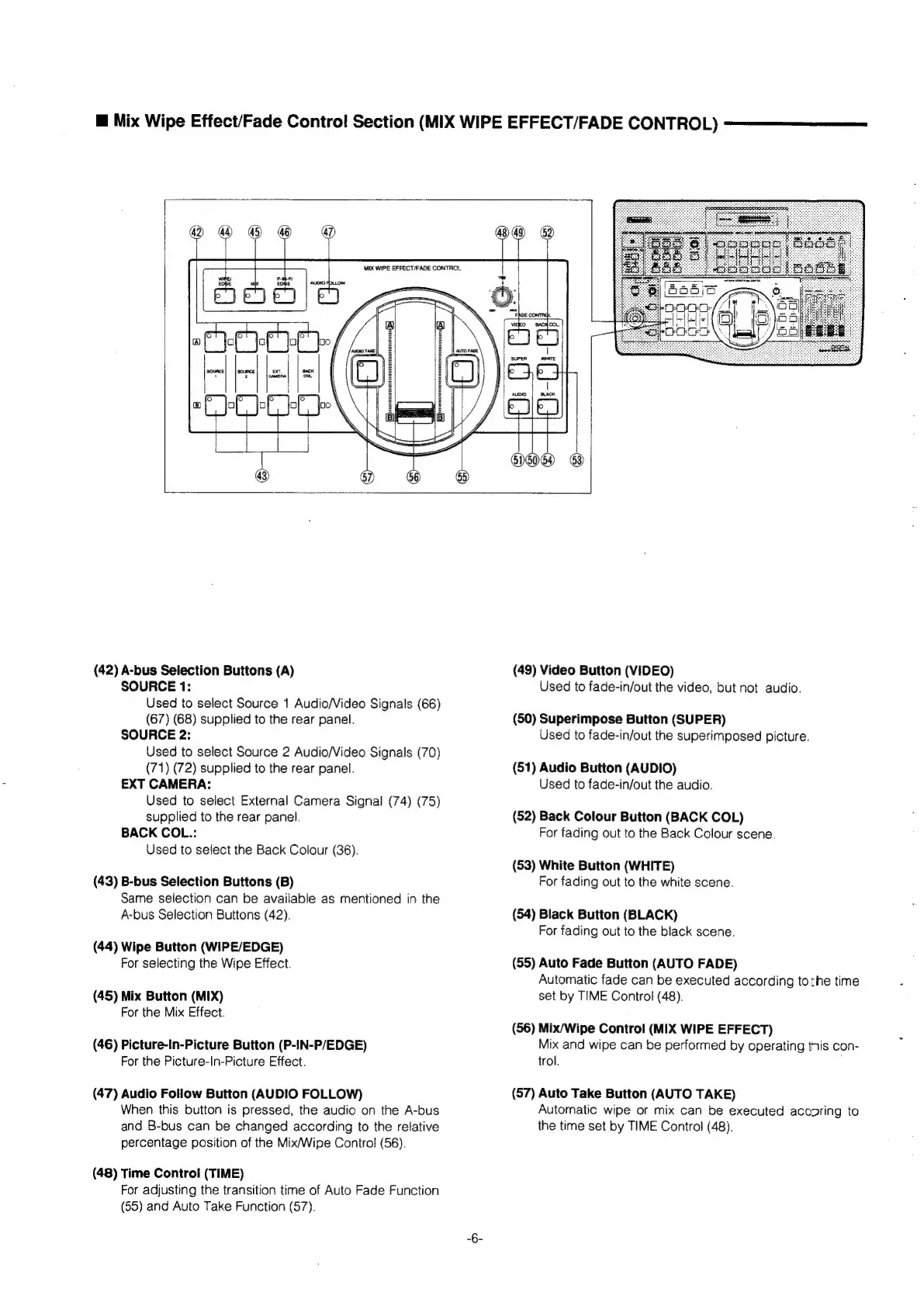
(42)
A-bus
Selection
Buttons
(A)
SOURCE
1:
Used
to
select
Source
1
Audio/Video
Signals
(66)
(67)
(68)
supplied
to
the
rear
panel.
SOURCE
2:
Used
to
select
Source
2
Audio/Video
Signals
(70)
(71)
(72)
supplied
to
the
rear
panel.
EXT
CAMERA:
Used
to
select
External
Camera
Signal
(74)
(75)
supplied
to
the
rear
panel.
BACK
COL.:
Used
to
select
the
Back
Colour
(36).
(43)
B-bus
Selection
Buttons
(B)
Same
selection
can
be
available
as
mentioned
in
the
A-bus
Selection
Buttons
(42).
(44)
Wipe
Button
(WIPE/EDGE)
For
selecting
the
Wipe
Effect.
(45)
Mix
Button
(MIX)
For
the
Mix
Effect.
(46)
Picture-In-Picture
Button
(P-IN-P/EDGE)
For
the
Picture-In-Picture
Effect.
(47)
Audio
Follow
Button
(AUDIO
FOLLOW)
When
this
button
is
pressed,
the
audio
on
the
A-bus
and
B-bus
can
be
changed
according
to
the
relative
percentage
position
of
the
Mix/Wipe
Control
(56).
(48)
Time
Control
(TIME)
For
adjusting
the
transition
time
of
Auto
Fade
Function
(55)
and
Auto
Take
Function
(57).
(49)
Video
Button
(VIDEO)
Used
to
fade-in/out
the
video,
but
not
audio.
(50)
Superimpose
Button
(SUPER)
Used
to
fade-in/out
the
superimposed
picture.
(51)
Audio
Button
(AUDIO)
Used
to
fade-in/out
the
audio.
(52)
Back
Colour
Button
(BACK
COL)
For
fading
out
to
the
Back
Colour
scene.
(53)
White
Button
(WHITE)
For
fading
out
to
the
white
scene.
(54)
Black
Button
(BLACK)
For
fading
out
to
the
black
scene.
(55)
Auto
Fade
Button
(AUTO
FADE)
Automatic
fade
can
be
executed
according
tothe
time
set
by
TIME
Control
(48).
(56)
Mix/Wipe
Control
(MIX
WIPE
EFFECT)
Mix
and
wipe
can
be
performed
by
operating
this
con-
trol.
(57)
Auto
Take
Button
(AUTO
TAKE)
Automatic
wipe
or
mix
can
be
executed
accoring
to
the
time
set
by
TIME
Control
(48).