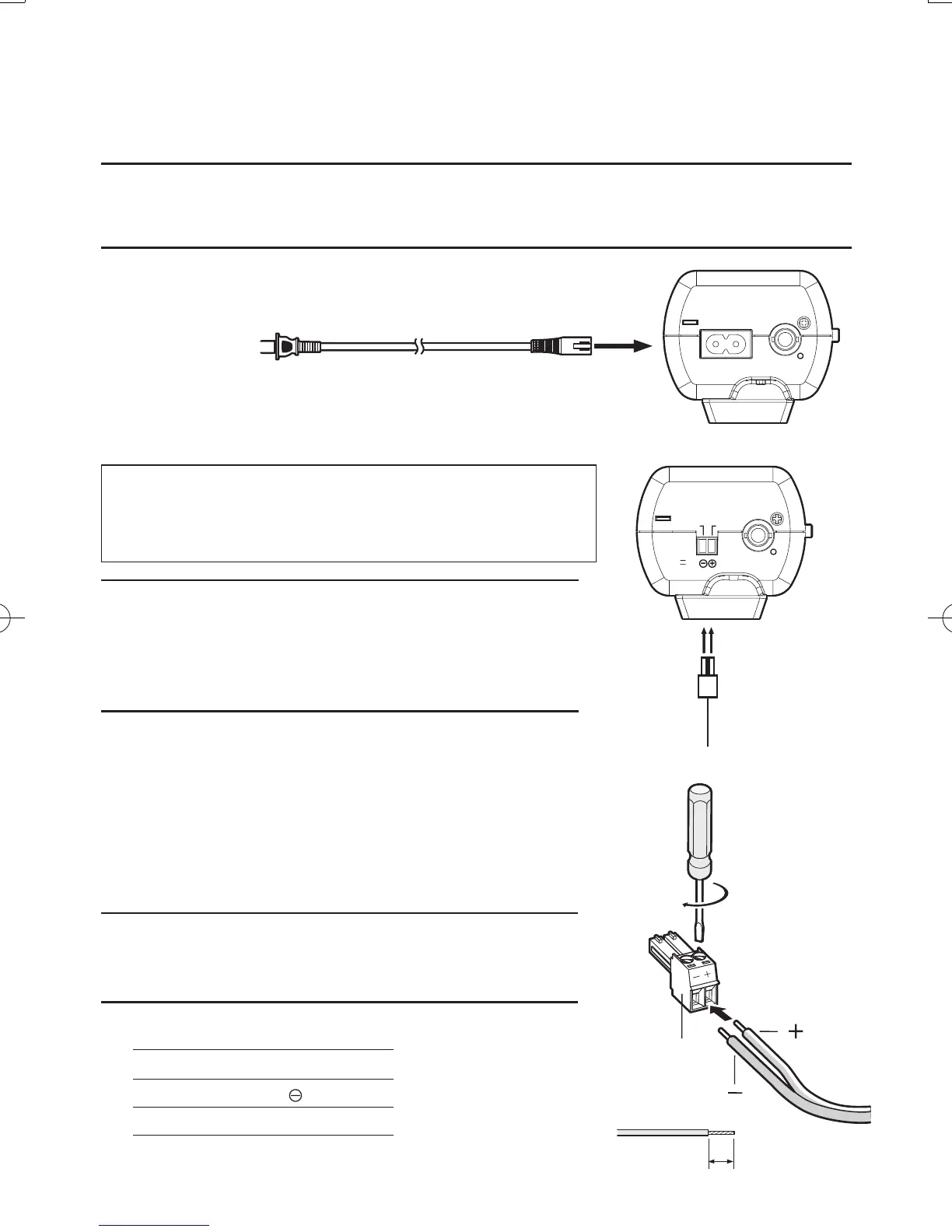
9 Turn on the power.
WV-CP300, WV-CP310
Use the power cord (accessory) to connect the power supply.
Important:
• Theincludedpowercordisthededicatedpowercordofthisproduct.Donotuseitwithother
devices.
WV-CP304, WV-CP314
Important:
• Use24VACor12VDCpowersupplythatisinsulated
from120VACpower.
• Thepowersupplyisautomaticallyswitchovereither24V
ACor12VDC.Nosettingisrequiredwiththiscamera.
Caution:
• ONLYCONNECTWV-CP304,WV-CP314TO24VAC OR
12VDCCLASS2POWERSUPPLY.
1 Loosenthescrewofthepowercordplug(accessory).
2 Connectthepowersupplyof24VACor12VDCtothe
powercordplug.
Striptheendofthewireby3mmto7mm,andtwistthe
strippedpartofthewiresufficientlytoavoidshortcircuit.
Specificationofpowercord(wire):AWG#16-#24,
Singlecore,twisted
Important:
•
Checkwhetherthecordcoreisfullyinsertedintothepower
cordplug.
< Ratings>
24 V AC 12 V DC
-
2-N
(GND)
+ 1-L ⊕





 To Next Page