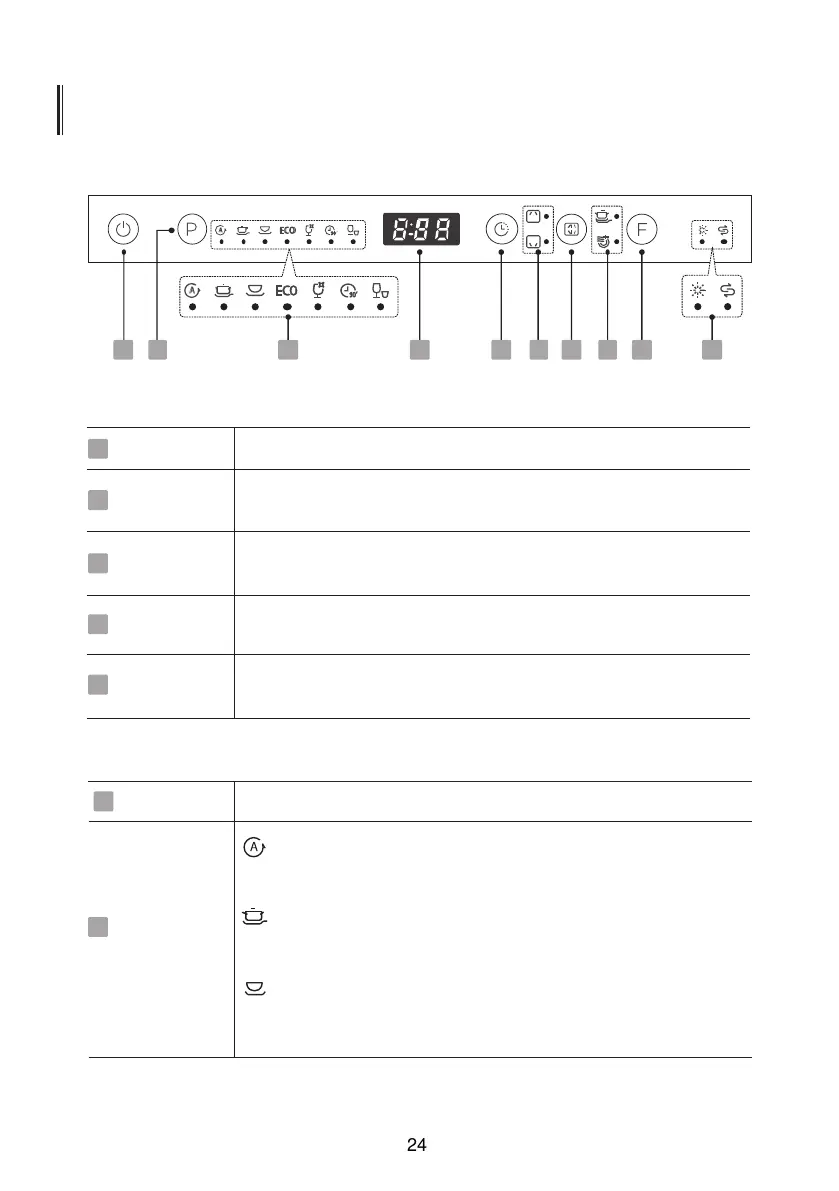
CONTROL PANEL
Operation (Button)
3 4
5
7
6
1
0
2
1
Power
Press this button to turn on the dishwasher, the screen lights up.
1
Program
Select the appropriate washing program and corresponding
indicator will be lit.
2
Function
Press the button to select a function, corresponding indicator will
be lit.
5
Alt
Press the button to select either upper basket or lower basket
loaded, and the response indicator will be lit.
4
Delay
Press the button to increase the delay start time. Delay a cycle for
up to 24 hours in one-hour increments.
3
Display
Screen
6
To show the Running time, Delay time, Error Code etc.
For l g
h
tl
y
, nor
m
a
lly or he
a
vi
l
y soiled cro
c
k
ery with or
Auto
w
it
h
o
u
t dried-on f
o
od.
Intensive
For heavily soiled items include pots and pans. With dried
on food.
Universal
For normally soiled loads, such as pots, plates, glasses
and lightly soiled pans.
Program
icon
7
8
9


 To Next Page