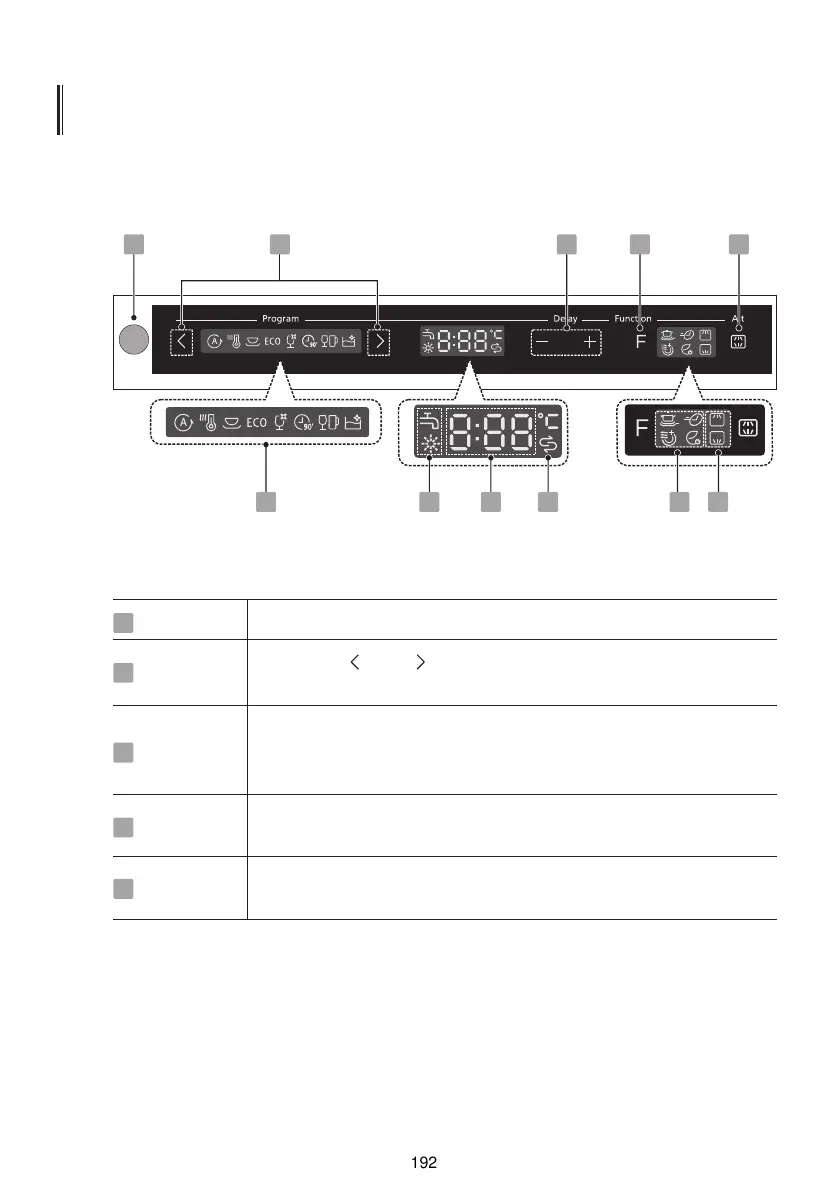
CONTROL PANEL
Operation (Button)
Power
Delay -/+
Function
Press the button to turn on your dishwasher,the screen lights up.
Press the “+”button to add the delay time or press the “-”button
to decrease the delay time, maximum 24 hours delay can be
defined.
Press the button to select a function, corresponding indicator will
be lit.
1
3
4
Alt
Press the button to select either upper basket or lower basket
loaded, and the response indicators will be lit.
5
2 31
6 87 7 9 10
4 5
Program
Press the “ ” or “ ” button to select a program, and the
corresponding indicator will be lit.
2
\
I
@
[
a
m
O
4
KTH
£
>
KD
\
L
/
\
\
/
CG
rn
nil
Wri


 To Next Page