14
02
03
04
05
06
07
08
01
15
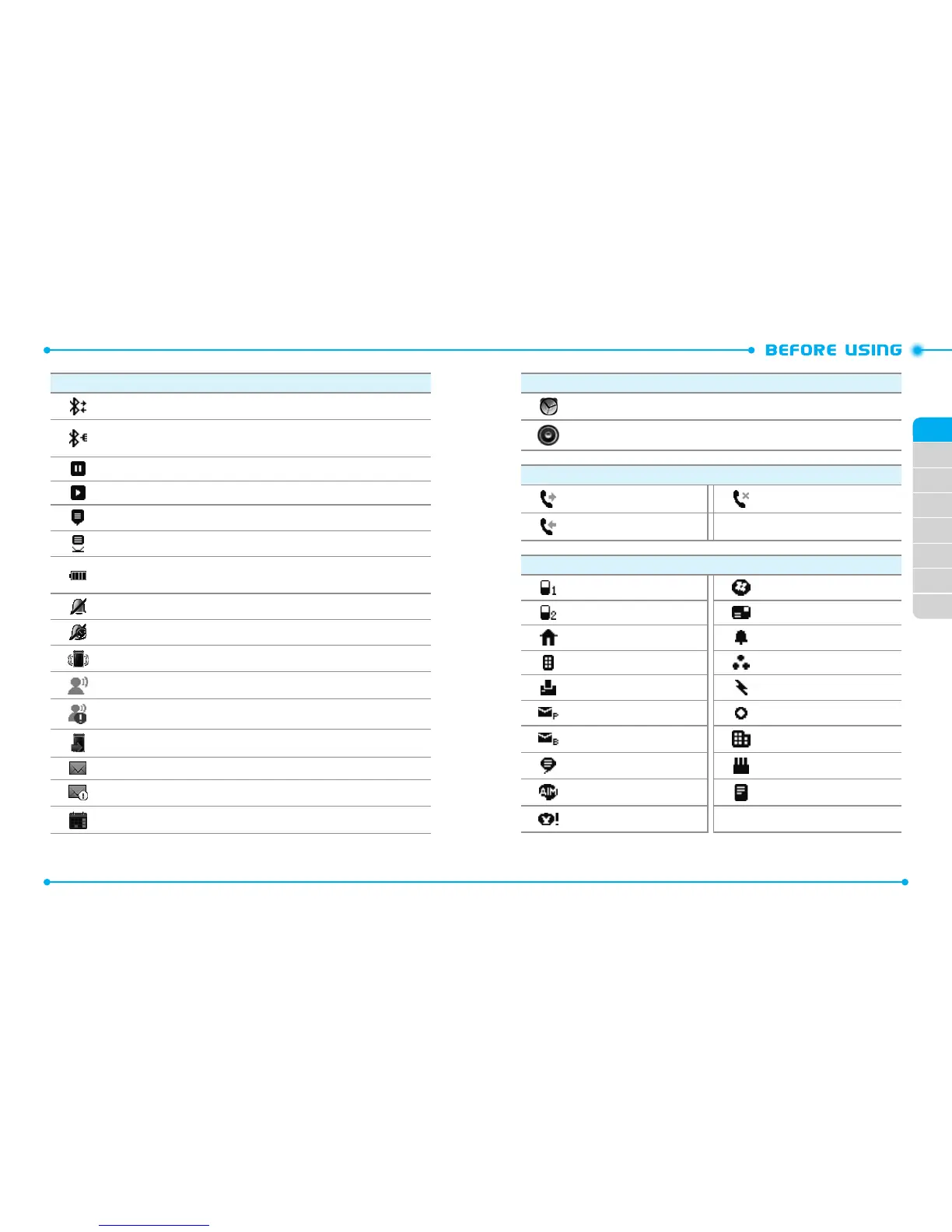
Icon Icon Descriptions
Bluetooth Active
: Indicates Bluetooth Active mode.
Bluetooth Connected
: Indicates a Bluetooth device is paired with your
phone.
Music Pause Mode
:
Indicates that music playback is paused.
Music Playing Mode
: Indicates that music is playing.
AVR Active
:
Advanced Voice Command feature is active.
AVR Listening
:
Indicates your phone recognizes your voice command.
Battery Level
:
Indicates the battery charging level - the more bars, the
stronger the power.
All Sounds O
:
Indicates phone sounds are set to o.
Alarm Only
:
Indicates the phone will alert you only with an alarm tone.
Vibrate On
:
Indicates Alert Vibrate for incoming calls is set to on.
Voicemail
:
Indicates you have a new voicemail.
Alert Voicemail
: Indicates a new voicemail.
Missed Calls
:
Indicates you have missed calls.
Message
:
Indicates you have new messages.
Alert Messages
: Indicates a new message.
Calendar Appointment
:
Indicates an alarm for your appointment is active.
Icon Icon Descriptions
Alarm On
:
Indicates an alarm is set.
Speakerphone
:
Indicates Speakerphone mode is active.
Recent Call Icons
Dialed Call Missed Call
Received Call
New Contact Icons
Mobile WL Messenger
Mobile 2 Address
Home Ringtone
Business Group
Fax Speed Dial
Personal E-mail Title
Business E-mail Company
IM Screen Name Birthday
AIM Note
Yahoo!



 To Next Page