14
15
INSTALLING UML290
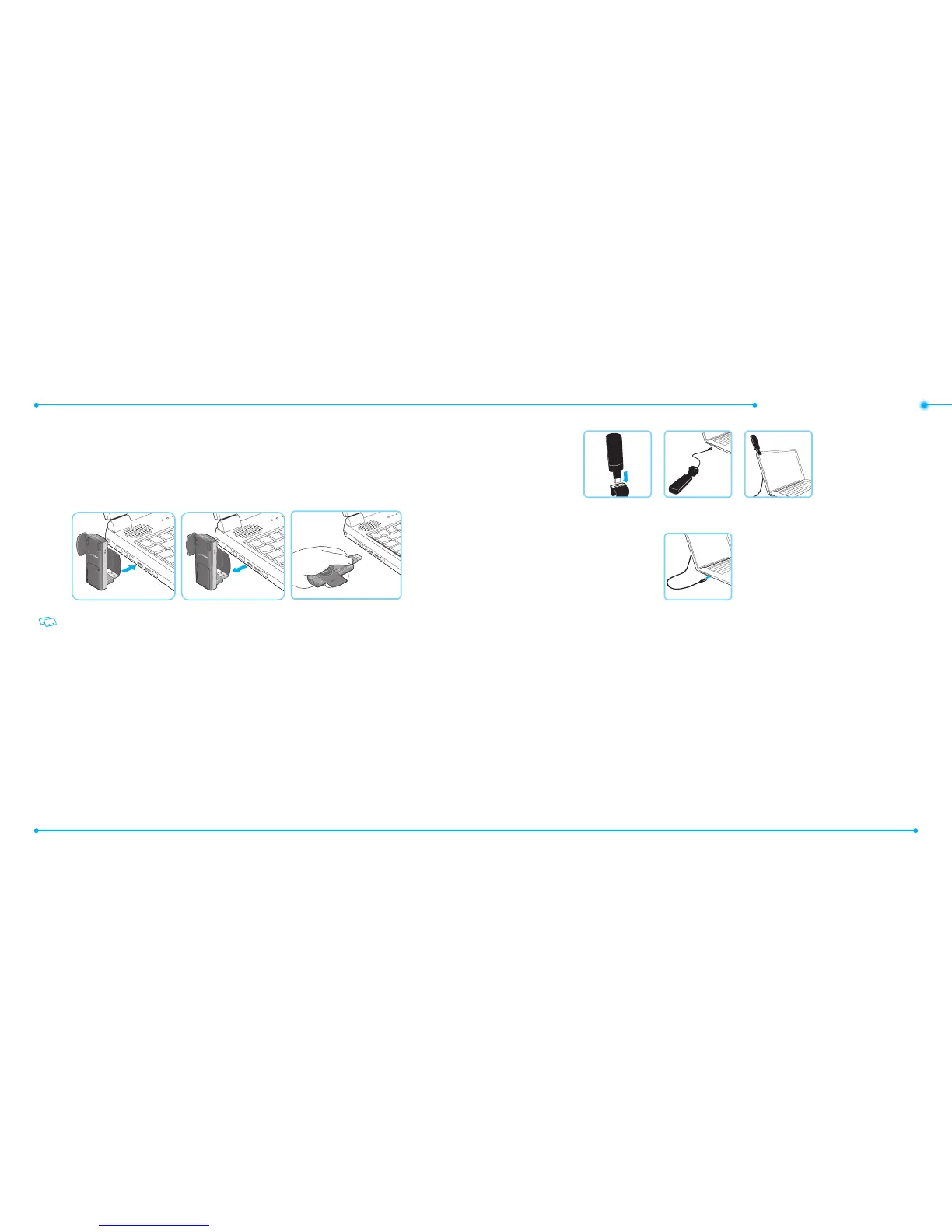
INSERTING AND REMOVING UML290
• It is normal to hear a short beep sound each time you insert or remove the UML290. It is an audible
notication that your PC recognizes the new hardware.
• After your session is over and you disconnect from the network, you’re ready to safely remove your
wireless device.
When removing the UML290, always grip the top and bottom of the modem and push/pull gently.
USB MODEM EXTENSION CABLE ACCESSORY
An extension cable is included to optimize the performance of your UML290 USB modem. This cable
increases the distance between your USB modem and computer, reducing possible interference from
your computer.
HOW TO USE THE EXTENSION CABLE:
1. Insert your USB modem into the wide end of the cable connector clip and extend the USB modem
away from your computer. (Or, you can use the built-in clip to hook the USB modem over the top of
your computer screen)
2. Plug the USB connector into the USB port on your computer.
3. Your USB modem is powered by your computer as soon as the USB cable is plugged properly into the
USB port.
4. Launch VZAccess Manager and click Connect.


 To Next Page