EasyManua.ls Logo

Pantech UML295 - User Manual

Pantech UML295
40 pages
Print Icon
To Next Page IconTo Next Page
Loading...
User Manual (Hardware)
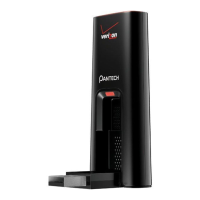
Thank you for purchasing the
Verizon Wireless 4G UML295 USB
Modem. The UML295 is a Global
Ready(TM) wireless device that
enables high-speed wireless
communication from your
computer and easily connects at
high speeds to the Internet, your
corporate Intranet, and your
email while youre away from the
office or out of the country.
The UML295 is simple to install
and use.

Other manuals for Pantech UML295

Question and Answer IconNeed help?

Do you have a question about the Pantech UML295 and is the answer not in the manual?

Summary

Before Using UML295

UML295 Product Features

Details the key attributes and technical specifications of the UML295 modem.

Getting Started

4 G SIM Card Installation

Step-by-step instructions for inserting the 4G SIM card into the modem.

4 G SIM Card Removal

Instructions on how to safely remove the 4G SIM card from the modem.

Installing UML295

Windows USB Driver Installation

Guides users on installing the necessary software drivers for Windows.

Mac USB Driver Installation

Provides instructions for installing the USB driver on Mac operating systems.

Using UML295

UML295 Connection Settings

Covers configuration options like connection type, roaming, and network settings.

Regulatory and Safety Information

General Safety Precautions

Outlines general safety measures for using the device, avoiding hazardous areas.

Appendix

Specific Absorption Rates (SAR)

Details SAR values and compliance with RF exposure standards.

RF Exposure Safety Information

Explains body-worn operation and safety for potentially explosive atmospheres.
Pantech UML295 Specifications

General IconGeneral
BrandPantech
ModelUML295
CategoryModem
LanguageEnglish

Related product manuals