Mode, Scanner, and Frequency Selection
1) Turn off Head in software
2) Click on Parts Select
3) Select proper mode of operation and scanner ranges
Head Mode: NC-AFM - ACTA tips should only be used for NC-AFM (non-contact mode)
XY Voltage Mode: High (50um x 50um) or Low (5umx5um)
Z Voltage Mode: High (12 um) or Low (1.7 um)
Z Scanner Range: Set to 1.00
Cantilever: General
4) Click OK
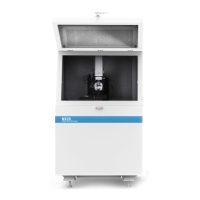
5) Turn Head back on in software, Frequency Sweep Window will open.
6) The software will automatically detect the cantilever’s resonance peak and select a driving
frequency just above that peak.
- If a very weak peak appears (peak is on the order of the noise) or if there is strong non-
ideal behavior like a double peak, replace the tip. An additional indication of a bad
cantilever is a Drive % at/near 100. This is a rare occurrence under normal operation.
7) Click OK
Bad (low amplitude, 100% drive) Good


 To Next Page