5
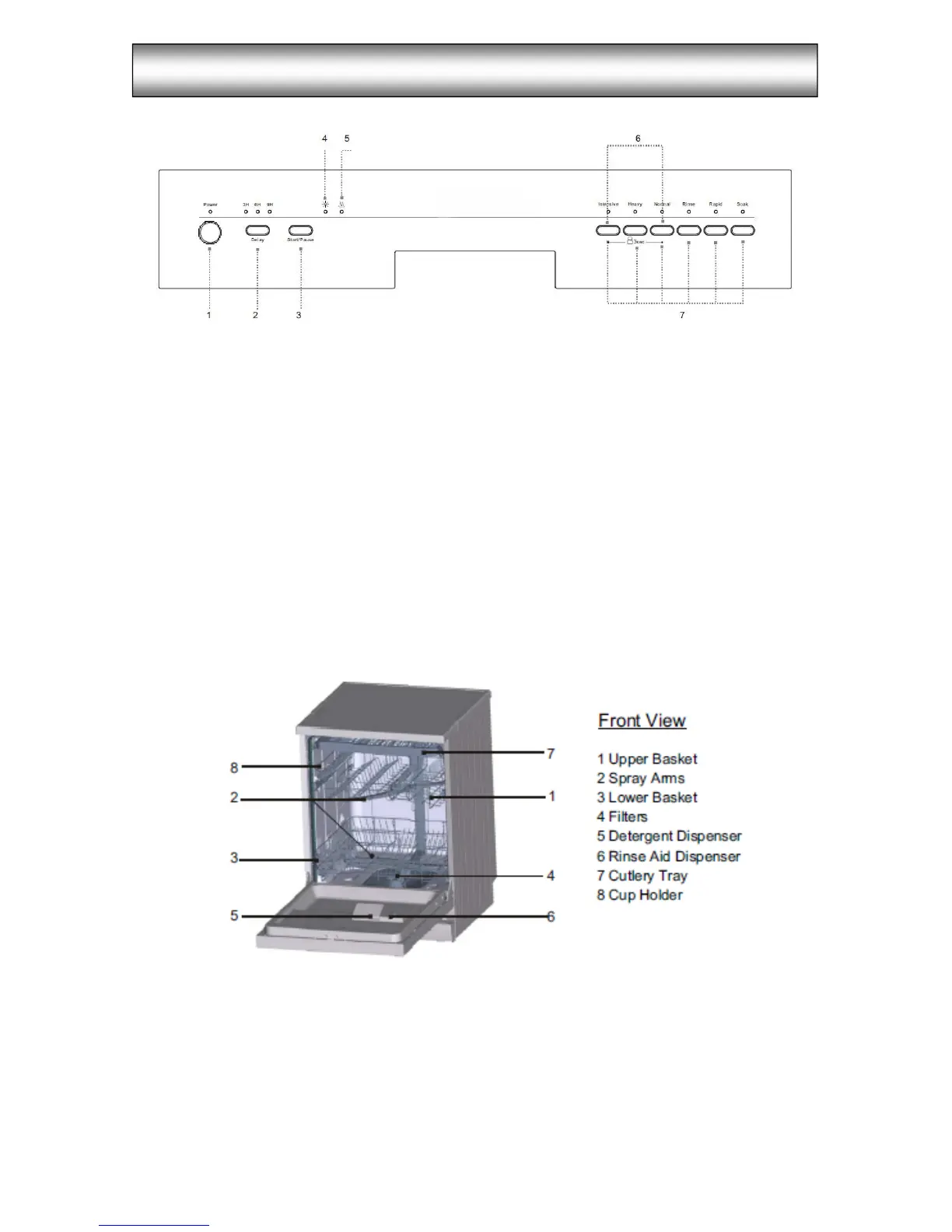
Control Panel
1. Power switch: to switch/off the power supply.
2. Delay time: pressing the delay pad once will select 3h delay time, continuous
pressing a second time will increase the delay hours to 6h and third time increase to
9h. Continuous pressing the fourth time can cancel the delay start function.
3. Start/Pause Button: press this button to start or pause the dishwasher, the light will
come on when starting.
4. Rinse Aid Indicator Light: to come on when dispenser needs to be refilled.
5. Drying light: to come on when the dishwasher is drying
6. Child lock: press and hold the Intensive & Normal button at the same time for 3
seconds, the Intensive & Normal lights will flash 6 times, and child lock will be
activated. To unlock the dishwasher controls, Press the same buttons and the child
lock will unlock.
7. Program Button: to select washing programme.
PRODUCT DESCRIPTION


 To Next Page