ENGLISH
6
CK3000 will propose that you learn the names from your phone book, you will hear: "Click Yes, and say the name displayed ".
Press the "Yes" key, and say the name that is displayed on the screen.
Example: Press the "Yes" key, then say Nicolas.
You will then hear the following message: "Click Yes and repeat Nicolas".
Press the "Yes" key and repeat the name.
IMPORTANT: If CK3000 responds by saying, "Speak louder", repeat the word after you hear the beep and articulate clearly.
You only need 2 words to make a call: " Phone " to connect and " Hang Up " to end the conversation.
To make a call using the buttons:
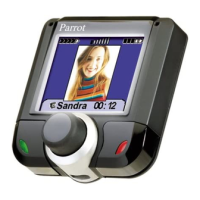
Press the green key, wait for the tone and say the name of the person you want to call.
Example : Press the green key once, [beep], Nicholas
To hang up, press the red key.
To make a call using the key words option:
the Wordspotting option must be activated (See Menu, Vocal Reco)
Say: "Telephone", wait for the beep, and pronounce the name of the person you wish to call.
Example: "Telephone, {beep}, Nicolas".
If there are several numbers stored in memory for the same name (visiting card or Vcard), the call, using voice dialling, will
be placed in the following manner:
Say: "Telephone", wait for the beep, and pronounce the name of the person you wish to call. CK3000 repeats the name, and
then emits a beep; you must then indicate the number to be dialled, "home", "work" or "cellular". You must wait for a beep
after every word.
Example: "Telephone, {beep}, Nicolas, {beep}, mobile ".
Placing a call manually :
Dial the number using the telephone keypad. The conversation automatically goes into hands-free mode.
Receiving a call:
Using the key words option : say " Phone " to pick up the call. If you do not want to accept the call, say " Hang Up ".
Using the buttons : press the green key to pick up call. If you do not want the call, press the red key.
If you are in " Automatic answer " mode, the call will come through automatically after 2 rings.
Discreet mode:
You can activate the Discreet Mode and thus transfer the call from CK3000 to your telephone. This operation is carried out
when you are on the line:
R520, T68 : press on " option key " of your phone, and until " Transfer sound " : press " Yes ". " Retrieve call in phone ?
" is displayed : press on " Yes ". The communication comes back on your mobile.
T39 : Press on until " call in progress " , and press on " Yes ". Select " Transfer sound " and press on " Yes ". " Retrieve
call in phone " is diplayed : press on " Yes ". The communication comes back on your mobile.
With DBA-10 : press until "extras", and press on " Yes ", and until "accessories", and press on " Yes ". Select DBA-10,
and " Transfer sound " : press " Yes ". " Retrieve call phone " is displayed : press on " Yes ". The communication comes back
on your mobile.
If you want to re-establish the connection, press and hold the green key.
CALLING
ERICSSON


 To Next Page
 Loading...