1
2
3
Specification
Item SP-1060 IoT Ready SP-1060 IoT Advanced
CPU Intel
®
Core™ i
3
-
6100
TE
Intel
®
Celeron® G
3900
TE
Intel
®
Core™ i
7
-
6700
TE
Intel
®
Core™ i
5
-
6500
TE
Chipset SKL H
110
SKL Q
170
LCD / Touch
1
.
15
Active TFT color LCD, resolution
1024
x
768
, LED backlight
2
. Touch Panel (PCT)
Memory DDR
4
SODIMM (
2133
MHz),
2
x Memory, support up to
32
GB,
Standard Spec:
4
GB,
8
GB,
16
GB
Ethernet IEEE
802
.
3
10
/
100
/
1000
Gigabit Ethernet x
2
Storage
2
.
5
type SATA Storage x
2
, default
500
G HDD x
1
External I/O
Interface
2
* Serial ports, RS
232
(DB
9
), RI/
5
V/
12
V selection by BIOS (COM
1
, COM
2
)
2
* Serial ports, RS
232
(RJ
45
), RI/
5
V/
12
V selection by JP (COM
3
, COM
4
)
1
* DB-
15
VGA port
1
* RJ
11
port supports
2
cash drawer with
24
V /
12
V by jumper setting
1
* DC+
12
V out
4
* USB
3
.
0
1
* DC +
12
V input power-jack
1
* Audio (Line-out)
1
* HDMI port
2
* USB
2
.
0
Type-A (Either
2
* USB
2
.
0
or
1
* Parallel port)
1
* Parallel Port (Optional, Either
2
* USB
2
.
0
or
1
* Parallel port)
1
* Powered USB
12
V &
24
V (Optional)
RAID Function NO RAID
0
/
1
Optional
2
nd
Displays
Customer display module (
2
x
20
VFD) /
7
LCD Monitor /
11
.
6
LCD Monitor /
15
LCD
Monitor
Optional Peripheral MSR, IC Card, Fingerprint, RFID, i-Button, KB-
32
programmable key board
Expansion Slot
1
* Mini-PCIe slot
Display Support Dual Independent Displays Triple Independent Displays
Intel AMT Not support Support
OS Window
7
, POS Ready
7
, Window
8
.
1
, Windows
8
.
1
Industry Pro Retail , Windows
10
, Linux
(Ubuntu)
Certification CE, FCC, VCCI, BSMI, CB
Adapter AC-In
100
~
240
V / DC-Out
12
V,
120
W/
180
W
Reliability System Operating Temperature:
0
~
40
degree
System Humidity:
15
% ~
80
%
Storage Temperature: -
20
~
60
degree
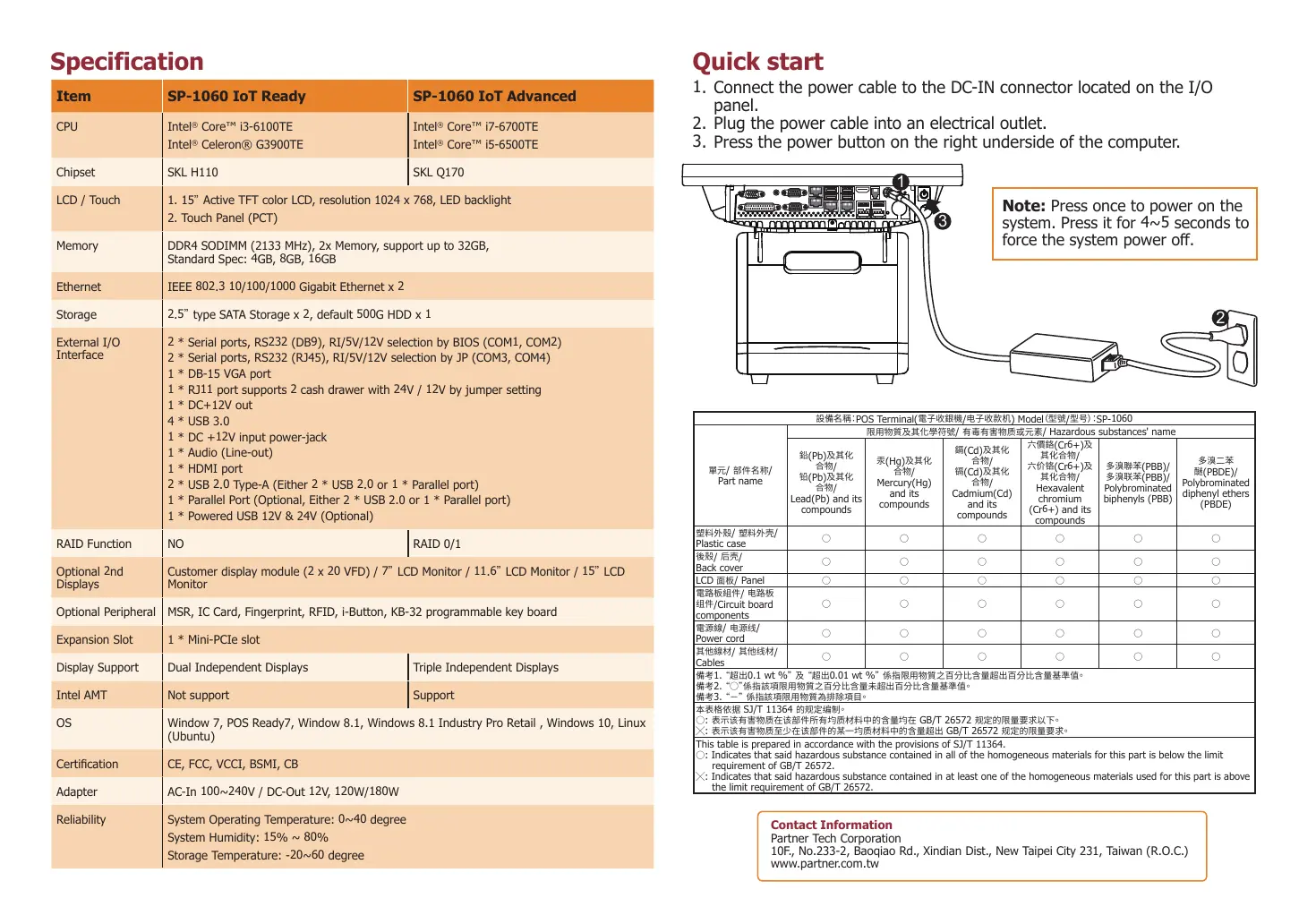
Note: Press once to power on the
system. Press it for
4
~
5
seconds to
force the system power off.
Quick start
1
. Connect the power cable to the DC-IN connector located on the I/O
panel.
2
. Plug the power cable into an electrical outlet.
3
. Press the power button on the right underside of the computer.
POS Terminal(
/
) Model
/
SP-
1060
/
/
Part name
/
/ Hazardous substances' name
(Pb)
/
(Pb)
/
Lead(Pb) and its
compounds
(Hg)
/
Mercury(Hg)
and its
compounds
(Cd)
/
(Cd)
/
Cadmium(Cd)
and its
compounds
(Cr
6
+)
/
(Cr
6
+)
/
Hexavalent
chromium
(Cr
6
+) and its
compounds
(PBB)/
(PBB)/
Polybrominated
biphenyls (PBB)
(PBDE)/
Polybrominated
diphenyl ethers
(PBDE)
/
/
Plastic case
/
/
Back cover
LCD
/ Panel
/
/Circuit board
components
/
/
Power cord
/
/
Cables
1
.
0
.
1
wt %
0
.
01
wt %
2
.
3
.
SJ/T
11364
:
GB/T
26572
:
GB/T
26572
This table is prepared in accordance with the provisions of SJ/T
11364
.
: Indicates that said hazardous substance contained in all of the homogeneous materials for this part is below the limit
requirement of GB/T
26572
.
: Indicates that said hazardous substance contained in at least one of the homogeneous materials used for this part is above
the limit requirement of GB/T
26572
.
Contact Information
Partner Tech Corporation
10
F., No.
233
-
2
, Baoqiao Rd., Xindian Dist., New Taipei City
231
, Taiwan (R.O.C.)
www.partner.com.tw



 To Previous Page
 Loading...










