MANUALE UTENTE ,USO E MANUTENZIONE
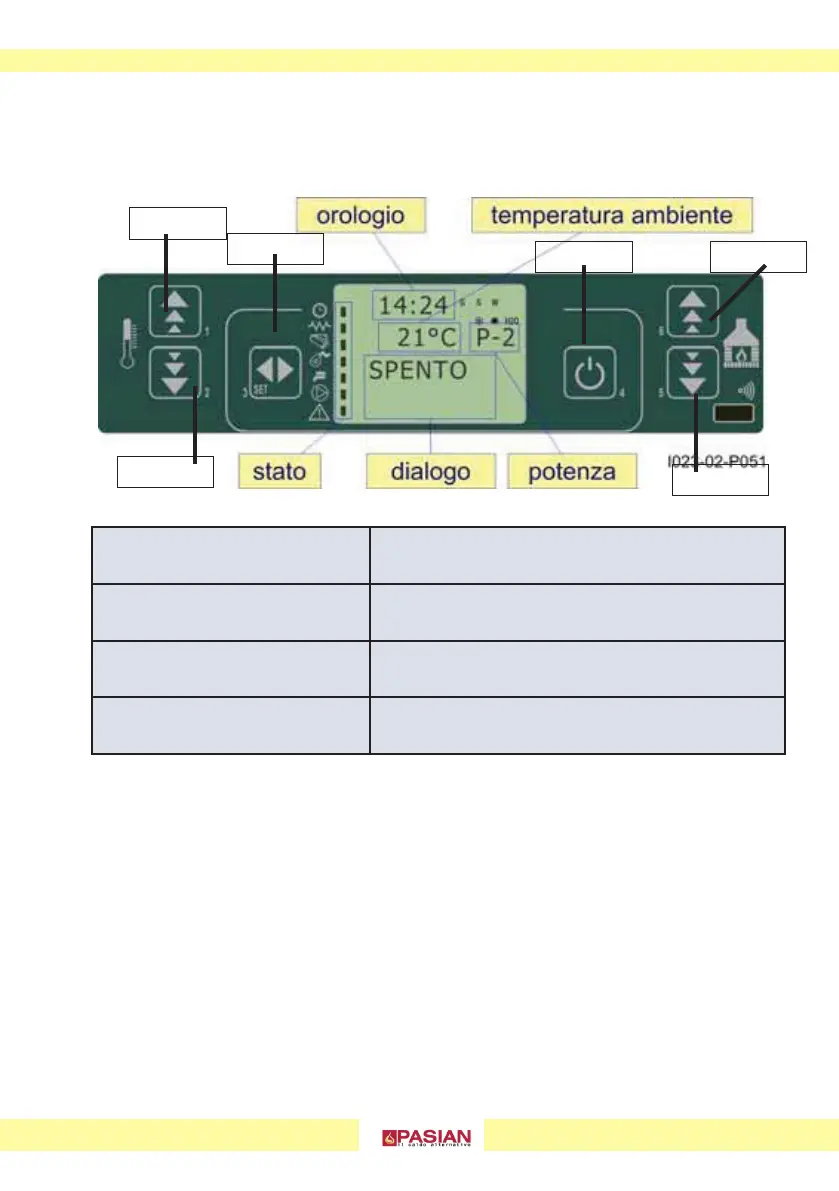
4.1 LCD CONTROL PANEL
The display shows information on the operating status of the stove.
COMPLETE INSTRUCTIONS ON USING THE DISPLAY IN THE FOLLOWING PAGES
1/2
temperature increase / decrease setting
3
menù access
4
start and stop
5/6
power increase / decrease setting
tasto 1
tasto 6
tasto 5
tasto 2
tasto 3
tasto 4
AIR FAN
IN THE INTERNAL MODEL)THERE IS AN AMBIENT FAN, IT IS POSSIBLE TO ADJUST THE POWER
OR DEACTIVATE IT.
FAN STATUS:
To set the fan power: Press key "5" once and then set the speed with keys "1"
to increase and "2" to lower.
“0”: off
From "1 to 5"
: working power from minimum to maximum, independent of
the status of the boiler.



 To Next Page