EasyManua.ls Logo

Paslode WCS200 - User Manual

Paslode WCS200
24 pages
Print Icon
To Next Page IconTo Next Page
Loading...
1
IMPORTANT!
DO NOT DESTROY
It is the customers responsibility to have all
operators and service personnel read and
understand this manual.
OPERATING MANUAL AND
SCHEMATIC
© 2018 Illinois Tool Works Inc.
51555-1
/18
Part# 51500
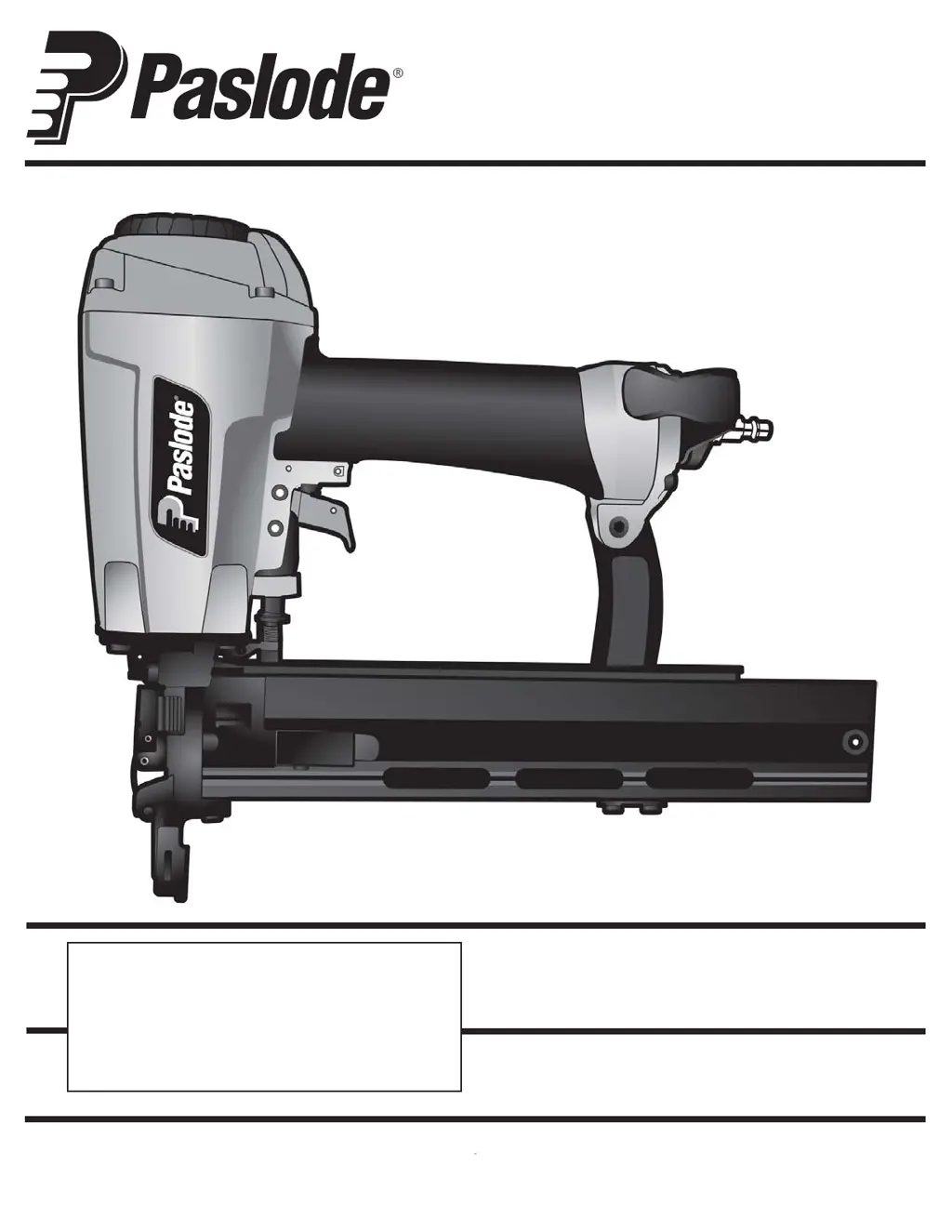
MODEL CS200
16 Gauge
ide
15/16" Crown
Stapler

Questions and Answers

Summary

Introduction

Tool and Fastener Specifications

Tool Specifications

Details the model number, height, width, length, weight, and operating pressure.

Fastener Specifications

Specifies staple length and staple diameter for the tool.

Tool Air Fittings

Describes the required 1/4” N.P.T. male plug and fitting specifications.

Operating Air Pressure

Recommends operating air pressure range and warns against exceeding it.

Safety Instructions

Safety First

Emphasizes reading and understanding all safety precautions before operating the tool.

Wear Eye and Hearing Protection

Mandates wearing appropriate eye and hearing protection devices.

Tool Usage Restrictions

Instructs users to operate the tool only as intended and not to misuse it.

No Horseplay With Tool

Warns against using the tool for pranks or pointing it at others.

Never Assume Tool is Empty

Advises checking the magazine for fasteners before handling the tool.

No Trigger Locking

Prohibits disabling or locking the trigger in an operating position.

Loading Fasteners Safely

Instructs to disconnect air line and ensure trigger/element are not depressed during loading.

Operate Only on Workpiece

Requires the tool to be in contact with a workpiece during operation.

Do Not Disable Work Contacting Element

Warns against tampering with or removing the safety work contacting element.

Disconnect Tool When Not in Use

Stresses disconnecting the tool from the air line when not in use or unattended.

Carry Tool By Handle Only

Advises carrying the tool solely by its handle.

Do Not Weaken Tool Housing

Discourages engraving or stamping the tool housing, as it's a pressure vessel.

Disconnect for Repairs and Jams

Requires disconnecting air line and removing fasteners before repairs or jam clearing.

Use Proper Air Fittings

Emphasizes using MALE pneumatic type air connectors and avoiding FEMALE couplings.

Do Not Exceed Max Air Pressure

Warns against exceeding recommended air pressure and advises checking gauges.

Inspect Tool for Proper Operation

Recommends inspecting the tool for proper function before use.

Use Only Paslode Parts and Fasteners

Insists on using only Paslode-approved parts and fasteners to prevent dangerous situations.

General Warning

General warning about potential severe personal injury and property damage if instructions are not followed.

Tool Operation

Fastener Compatibility

Specifies that the tool uses Paslode® 16 gauge fasteners and warns about using non-standard ones.

Loading Fasteners

Provides step-by-step instructions for loading staples into the magazine.

Depth of Drive Adjustment

Explains how to adjust the depth of drive using the wheel below the trigger.

Clearing a Jam

Details the procedure for easily clearing a jammed fastener from the stapler.

Lockout Feature Explanation

Describes the lockout feature that prevents blank cycling and how to inspect for fasteners.

Successive (Bounce) Driving

Explains the technique for rapid fastening using a bouncing motion with the trigger depressed.

Unload Staples

Provides instructions on how to unload staples from the magazine.

Trigger Safety Warning

Important safety advice: do not clamp or hold the trigger with anything other than your hand.

Maintenance

Cold Weather Care

Provides procedures for warming up tools in sub-freezing temperatures.

Testing Tool After Servicing

Outlines essential checks to ensure the tool is safe and operating correctly after repairs.

Daily Maintenance Checks

Lists daily actions like draining filters, checking screws, and cleaning mechanisms for efficient operation.

Operator Troubleshooting

Fasteners Not Driving Completely

Troubleshooting steps for fasteners not driving fully into wood.

Inconsistent Fastener Driving Speed

Troubleshooting for fasteners not driving fully at higher speeds.

Over-Driving Fasteners

Troubleshooting steps for fasteners driving too deep into wood.

Clearing Nose Jams

Procedure for clearing a jammed fastener from the tool's nose.

Intermittent Fastener Driving

Troubleshooting steps for the tool skipping or not driving fasteners intermittently.

No Fasteners Driven

Troubleshooting steps when the tool operates but doesn't drive fasteners.

Air Leaks at Cap

Troubleshooting for air leaks at the tool's cap when connected to air.

Parts Legend

Air Consumption Chart

Graph showing air consumption in CFM versus air pressure in PSIG.

Exploded View

WCS200 Stapler Components Diagram

Diagram showing the internal components of the WCS200 stapler with part numbers.

Accessories

Safety Glasses

Lists clear safety glasses as an available accessory with their part number.

Summary

Introduction

Tool and Fastener Specifications

Tool Specifications

Details the model number, height, width, length, weight, and operating pressure.

Fastener Specifications

Specifies staple length and staple diameter for the tool.

Tool Air Fittings

Describes the required 1/4” N.P.T. male plug and fitting specifications.

Operating Air Pressure

Recommends operating air pressure range and warns against exceeding it.

Safety Instructions

Safety First

Emphasizes reading and understanding all safety precautions before operating the tool.

Wear Eye and Hearing Protection

Mandates wearing appropriate eye and hearing protection devices.

Tool Usage Restrictions

Instructs users to operate the tool only as intended and not to misuse it.

No Horseplay With Tool

Warns against using the tool for pranks or pointing it at others.

Never Assume Tool is Empty

Advises checking the magazine for fasteners before handling the tool.

No Trigger Locking

Prohibits disabling or locking the trigger in an operating position.

Loading Fasteners Safely

Instructs to disconnect air line and ensure trigger/element are not depressed during loading.

Operate Only on Workpiece

Requires the tool to be in contact with a workpiece during operation.

Do Not Disable Work Contacting Element

Warns against tampering with or removing the safety work contacting element.

Disconnect Tool When Not in Use

Stresses disconnecting the tool from the air line when not in use or unattended.

Carry Tool By Handle Only

Advises carrying the tool solely by its handle.

Do Not Weaken Tool Housing

Discourages engraving or stamping the tool housing, as it's a pressure vessel.

Disconnect for Repairs and Jams

Requires disconnecting air line and removing fasteners before repairs or jam clearing.

Use Proper Air Fittings

Emphasizes using MALE pneumatic type air connectors and avoiding FEMALE couplings.

Do Not Exceed Max Air Pressure

Warns against exceeding recommended air pressure and advises checking gauges.

Inspect Tool for Proper Operation

Recommends inspecting the tool for proper function before use.

Use Only Paslode Parts and Fasteners

Insists on using only Paslode-approved parts and fasteners to prevent dangerous situations.

General Warning

General warning about potential severe personal injury and property damage if instructions are not followed.

Tool Operation

Fastener Compatibility

Specifies that the tool uses Paslode® 16 gauge fasteners and warns about using non-standard ones.

Loading Fasteners

Provides step-by-step instructions for loading staples into the magazine.

Depth of Drive Adjustment

Explains how to adjust the depth of drive using the wheel below the trigger.

Clearing a Jam

Details the procedure for easily clearing a jammed fastener from the stapler.

Lockout Feature Explanation

Describes the lockout feature that prevents blank cycling and how to inspect for fasteners.

Successive (Bounce) Driving

Explains the technique for rapid fastening using a bouncing motion with the trigger depressed.

Unload Staples

Provides instructions on how to unload staples from the magazine.

Trigger Safety Warning

Important safety advice: do not clamp or hold the trigger with anything other than your hand.

Maintenance

Cold Weather Care

Provides procedures for warming up tools in sub-freezing temperatures.

Testing Tool After Servicing

Outlines essential checks to ensure the tool is safe and operating correctly after repairs.

Daily Maintenance Checks

Lists daily actions like draining filters, checking screws, and cleaning mechanisms for efficient operation.

Operator Troubleshooting

Fasteners Not Driving Completely

Troubleshooting steps for fasteners not driving fully into wood.

Inconsistent Fastener Driving Speed

Troubleshooting for fasteners not driving fully at higher speeds.

Over-Driving Fasteners

Troubleshooting steps for fasteners driving too deep into wood.

Clearing Nose Jams

Procedure for clearing a jammed fastener from the tool's nose.

Intermittent Fastener Driving

Troubleshooting steps for the tool skipping or not driving fasteners intermittently.

No Fasteners Driven

Troubleshooting steps when the tool operates but doesn't drive fasteners.

Air Leaks at Cap

Troubleshooting for air leaks at the tool's cap when connected to air.

Parts Legend

Air Consumption Chart

Graph showing air consumption in CFM versus air pressure in PSIG.

Exploded View

WCS200 Stapler Components Diagram

Diagram showing the internal components of the WCS200 stapler with part numbers.

Accessories

Safety Glasses

Lists clear safety glasses as an available accessory with their part number.

Paslode WCS200 Specifications

General IconGeneral
TypeCordless Framing Nailer
Battery Voltage7.2V
Operating PressureN/A (Cordless)
Fuel Cell TypePaslode Fuel Cell
Fastener Length2 in - 3-1/4 in (50 mm - 83 mm)
Power SourceBattery and fuel cell
Battery TypeNiCd

Related product manuals